> ## Content Index
> Fetch the complete content index at: https://arabroot.io/llms.txt
> Use this file to discover other available public pages before exploring further.

# اختبارات E2E مع Playwright: من أول اختبار إلى CI
- URL: https://arabroot.io/articles/اختبارات-e2e-مع-playwright-بالتفصيل/
- Published: 2026-10-13T02:30:00.000Z
- Updated: 2026-10-12T20:55:20.000Z
- Description: كيف تكتب اختبارات متصفح ثابتة لموقع عربي مع Playwright، وتشخص الاختبار المتقلب، وتقسمها على أكثر من جهاز في خط CI.
- Author: فريق عرب رووت
- Tags: الأدلة التقنية, DevOps والتشغيل, DevOps وCI/CD, الاستضافة الذاتية

في [أنواع الاختبارات للمبتدئين](https://arabroot.io/articles/%D8%A7%D9%86%D9%88%D8%A7%D8%B9-%D8%A7%D9%84%D8%A7%D8%AE%D8%AA%D8%A8%D8%A7%D8%B1%D8%A7%D8%AA-%D9%84%D9%84%D9%85%D8%A8%D8%AA%D8%AF%D8%A6%D9%8A%D9%86-unit-%D9%88-integration-%D9%88-e2e/) كتبنا اختبار E2E واحداً ب Playwright، ورأينا الانتظار التلقائي Auto-waiting والمحددات حسب الدور وعارض التتبع Trace Viewer باختصار. لكن الفريق الذي يكتب عشرات اختبارات المتصفح يواجه أسئلة أخرى: كيف لا يسجل كل اختبار الدخول من جديد؟ كيف تختبر رسالة خطأ الدفع وبوابة الدفع التجريبية لا تفشل عندما تريد؟ لماذا ينجح الاختبار على جهازك ويفشل مرة كل خمس مرات في خط CI؟ وكيف تعرف أن الصفحة العربية لم تنقلب إلى اليسار بعد تعديل في التصميم؟ وفي هذا المقال سوف نأخذ تطبيق متجر صغيراً بالعربية ونبني له مجموعة اختبارات كاملة، ثم نكسرها بثلاث طرق حقيقية، ثم نشغلها مقسمة على جهازين في Gitea Actions.

وسوف نناقش في هذا المقال ما يلي:

- إعداد Playwright Test بمشاريع Projects لمتصفحين، ومشروع لتسجيل الدخول مرة واحدة وإعادة استخدام حالة الدخول Authentication State.
- المحددات Locators في صفحة عربية، وال Fixtures لصفحة المتجر ولبيانات الاختبار مع حذفها بعد كل اختبار.
- محاكاة الشبكة Network Mocking لبوابة الدفع، واختبار صفحة RTL، والمقارنة المرئية Visual Comparisons.
- ثلاثة أعطال متعمدة: اختبار متقلب Flaky بسبب انتظار ثابت ونشخصه بعارض التتبع، وتحقق خاطئ ينجح على صفحة مكسورة، ومحدد CSS ينكسر مع تغيير في الواجهة.
- التوازي والتقسيم Sharding ودمج التقارير، ثم خط CI على Gitea Actions وخطآن حقيقيان ظهرا فيه.

## التطبيق ومجلد التجربة

التطبيق متجر بسيط بلغة Node.js دون مكتبات، فيه صفحة دخول، وصفحة منتجات عربية RTL فيها بحث وسلة وزر لإتمام الطلب، وAPI صغير للمنتجات والطلبات والدفع. وفيه ثلاثة مفاتيح نستخدمها لكسر الأشياء عمداً: UI\_V2 يغير تصميم قائمة المنتجات، وBROKEN=checkout يجعل إنشاء الطلب يفشل، وSLOW\_SEARCH يجعل البحث يتأخر وقتاً عشوائياً بين 100 و900 مللي ثانية، وهذا يشبه API مشغولاً في الواقع. وشكل المجلد كما يلي:

```text
lab-e2e/
├── compose.yaml           # the shop app (node:24-alpine)
├── app/
│   ├── server.mjs
│   └── fonts/IBMPlexSansArabic-Medium.ttf
└── e2e/
    ├── package.json        # @playwright/test 1.64.0
    ├── playwright.config.ts
    ├── merge.config.ts
    └── tests/
        ├── auth.setup.ts
        ├── fixtures.ts
        ├── shop.spec.ts  mock.spec.ts  rtl.spec.ts  visual.spec.ts
        └── breakit/      # flaky.spec.ts  assertion.spec.ts  selector.spec.ts
```

والتطبيق كاملاً في ملف واحد، وهو تطبيق تجربة فقط، فالجلسات في الذاكرة والمستخدم مكتوب في الكود:

```javascript
// A small Arabic shop for the E2E lab: login, product search, cart, checkout.
// Lab only: sessions in memory, one hard-coded user.
//   UI_V2=1          redesigned product list: new classes and a new button style, same roles
//   BROKEN=checkout  the order API fails, the page shows an error message
//   SLOW_SEARCH=1    search answers after a random 100-900 ms, like a busy API
import { createServer } from 'node:http';
import { readFileSync } from 'node:fs';
import { randomUUID } from 'node:crypto';

const PORT = 8080;
const UI_V2 = process.env.UI_V2 === '1';
const BROKEN = process.env.BROKEN || '';
const SLOW = process.env.SLOW_SEARCH === '1';
const FONT = readFileSync(new URL('./fonts/IBMPlexSansArabic-Medium.ttf', import.meta.url));

const USERS = { 'sara@example.com': { password: 'Lab-Sara-2026!', name: 'سارة' } };
const sessions = new Map();
let products = [
  { id: 1, name: 'قهوة عربية', price: 45 },
  { id: 2, name: 'تمر سكري', price: 60 },
  { id: 3, name: 'هيل', price: 25 },
  { id: 4, name: 'زعفران', price: 120 },
  { id: 5, name: 'دلة قهوة', price: 150 },
];
let nextId = 6;
let orderNo = 1040;

// Users type «قهوه» or «قهوة», «اسعار» or «أسعار»: search on a normalised form
const norm = (s) => s.trim().replace(/[أإآ]/g, 'ا').replace(/ة/g, 'ه').replace(/ى/g, 'ي');

const send = (res, status, body, headers = {}) => {
  const isJson = typeof body !== 'string';
  res.writeHead(status, { 'Content-Type': isJson ? 'application/json; charset=utf-8' : 'text/html; charset=utf-8', ...headers });
  res.end(isJson ? JSON.stringify(body) : body);
};
const readJson = (req) => new Promise((ok) => { let d = ''; req.on('data', (c) => d += c); req.on('end', () => { try { ok(JSON.parse(d || '{}')); } catch { ok({}); } }); });
const userOf = (req) => sessions.get((req.headers.cookie || '').match(/sid=([\w-]+)/)?.[1]);

const page = (title, body) => `<!doctype html>
<html lang="ar" dir="rtl"><head><meta charset="utf-8"><title>${title}</title>
<meta name="viewport" content="width=device-width, initial-scale=1">
<style>
@font-face { font-family: Plex; src: url(/fonts/plex.ttf); }
* { box-sizing: border-box; }
body { margin: 0; font: 16px/1.6 Plex, sans-serif; background: #f6f7f9; color: #17111a; }
header { background: #2c001e; color: #fff; padding: 12px 24px; display: flex; justify-content: space-between; }
main { display: grid; grid-template-columns: 1fr 280px; gap: 24px; padding: 24px; }
ul.products, ul.grid { list-style: none; margin: 0; padding: 0; display: grid; grid-template-columns: repeat(3, 1fr); gap: 16px; }
.card, .product-tile { background: #fff; border: 1px solid #dcdfe4; border-radius: 10px; padding: 14px; }
.btn-add, .button { background: #e95420; color: #fff; border: 0; border-radius: 6px; padding: 6px 14px; font: inherit; cursor: pointer; }
.button--primary { background: #c7461b; border-radius: 20px; padding: 8px 18px; }
aside { background: #fff; border: 1px solid #dcdfe4; border-radius: 10px; padding: 16px; height: fit-content; }
input { font: inherit; padding: 6px 10px; border: 1px solid #b8bec8; border-radius: 6px; width: 100%; }
[role=status] { margin-top: 12px; }
.error { color: #c62828; }
</style></head><body>${body}</body></html>`;

const loginPage = () => page('تسجيل الدخول', `
<main style="display:block;max-width:360px;margin:60px auto">
  <h1>تسجيل الدخول</h1>
  <form id="login">
    <label>البريد الإلكتروني <input name="email" type="email" required></label>
    <label>كلمة المرور <input name="password" type="password" required></label>
    <button class="btn-add" type="submit">دخول</button>
    <p role="alert" class="error"></p>
  </form>
</main>
<script>
document.getElementById('login').onsubmit = async (e) => {
  e.preventDefault();
  const f = new FormData(e.target);
  const r = await fetch('/api/login', { method: 'POST', body: JSON.stringify(Object.fromEntries(f)) });
  if (r.ok) location.href = '/shop'; else document.querySelector('[role=alert]').textContent = 'بيانات الدخول غير صحيحة';
};
</script>`);

const card = (p) => UI_V2
  ? `<li class="product-tile"><div class="tile-body"><h3>${p.name}</h3><p class="tile-price">${p.price} ر.س</p></div>
     <div class="tile-actions"><button class="button button--primary" data-id="${p.id}">أضف إلى السلة</button></div></li>`
  : `<li class="card"><h3>${p.name}</h3><p class="price">${p.price} ر.س</p>
     <button class="btn-add" data-id="${p.id}">أضف إلى السلة</button></li>`;

const shopPage = (user) => page('المتجر', `
<header><span>متجر التجربة</span><span>مرحباً، ${user.name}</span></header>
<main>
  <section>
    <label>ابحث عن منتج <input id="q" type="search" placeholder="مثلاً: قهوة"></label>
    <h2>المنتجات</h2>
    <ul class="${UI_V2 ? 'grid' : 'products'}" id="list"></ul>
  </section>
  <aside aria-label="السلة">
    <h2>السلة</h2>
    <ul id="cart"></ul>
    <p>المجموع: <span id="total">0.00</span> ر.س</p>
    <button class="btn-add" id="checkout">إتمام الطلب</button>
    <p role="status" id="status"></p>
  </aside>
</main>
<script>
const card = ${card.toString().replace('UI_V2', UI_V2)};
const cart = [];
let all = [];
const render = (items) => { document.getElementById('list').innerHTML = items.map(card).join(''); };
const renderCart = () => {
  document.getElementById('cart').innerHTML = cart.map(p => '<li>' + p.name + '</li>').join('');
  document.getElementById('total').textContent = cart.reduce((s, p) => s + p.price, 0).toFixed(2);
};
document.getElementById('list').onclick = (e) => {
  const id = e.target.dataset.id; if (!id) return;
  cart.push(all.find(p => p.id == id)); renderCart();
};
let timer;
document.getElementById('q').oninput = (e) => {
  clearTimeout(timer);
  timer = setTimeout(async () => {
    const r = await fetch('/api/search?q=' + encodeURIComponent(e.target.value));
    render(await r.json());
  }, 250);   // debounce: wait until the user stops typing
};
document.getElementById('checkout').onclick = async () => {
  const s = document.getElementById('status');
  const r = await fetch('/api/orders', { method: 'POST', body: JSON.stringify({ items: cart.map(p => p.id) }) });
  if (!r.ok) { s.className = 'error'; s.textContent = 'تعذر إتمام الطلب، حاول مرة أخرى'; return; }
  const o = await r.json();
  const pay = await fetch('/api/pay', { method: 'POST', body: JSON.stringify({ order: o.number }) });
  if (!pay.ok) { s.className = 'error'; s.textContent = 'تعذر الدفع، لم يخصم أي مبلغ'; return; }
  s.className = ''; s.innerHTML = 'تم استلام طلبك رقم <bdi>' + o.number + '</bdi>';
};
fetch('/api/products').then(r => r.json()).then(p => { all = p; render(p); });
</script>`);

const routes = {
  'GET /login': (req, res) => send(res, 200, loginPage()),
  'GET /shop': (req, res) => { const u = userOf(req); u ? send(res, 200, shopPage(u)) : send(res, 302, '', { Location: '/login' }); },
  'GET /fonts/plex.ttf': (req, res) => { res.writeHead(200, { 'Content-Type': 'font/ttf' }); res.end(FONT); },
  'GET /health': (req, res) => send(res, 200, { status: 'ok', ui: UI_V2 ? 'v2' : 'v1', broken: BROKEN || null }),
  'POST /api/login': async (req, res) => {
    const { email, password } = await readJson(req);
    const u = USERS[email];
    if (!u || u.password !== password) return send(res, 401, { error: 'invalid credentials' });
    const sid = randomUUID(); sessions.set(sid, u);
    send(res, 200, { name: u.name }, { 'Set-Cookie': `sid=${sid}; HttpOnly; SameSite=Lax; Path=/` });
  },
  'GET /api/products': (req, res) => send(res, 200, products),
  'POST /api/products': async (req, res) => {   // test data endpoint, needs the lab token
    if (req.headers.authorization !== 'Bearer lab-seed-token') return send(res, 403, { error: 'forbidden' });
    const p = { id: nextId++, ...(await readJson(req)) }; products.push(p); send(res, 201, p);
  },
  'GET /api/search': (req, res) => {
    const q = norm(new URL(req.url, 'http://x').searchParams.get('q') || '');
    const found = products.filter((p) => norm(p.name).includes(q));
    setTimeout(() => send(res, 200, found), SLOW ? 100 + Math.random() * 800 : 0);
  },
  'POST /api/orders': async (req, res) => {
    if (!userOf(req)) return send(res, 401, { error: 'login required' });
    if (BROKEN === 'checkout') return send(res, 500, { error: 'database is read-only' });
    await readJson(req); send(res, 201, { number: `A-${orderNo++}` });
  },
  'POST /api/pay': async (req, res) => { await readJson(req); send(res, 200, { paid: true }); },
};

createServer(async (req, res) => {
  const path = req.url.split('?')[0];
  if (req.method === 'DELETE' && path.startsWith('/api/products/')) {
    if (req.headers.authorization !== 'Bearer lab-seed-token') return send(res, 403, { error: 'forbidden' });
    const id = Number(path.split('/').pop()); products = products.filter((p) => p.id !== id); return send(res, 204, '');
  }
  const h = routes[`${req.method} ${path}`];
  h ? await h(req, res) : send(res, 404, { error: 'not found' });
}).listen(PORT, () => console.log(`shop on :${PORT} ui=${UI_V2 ? 'v2' : 'v1'} broken=${BROKEN || '-'} slow=${SLOW}`));
```

في الكود أعلاه لاحظ التالي:

- الصفحة lang="ar" وdir="rtl"، والخط IBM Plex Sans Arabic يقدمه التطبيق نفسه، والسبب سوف تراه في قسم المقارنة المرئية.
- البحث ينتظر 250 مللي ثانية بعد آخر حرف قبل أن يرسل الطلب Debounce، ثم ينتظر رد ال API، فالوقت بين الكتابة وظهور النتائج متغير.
- رقم الطلب داخل العنصر bdi، والسبب أن A-1040 نص لاتيني داخل جملة عربية، ويشرح [دليل W3C عن النص ثنائي الاتجاه](https://www.w3.org/International/articles/inline-bidi-markup/?ref=arabroot.io) لماذا نعزله.
- المسار POST /api/products يحتاج رمزاً خاصاً بالاختبار، وهو الطريقة التي ينشئ بها الاختبار بياناته.

ملف Compose يشغل التطبيق في node:24-alpine على المنفذ 127.0.0.1:18400، ونشغل Playwright من ال Docker Image الرسمية mcr.microsoft.com/playwright:v1.64.0-noble، والإصدار في اسم ال Image يطابق إصدار @playwright/test في package.json كما تطلب [وثائق Docker](https://playwright.dev/docs/docker?ref=arabroot.io):

```yaml
name: lab-qa2-e2e

services:
  shop:
    image: node:24-alpine
    container_name: lab-qa2-shop
    working_dir: /app
    command: node server.mjs
    environment:
      UI_V2: ${UI_V2:-0}
      BROKEN: ${BROKEN:-}
      SLOW_SEARCH: ${SLOW_SEARCH:-1}
    volumes:
      - ./app:/app:ro
    ports:
      - "127.0.0.1:18400:8080"
    networks: [lab-qa2-net]

networks:
  lab-qa2-net:
    name: lab-qa2-net
```

```json
{
  "name": "lab-qa2-e2e",
  "private": true,
  "scripts": { "test": "playwright test" },
  "devDependencies": {
    "@playwright/test": "1.64.0"
  }
}
```

```bash
#!/bin/sh
# usage: ./pw.sh <command...>   (Playwright 1.64.0 image, on the lab network)
docker run --rm --name "lab-qa2-pw${PW_SUFFIX:-}" --init --ipc=host --network lab-qa2-net \
  -e CI -e BREAKIT -v "$PWD/e2e:/e2e" -w /e2e mcr.microsoft.com/playwright:v1.64.0-noble "$@"
```

## ملف الإعداد: مشروع للدخول ومتصفحان

```typescript
import { defineConfig, devices } from '@playwright/test';

export default defineConfig({
  testDir: './tests',
  // the break-it files run only when we ask for them
  testIgnore: process.env.BREAKIT ? [] : ['**/breakit/**'],
  fullyParallel: true,
  forbidOnly: !!process.env.CI,
  retries: process.env.CI ? 2 : 0,
  workers: process.env.CI ? 2 : undefined,
  reporter: process.env.CI ? [['list'], ['blob']] : [['list'], ['html', { open: 'never' }]],
  expect: { timeout: 5_000 },
  use: {
    baseURL: process.env.BASE_URL ?? 'http://lab-qa2-shop:8080',
    locale: 'ar-SA',
    timezoneId: 'Asia/Riyadh',
    actionTimeout: 5_000,
    trace: 'on-first-retry',
    screenshot: 'only-on-failure',
  },
  projects: [
    { name: 'setup', testMatch: /auth\.setup\.ts/ },
    {
      name: 'chromium',
      use: { ...devices['Desktop Chrome'], storageState: '.auth/sara.json' },
      dependencies: ['setup'],
    },
    {
      name: 'firefox',
      use: { ...devices['Desktop Firefox'], storageState: '.auth/sara.json' },
      dependencies: ['setup'],
    },
  ],
});
```

في الإعداد أعلاه لاحظ التالي:

- المشروع setup يشغل ملف auth.setup.ts وحده، والمشروعان chromium وfirefox يعتمدان عليه عبر dependencies، فلا يبدأ أي اختبار قبل أن ينجح الدخول.
- storageState يجعل كل اختبار يبدأ بال Cookies التي حفظها مشروع الدخول، ونشرحه بعد قليل.
- في خط CI تصبح إعادة المحاولة Retries مرتين، والتتبع يسجل في أول إعادة فقط on-first-retry، والتقرير بصيغة blob التي تدمج بعد التقسيم.
- locale وtimezoneId يثبتان اللغة والمنطقة الزمنية للمتصفح، فلا تتغير النتيجة بين جهاز المطور وسيرفر خط CI.
- actionTimeout خمس ثوان حتى يفشل المحدد الخاطئ بسرعة بدل أن ينتظر مهلة الاختبار كاملة.

## المحددات في صفحة عربية

يوصي Playwright في [أفضل الممارسات](https://playwright.dev/docs/best-practices?ref=arabroot.io) بأن تبحث عن العنصر كما يراه المستخدم، بدوره Role واسمه، وفي صفحة عربية يعني هذا أن الاسم عربي: الزر «أضف إلى السلة» والحقل «ابحث عن منتج». ووضعنا المحددات كلها في كلاس واحد Page Object، فإذا تغير شيء في الصفحة نعدل مكاناً واحداً:

```typescript
import { test as base, expect, type Page } from '@playwright/test';

// A small page object: the tests speak about products, not about selectors
export class Shop {
  constructor(readonly page: Page) {}
  async open() { await this.page.goto('/shop'); }
  products() { return this.page.locator('#list').getByRole('listitem'); }
  product(name: string) {
    return this.products().filter({ has: this.page.getByRole('heading', { name, exact: true }) });
  }
  async add(name: string) {
    await this.product(name).getByRole('button', { name: 'أضف إلى السلة' }).click();
  }
  async search(text: string) { await this.page.getByLabel('ابحث عن منتج').fill(text); }
  async checkout() { await this.page.getByRole('button', { name: 'إتمام الطلب' }).click(); }
  get total() { return this.page.locator('#total'); }
  get status() { return this.page.getByRole('status'); }
}

type Product = { id: number; name: string; price: number };

export const test = base.extend<{ shop: Shop; seededProduct: Product }>({
  shop: async ({ page }, use) => {
    await use(new Shop(page));
  },
  // Test data: created through the API before the test, deleted after it, even when the test fails
  seededProduct: async ({ request }, use, testInfo) => {
    const auth = { Authorization: 'Bearer lab-seed-token' };
    const name = `منتج اختبار ${testInfo.workerIndex}-${testInfo.retry}-${Date.now()}`;
    const res = await request.post('/api/products', { headers: auth, data: { name, price: 10 } });
    expect(res.status()).toBe(201);
    const product: Product = await res.json();
    await use(product);
    await request.delete(`/api/products/${product.id}`, { headers: auth });
  },
});

export { expect };
```

في الكود أعلاه لاحظ التالي:

- product يبحث عن عنصر القائمة listitem الذي فيه عنوان heading بالاسم المطلوب بالضبط، ثم الزر داخله، فلا يعتمد على ترتيب المنتجات ولا على أسماء الكلاسات.
- exact: true مهم مع العربية، والسبب أن البحث عن «قهوة» دون exact يطابق «قهوة عربية» و«دلة قهوة» معاً.
- total هو المحدد الوحيد بالمعرف id، لأن الرقم لا يحمل اسماً يصلح للبحث عنه.

وقد يتساءل البعض: لماذا لا نستخدم getByRole('status') للمجموع أيضاً؟ والإجابة جاءت من أول تشغيل، فقد كان المجموع في نسختنا الأولى عنصر output، ففشل اختبار الطلب بهذا الخطأ:

```text
Error: expect(locator).toHaveText(expected) failed

Locator: getByRole('status')
Expected pattern: /^تم استلام طلبك رقم A-\d+$/
Error: strict mode violation: getByRole('status') resolved to 2 elements:
    1) <output id="total">25.00</output> aka getByText('25.00')
    2) <p class="" id="status" role="status">…</p> aka getByText('تم استلام طلبك رقم A-')
```

العنصر output له الدور status ضمنياً بحسب [مواصفة ربط HTML بأدوار الوصول HTML-AAM](https://www.w3.org/TR/html-aam-1.0/?ref=arabroot.io)، فأصبح في الصفحة عنصران بالدور نفسه، ورفض Playwright أن يختار أحدهما، وهذا هو الوضع الصارم Strict Mode. وهذا الخطأ مفيد، فقارئ الشاشة كان سيعلن كل تغيير في المجموع كأنه رسالة حالة، لذلك غيرنا المجموع إلى span بدل أن نضيف first() إلى المحدد.

## ال Fixtures: صفحة جاهزة وبيانات تحذف بعد الاختبار

ال Fixture في Playwright Test شيء يجهزه المشغل قبل الاختبار ويعطيه له كمعامل، ثم ينظفه بعده، مثل page نفسها، كما تشرح [وثائق ال Fixtures](https://playwright.dev/docs/test-fixtures?ref=arabroot.io). وفي الملف السابق عرفنا اثنين: shop يعطي الاختبار كائن Shop، وseededProduct ينشئ منتجاً عبر ال API باسم فريد قبل الاختبار، ثم يحذفه بعد await use مهما كانت نتيجة الاختبار، فالكود بعد use يعمل حتى عندما يفشل الاختبار. والاسم فيه رقم ال Worker ورقم إعادة المحاولة والوقت، والسبب أن الاختبارات تعمل بالتوازي، فإذا استخدم اختباران الاسم نفسه رأى كل منهما منتج الآخر في البحث:

```typescript
import { test, expect } from './fixtures';

test('add two products and see the total', async ({ shop }) => {
  await shop.open();
  await shop.add('قهوة عربية');
  await shop.add('تمر سكري');
  await expect(shop.total).toHaveText('105.00');
});

test('checkout shows the order number', async ({ shop }) => {
  await shop.open();
  await shop.add('هيل');
  await shop.checkout();
  await expect(shop.status).toHaveText(/^تم استلام طلبك رقم A-\d+$/);
});

test('a product created through the API appears in search', async ({ seededProduct, shop }) => {
  await shop.open();
  await shop.search(seededProduct.name);
  await expect(shop.products()).toHaveCount(1);
  await expect(shop.product(seededProduct.name)).toContainText('10 ر.س');
});
```

ولاحظ أن الاختبار الثالث يطلب seededProduct في معاملاته فقط، ولا يعرف كيف أنشئ المنتج ولا كيف يحذف.

## تسجيل الدخول مرة واحدة: حالة الدخول Authentication State

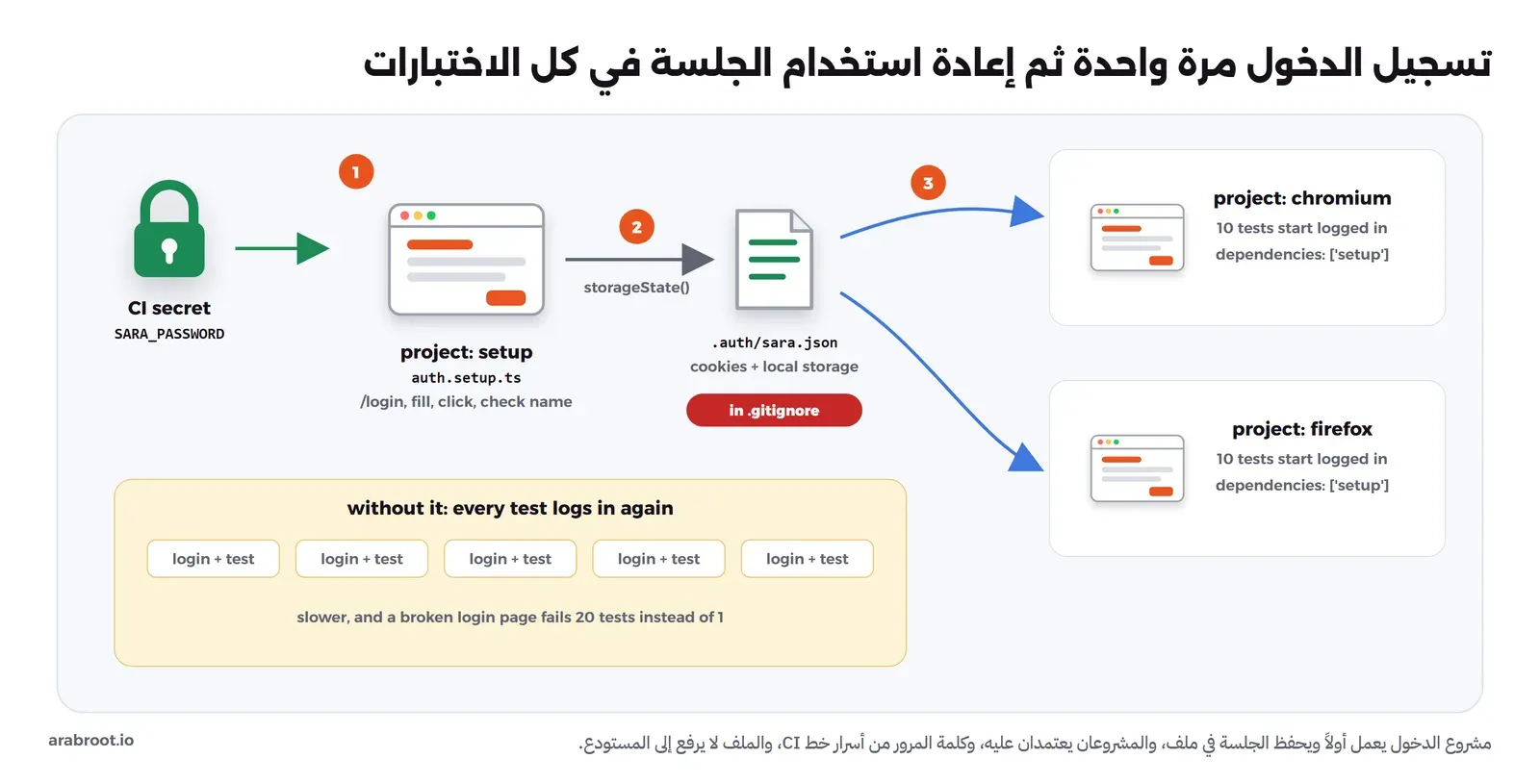
الطريقة البسيطة أن يبدأ كل اختبار بفتح صفحة الدخول وكتابة البريد وكلمة المرور، وهي تعمل، لكنها تضيف ثانية أو أكثر لكل اختبار، وتجعل كل الاختبارات تفشل عندما تتعطل صفحة الدخول وحدها، فترى عشرين خطأ بدل خطأ واحد. والطريقة التي تشرحها [وثائق المصادقة](https://playwright.dev/docs/auth?ref=arabroot.io) أن يسجل مشروع setup الدخول مرة واحدة، ثم يحفظ حالة المتصفح Cookies وLocal Storage في ملف، وتبدأ كل الاختبارات بها، والصورة التالية تبين ذلك:
![مخطط فيه مشروع setup يسجل الدخول في صفحة login ويحفظ الملف .auth/sara.json، ثم مشروعا chromium وfirefox يقرآن الملف عبر storageState فتبدأ كل الاختبارات مسجلة الدخول، وكلمة المرور تأتي من متغير بيئة في خط CI والملف في .gitignore](https://arabroot.io/content/images/2026/10/e2e-playwright-01-auth-state.webp)

الدخول مرة واحدة في مشروع setup، ثم كل اختبار يبدأ بالجلسة المحفوظة

```typescript
import { test as setup, expect } from '@playwright/test';

const file = '.auth/sara.json';

// Log in once through the real form, then every test starts with this session
setup('log in as sara', async ({ page }) => {
  await page.goto('/login');
  await page.getByLabel('البريد الإلكتروني').fill('sara@example.com');
  await page.getByLabel('كلمة المرور').fill(process.env.SARA_PASSWORD ?? 'Lab-Sara-2026!');
  await page.getByRole('button', { name: 'دخول' }).click();
  await expect(page.getByText('مرحباً، سارة')).toBeVisible();
  await page.context().storageState({ path: file });
});
```

في الكود أعلاه لاحظ التالي:

- كلمة المرور من المتغير SARA\_PASSWORD، وفي خط CI تأتي من الأسرار Secrets، والقيمة الثابتة في الكود هي حساب التجربة فقط.
- الملف .auth/sara.json فيه Cookie جلسة صالحة، وتحذر الوثائق من أنه قد يستخدم لانتحال الحساب، لذلك أضفناه إلى .gitignore، ولا تقم برفعه إلى المستودع ولا إلى ال Artifacts.
- التحقق من رسالة «مرحباً، سارة» قبل الحفظ مهم، والسبب أن الدخول الفاشل يحفظ حالة فارغة، فتفشل كل الاختبارات بعده برسائل لا علاقة لها بالدخول.
- هذه الطريقة تناسب الاختبارات التي لا تغير حالة الحساب، أما إذا كانت الاختبارات تعدل الحساب نفسه فاستخدم حساباً لكل Worker كما في الوثائق نفسها.

## محاكاة الشبكة: اختبار ما لا تستطيع إعادة إنتاجه

كيف تختبر رسالة «تعذر الدفع» وبوابة الدفع التجريبية تنجح دائماً؟ الطريقة التي تشرحها [وثائق المحاكاة](https://playwright.dev/docs/mock?ref=arabroot.io) أن تعترض الطلب في المتصفح نفسه بالدالة page.route وترد عليه بما تريد، فلا يصل الطلب إلى السيرفر أصلاً:

```typescript
import { test, expect } from './fixtures';

test('a failed payment shows a clear message', async ({ shop, page }) => {
  // the payment gateway answers 502: the real sandbox cannot do that on demand
  await page.route('**/api/pay', (route) =>
    route.fulfill({ status: 502, json: { error: 'gateway timeout' } }));
  await shop.open();
  await shop.add('زعفران');
  await shop.checkout();
  await expect(shop.status).toHaveText('تعذر الدفع، لم يخصم أي مبلغ');
});

test('a very long product name does not push the button out of the card', async ({ shop, page }) => {
  // take the real answer and change one field
  await page.route('**/api/products', async (route) => {
    const response = await route.fetch();
    const products = await response.json();
    products[0].name = 'قهوة عربية مختصة من مرتفعات جازان محمصة تحميصاً متوسطاً';
    await route.fulfill({ response, json: products });
  });
  await shop.open();
  const card = shop.products().first();
  const button = card.getByRole('button', { name: 'أضف إلى السلة' });
  await expect(button).toBeVisible();
  const c = (await card.boundingBox())!;
  const b = (await button.boundingBox())!;
  expect(b.x).toBeGreaterThanOrEqual(c.x);
  expect(b.x + b.width).toBeLessThanOrEqual(c.x + c.width);
});
```

في الكود أعلاه لاحظ التالي:

- الاختبار الأول يرد على /api/pay ب 502 دون أن يلمس بوابة الدفع، ويتحقق من الرسالة التي يراها المستخدم بالضبط.
- الاختبار الثاني يأخذ الرد الحقيقي بالدالة route.fetch ثم يغير اسم منتج واحد إلى اسم طويل جداً، فيبقى باقي الرد حقيقياً، ويتحقق أن الزر لم يخرج من البطاقة.
- المحاكاة تختبر الواجهة وحدها، فلا تقم باستبدال كل ال API بالمحاكاة، والسبب أن الاختبار سيمر حتى لو تغير ال API الحقيقي، وهذا مكان [اختبار العقود Contract Testing](https://arabroot.io/articles/%D8%A7%D8%AE%D8%AA%D8%A8%D8%A7%D8%B1-%D8%A7%D9%84%D8%B9%D9%82%D9%88%D8%AF-contract-testing-%D9%85%D8%B9-pact/).

## اختبار صفحة عربية RTL

أخطاء الصفحات العربية لا تظهر في اختبار يتحقق من النصوص فقط، فقد تبقى كل النصوص صحيحة والصفحة منقلبة إلى اليسار، أو يتحرك رقم الطلب إلى طرف الجملة الخطأ. لذلك كتبنا أربعة اختبارات خاصة بالعربية:

```typescript
import { test, expect } from './fixtures';

test('the page is Arabic and right to left', async ({ shop, page }) => {
  await shop.open();
  await expect(page.locator('html')).toHaveAttribute('lang', 'ar');
  await expect(page.locator('html')).toHaveAttribute('dir', 'rtl');
});

test('in RTL the products start on the right and the cart is on the left', async ({ shop, page }) => {
  await shop.open();
  const list = (await page.locator('#list').boundingBox())!;
  const cart = (await page.getByRole('complementary', { name: 'السلة' }).boundingBox())!;
  expect(cart.x + cart.width).toBeLessThan(list.x);
});

test('search finds «قهوه» typed without the dots of «ة»', async ({ shop }) => {
  await shop.open();
  await shop.search('قهوه');
  await expect(shop.products()).toHaveCount(2);
  await expect(shop.products()).toContainText(['قهوة عربية', 'دلة قهوة']);
});

test('the order number keeps its own direction inside Arabic text', async ({ shop }) => {
  await shop.open();
  await shop.add('هيل');
  await shop.checkout();
  await expect(shop.status.locator('bdi')).toHaveText(/^A-\d+$/);
});
```

في الكود أعلاه لاحظ التالي:

- الاختبار الأول يتحقق من lang وdir، فإذا حذفهما أحد أو غيرهما قالب جديد يفشل فوراً.
- الاختبار الثاني يتحقق من مكان العناصر بالبكسل عبر boundingBox: في RTL يكون العمود الأول من الشبكة Grid على اليمين، فالسلة تكون يسار قائمة المنتجات.
- الاختبار الثالث عن المستخدم الذي يكتب «قهوه» بالهاء، وهو شيء شائع في البحث العربي، والتطبيق يوحد ة وه وأشكال الألف قبل المقارنة.
- الاختبار الرابع يتحقق أن رقم الطلب معزول في bdi، ولا يتحقق من موضعه بالبكسل، لأن العزل هو ما يضمن الاتجاه الصحيح في كل المتصفحات.

وفحص سهولة الوصول Accessibility للصفحة العربية بأدواته موضوع [مقال خاص](https://arabroot.io/articles/%D8%A7%D8%AE%D8%AA%D8%A8%D8%A7%D8%B1-%D8%B3%D9%87%D9%88%D9%84%D8%A9-%D8%A7%D9%84%D9%88%D8%B5%D9%88%D9%84-accessibility-%D9%84%D9%85%D9%88%D9%82%D8%B9-%D8%B9%D8%B1%D8%A8%D9%8A/).

## المقارنة المرئية

التحقق toHaveScreenshot يلتقط صورة للعنصر ويقارنها بصورة مرجعية Baseline محفوظة في المستودع، فإذا اختلفت أكثر من الحد المسموح فشل الاختبار وحفظ صورة الفرق، كما تشرح [وثائق المقارنة المرئية](https://playwright.dev/docs/test-snapshots?ref=arabroot.io):

```typescript
import { test, expect } from './fixtures';

const FIXED = [
  { id: 1, name: 'قهوة عربية', price: 45 },
  { id: 2, name: 'تمر سكري', price: 60 },
  { id: 3, name: 'هيل', price: 25 },
];

test('the product grid looks the same', async ({ shop, page }) => {
  // fixed data: the picture should change only when the design changes
  await page.route('**/api/products', (route) => route.fulfill({ json: FIXED }));
  await shop.open();
  await expect(shop.products()).toHaveCount(3);
  await expect(page.locator('#list')).toHaveScreenshot('product-grid.png');
});
```

وفي أول تشغيل لا توجد صورة مرجعية، فيفشل الاختبار ويكتب الصورة الحالية لتصبح المرجع، وهذا سلوك مقصود:

```text
Error: A snapshot doesn't exist at /e2e/tests/visual.spec.ts-snapshots/product-grid-chromium-linux.png, writing actual.
```

ولاحظ ثلاثة أشياء في هذا الاختبار. الأول أن البيانات ثابتة بالمحاكاة، فالصورة يجب أن تتغير فقط عندما يتغير التصميم، وليس عندما يضيف أحد منتجاً. والثاني أن اسم الملف فيه المتصفح والنظام product-grid-chromium-linux.png، والسبب أن الوثائق تذكر أن العرض يختلف باختلاف نظام التشغيل والإعدادات والخطوط، وتوصي بتشغيل الاختبارات في البيئة نفسها التي أنشئت فيها الصورة المرجعية، لذلك ننشئها ونقارنها داخل ال Docker Image نفسها دائماً. والثالث أن الخط يقدمه التطبيق، فال Image الرسمية ليس فيها خط عربي خاص، فإذا اعتمدت صفحتك على خطوط النظام فسوف تختلف الحروف العربية بين جهاز المطور وخط CI.

## أول تشغيل كامل

```bash
docker compose up -d
curl -s http://127.0.0.1:18400/health
./pw.sh npm ci
./pw.sh npx playwright test
```

والمخرج سوف يكون كما يلي، وقد اختصرنا بعض السطور:

```text
Running 21 tests using 4 workers

  ✓   1 [setup] › tests/auth.setup.ts:6:6 › log in as sara (723ms)
  ✓   3 [chromium] › tests/rtl.spec.ts:3:5 › the page is Arabic and right to left (684ms)
  ✓   2 [chromium] › tests/rtl.spec.ts:9:5 › in RTL the products start on the right and the cart is on the left (861ms)
  ✓   5 [chromium] › tests/mock.spec.ts:13:5 › a very long product name does not push the button out of the card (841ms)
  ✓   4 [chromium] › tests/mock.spec.ts:3:5 › a failed payment shows a clear message (1.0s)
  ✓   7 [chromium] › tests/rtl.spec.ts:23:5 › the order number keeps its own direction inside Arabic text (595ms)
  ✓   8 [chromium] › tests/shop.spec.ts:3:5 › add two products and see the total (552ms)
  ✓   9 [chromium] › tests/shop.spec.ts:10:5 › checkout shows the order number (571ms)
  ✓   6 [chromium] › tests/rtl.spec.ts:16:5 › search finds «قهوه» typed without the dots of «ة» (1.4s)
  ✓  11 [chromium] › tests/visual.spec.ts:9:5 › the product grid looks the same (585ms)
  ✓  10 [chromium] › tests/shop.spec.ts:17:5 › a product created through the API appears in search (1.9s)
  ✓  12 [firefox] › tests/mock.spec.ts:3:5 › a failed payment shows a clear message (16.2s)
  ...
  ✓  20 [firefox] › tests/shop.spec.ts:17:5 › a product created through the API appears in search (2.2s)
  ✓  19 [firefox] › tests/shop.spec.ts:10:5 › checkout shows the order number (12.6s)

  21 passed (1.0m)
```

في المخرج أعلاه لاحظ التالي:

- مشروع setup عمل أولاً مرة واحدة، ثم عشرة اختبارات على كل متصفح بأربعة Workers.
- أول اختبارات Firefox أخذت بين 12 و17 ثانية، وهذا وقت تشغيل المتصفح أول مرة في كل Worker، أما Chromium فأقل من ثانيتين، والأرقام على جهازنا للتوضيح فقط.

## العطل الأول: اختبار متقلب بسبب انتظار ثابت

شرحنا في [أنواع الاختبارات](https://arabroot.io/articles/%D8%A7%D9%86%D9%88%D8%A7%D8%B9-%D8%A7%D9%84%D8%A7%D8%AE%D8%AA%D8%A8%D8%A7%D8%B1%D8%A7%D8%AA-%D9%84%D9%84%D9%85%D8%A8%D8%AA%D8%AF%D8%A6%D9%8A%D9%86-unit-%D9%88-integration-%D9%88-e2e/#lab-flaky) لماذا يتقلب الانتظار الثابت، وهنا نركز على شيء آخر: كيف تشخص اختباراً متقلباً وصلك من خط CI، وكيف تمنعه من المرور بصمت. لنفرض أن مطوراً كتب هذا الاختبار، وجربه عشر مرات على جهازه فنجح، فاعتبر أن ثانية واحدة كافية:

```typescript
import { test, expect } from '../fixtures';

// It passed ten times on the developer's laptop, so 1000 ms looked "safe"
test('search shows the two coffee products (fixed wait)', async ({ shop, page }) => {
  await shop.open();
  await shop.search('قهوة');
  await page.waitForTimeout(1000);
  expect(await shop.products().count()).toBe(2);
});

test('search shows the two coffee products (web-first)', async ({ shop }) => {
  await shop.open();
  await shop.search('قهوة');
  await expect(shop.products()).toHaveCount(2);
});
```

أول أداة للتشخيص هي التكرار، فالخيار --repeat-each يشغل الاختبار عشرين مرة متتالية:

```bash
BREAKIT=1 ./pw.sh npx playwright test tests/breakit/flaky.spec.ts \
  --project=chromium --repeat-each=20 --reporter=dot
```

```text
    Error: expect(received).toBe(expected) // Object.is equality

    Expected: 2
    Received: 5

       6 |   await shop.search('قهوة');
       7 |   await page.waitForTimeout(1000);
    >  8 |   expect(await shop.products().count()).toBe(2);
         |                                         ^

  4 failed
    [chromium] › tests/breakit/flaky.spec.ts:4:5 › search shows the two coffee products (fixed wait)
    [chromium] › tests/breakit/flaky.spec.ts:4:5 › search shows the two coffee products (fixed wait)
    [chromium] › tests/breakit/flaky.spec.ts:4:5 › search shows the two coffee products (fixed wait)
    [chromium] › tests/breakit/flaky.spec.ts:4:5 › search shows the two coffee products (fixed wait)
  37 passed (1.8m)
```

الاختبار بالانتظار الثابت فشل 4 مرات من 20، والاختبار الثاني نجح 20 من 20 على الكود نفسه. والسؤال الآن لماذا، والرقم 5 بدل 2 يقول إن الاختبار قرأ القائمة قبل أن تصل نتيجة البحث. ولنتأكد من ذلك سجلنا التتبع للتشغيلات الفاشلة فقط بالخيار --trace=retain-on-failure، ثم فتحنا أحدها في عارض التتبع:

```bash
BREAKIT=1 ./pw.sh npx playwright test tests/breakit/flaky.spec.ts -g "fixed wait" \
  --project=chromium --repeat-each=20 --trace=retain-on-failure --reporter=dot
docker run -d --name lab-qa2-trace -p 127.0.0.1:18401:9323 -v "$PWD/e2e:/e2e" -w /e2e \
  mcr.microsoft.com/playwright:v1.64.0-noble npx playwright show-trace --host 0.0.0.0 --port 9323 \
  test-results/breakit-flaky-search-shows-02ebe-coffee-products-fixed-wait--chromium-repeat7/trace.zip
```

```text
········F·F··········
  2 failed
  19 passed (57.3s)
```

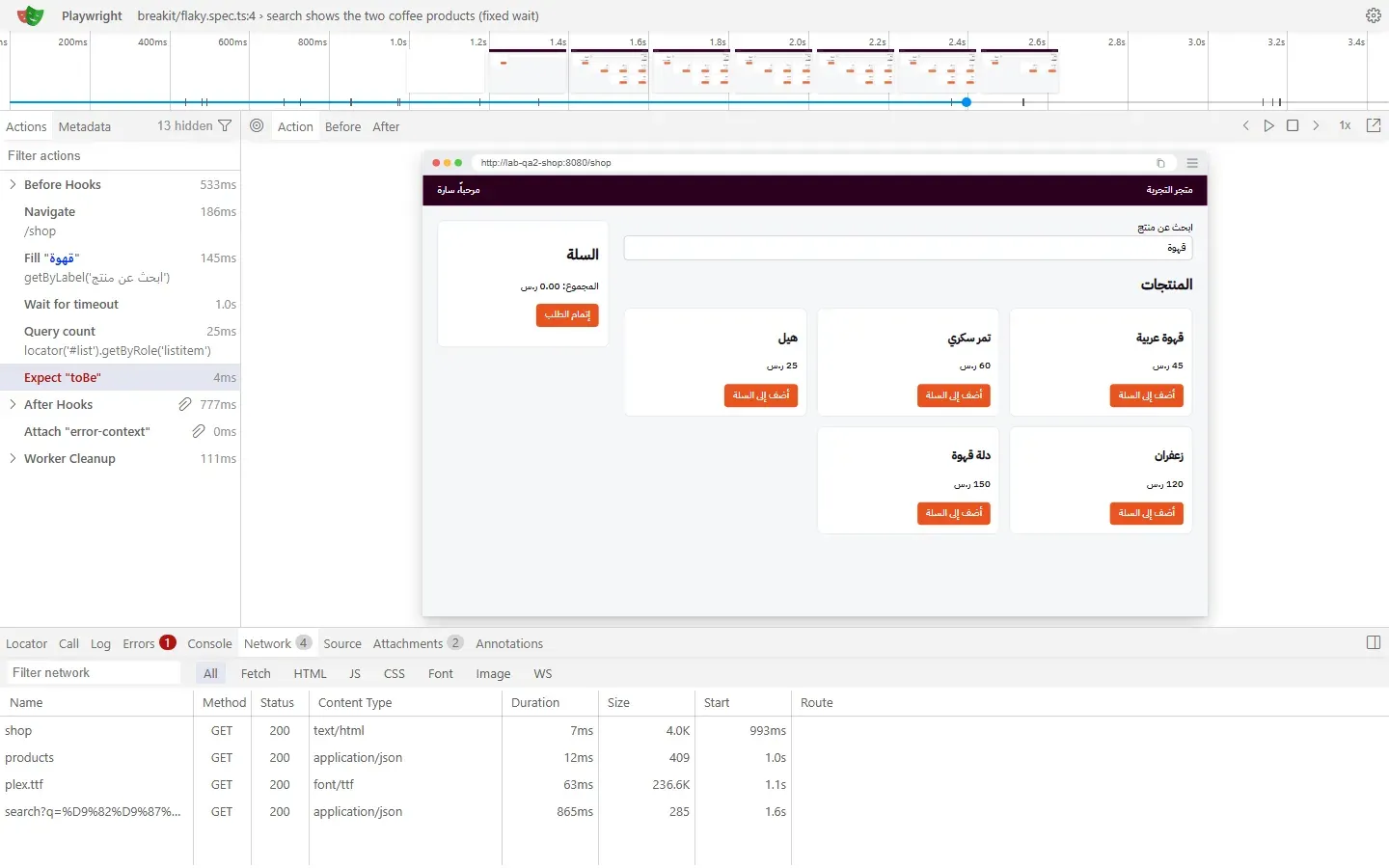
والصورة التالية تبين عارض التتبع على الخطوة Expect "toBe" التي فشلت، مع تبويب Network:
![عارض التتبع في Playwright: قائمة الخطوات على اليسار فيها Fill قهوة ثم Wait for timeout 1.0s ثم Query count ثم Expect toBe باللون الأحمر، ولقطة الصفحة في الوسط تعرض خمسة منتجات، وتبويب Network في الأسفل يبين أن طلب search بدأ عند 1.6s واستغرق 865ms](https://arabroot.io/content/images/2026/10/e2e-playwright-03-trace-network.webp)

طلب البحث بدأ عند 1.6 ثانية واستغرق 865 مللي ثانية، والتحقق نفذ قبل أن يعود، فاللقطة ما زالت تعرض المنتجات الخمسة

لاحظ أن البحث لم يبدأ لحظة الكتابة، وإنما بعد 250 مللي ثانية من الانتظار الذي في التطبيق، ثم أخذ ال API وقتاً عشوائياً، فمجموع الوقت تجاوز الثانية في هذا التشغيل، وهذا ما لم يره المطور على جهازه لأن الحالات البطيئة قليلة. والآن ماذا يحدث في خط CI مع إعادة المحاولة؟

```bash
BREAKIT=1 ./pw.sh npx playwright test tests/breakit/flaky.spec.ts -g "fixed wait" \
  --project=chromium --repeat-each=10 --retries=2 --fail-on-flaky-tests --reporter=dot
echo "exit=$?"
```

```text
··········×±
  1 flaky
    [chromium] › tests/breakit/flaky.spec.ts:4:5 › search shows the two coffee products (fixed wait)
  10 passed (43.1s)
exit=1
```

العلامة × محاولة فشلت، و± نجاح في إعادة المحاولة، وPlaywright يصنف الاختبار flaky. وبدون الخيار [\--fail-on-flaky-tests](https://playwright.dev/docs/test-cli?ref=arabroot.io) يمر التشغيل باللون الأخضر ويبقى الاختبار المتقلب في التقرير فقط، أما معه فيخرج الأمر بالرمز 1، فلا يمر طلب الدمج حتى يصلح أحد السبب. والإصلاح هو الاختبار الثاني نفسه: التحقق toHaveCount يعيد الفحص حتى يتحقق الشرط أو تنتهي المهلة، فلا يراهن على وقت محدد.

## العطل الثاني: تحقق خاطئ ينجح على صفحة مكسورة

هذا العطل أخطر من التقلب، لأن الاختبار أخضر دائماً. شغلنا التطبيق مع BROKEN=checkout فأصبح إنشاء الطلب يفشل، ثم شغلنا اختبارين يتحققان من نجاح الطلب:

```typescript
import { test, expect } from '../fixtures';

test('checkout works (bad assertion)', async ({ shop, page }) => {
  await shop.open();
  await shop.add('هيل');
  await shop.checkout();
  // a Locator is an object, and an object is always truthy
  expect(page.getByText('تم استلام طلبك')).toBeTruthy();
});

test('checkout works (web-first assertion)', async ({ shop }) => {
  await shop.open();
  await shop.add('هيل');
  await shop.checkout();
  await expect(shop.status).toContainText('تم استلام طلبك');
});
```

```bash
BROKEN=checkout docker compose up -d
BREAKIT=1 ./pw.sh npx playwright test tests/breakit/assertion.spec.ts --project=chromium
```

```text
  ✓  1 [setup] › tests/auth.setup.ts:6:6 › log in as sara (1.1s)
  ✓  3 [chromium] › tests/breakit/assertion.spec.ts:3:5 › checkout works (bad assertion) (888ms)
  ✘  2 [chromium] › tests/breakit/assertion.spec.ts:11:5 › checkout works (web-first assertion) (6.0s)

    Error: expect(locator).toContainText(expected) failed
    Locator: getByRole('status')
    Expected substring: "تم استلام طلبك"
    Received string:    "تعذر إتمام الطلب، حاول مرة أخرى"
    Timeout: 5000ms
    Call log:
      - Expect "toContainText" getByRole('status') with timeout 5000ms
      - waiting for getByRole('status')
        14 × locator resolved to <p id="status" role="status" class="error">تعذر إتمام الطلب، حاول مرة أخرى</p>
           - unexpected value "تعذر إتمام الطلب، حاول مرة أخرى"

  1 failed
  2 passed (16.6s)
```

في المخرج أعلاه لاحظ التالي:

- الاختبار الأول نجح في 888 مللي ثانية والصفحة تعرض «تعذر إتمام الطلب»، والسبب أن page.getByText يرجع كائن Locator، والكائن في JavaScript قيمته صحيحة Truthy دائماً، فالتحقق لا يفحص الصفحة إطلاقاً.
- الاختبار الثاني فشل بعد أن أعاد الفحص 14 مرة خلال خمس ثوان، وأظهر النص الحقيقي الذي في الصفحة، فتعرف الخطأ من الرسالة نفسها.
- القاعدة: كل تحقق على عنصر في الصفحة يبدأ ب await expect(locator) ويستخدم تحققاً من [التحققات التي تعيد المحاولة](https://playwright.dev/docs/test-assertions?ref=arabroot.io)، مثل toHaveText وtoBeVisible وtoHaveCount، ولا تقم بتمرير Locator أو نتيجة isVisible إلى toBeTruthy.

وطريقة سريعة لتكتشف هذا النوع قبل الدمج: شغل الاختبار مرة على نسخة مكسورة عمداً من الصفحة، فإذا نجح فهو لا يختبر شيئاً، وهذه هي فكرة [اختبار الطفرات Mutation Testing](https://arabroot.io/articles/%D8%A7%D8%AE%D8%AA%D8%A8%D8%A7%D8%B1-%D8%A7%D9%84%D8%B7%D9%81%D8%B1%D8%A7%D8%AA-mutation-testing/) نفسها.

## العطل الثالث: محدد ينكسر مع تغيير في الواجهة

غير فريق التصميم قائمة المنتجات: كلاسات جديدة، وطبقة div إضافية، وزر بحواف دائرية ولون أغمق قليلاً، والأدوار والأسماء كما هي. شغلنا التطبيق مع UI\_V2=1، ثم اختبارين يضيفان التمر إلى السلة، الأول بمحدد CSS منسوخ من أدوات المطور DevTools، والثاني بالدور والاسم:

```typescript
import { test, expect } from '../fixtures';

test('add the dates (CSS selector copied from DevTools)', async ({ shop, page }) => {
  await shop.open();
  await page.locator('ul.products > li.card:nth-child(2) > button.btn-add').click();
  await expect(shop.total).toHaveText('60.00');
});

test('add the dates (role and accessible name)', async ({ shop }) => {
  await shop.open();
  await shop.add('تمر سكري');
  await expect(shop.total).toHaveText('60.00');
});
```

```bash
UI_V2=1 BROKEN= docker compose up -d
BREAKIT=1 ./pw.sh npx playwright test tests/breakit/selector.spec.ts tests/visual.spec.ts --project=chromium
```

```text
  ✓  2 [chromium] › tests/breakit/selector.spec.ts:9:5 › add the dates (role and accessible name) (2.2s)
  ✘  4 [chromium] › tests/visual.spec.ts:9:5 › the product grid looks the same (4.3s)
  ✘  3 [chromium] › tests/breakit/selector.spec.ts:3:5 › add the dates (CSS selector copied from DevTools) (6.8s)

    TimeoutError: locator.click: Timeout 5000ms exceeded.
    Call log:
      - waiting for locator('ul.products > li.card:nth-child(2) > button.btn-add')
```

محدد CSS فشل بعد خمس ثوان لأن ul.products وli.card وbutton.btn-add لم تعد موجودة، أما الاختبار بالدور والاسم فنجح دون أي تعديل، لأن المستخدم ما زال يرى زراً اسمه «أضف إلى السلة» داخل بطاقة «تمر سكري». ولاحظ أن المحدد المنسوخ أسوأ من مجرد هش، فلو بقيت الكلاسات وتغير ترتيب المنتجات لنقر nth-child(2) منتجاً آخر بصمت.

وفي التشغيل نفسه فشل الاختبار المرئي، وهذا هو المطلوب منه، فالتصميم تغير فعلاً:

```text
    Error: expect(locator).toHaveScreenshot(expected) failed
    Locator: locator('#list')
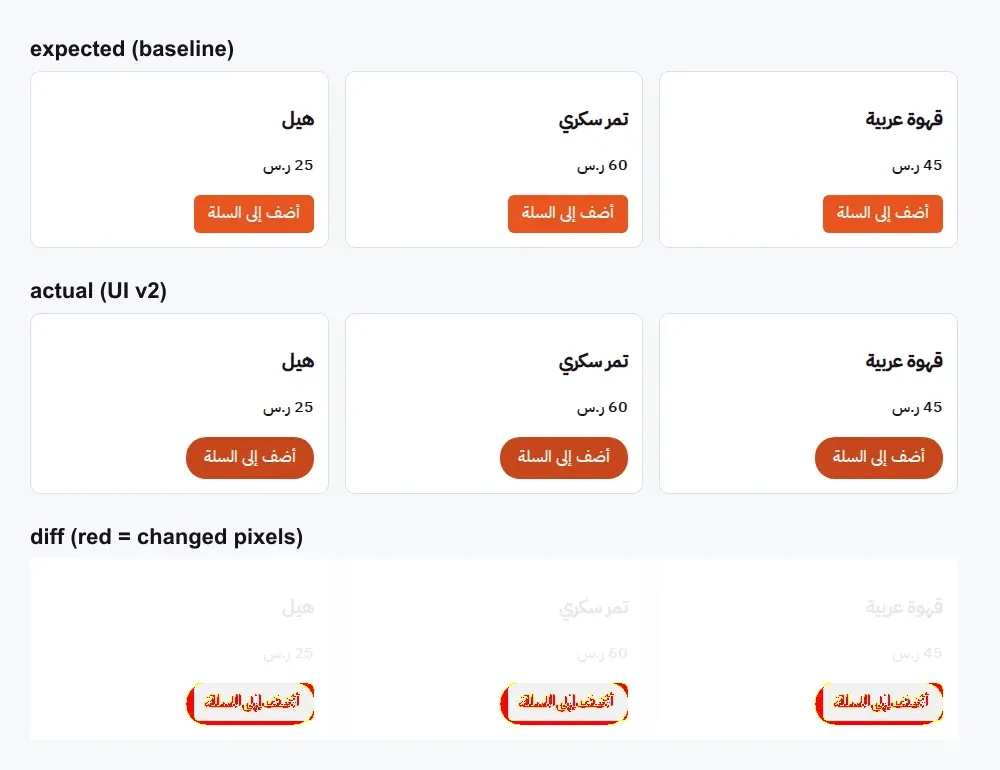
      Expected an image 928px by 178px, received 928px by 182px. 3294 pixels (ratio 0.02 of all image pixels) are different.
      Snapshot: product-grid.png
    Call log:
      ...
      - waiting for fonts to load...
      - fonts loaded
      ...
    Expected: tests/visual.spec.ts-snapshots/product-grid-chromium-linux.png
    Received: test-results/visual-the-product-grid-looks-the-same-chromium/product-grid-actual.png
    Diff:     test-results/visual-the-product-grid-looks-the-same-chromium/product-grid-diff.png
```

والصورة التالية تبين الصور الثلاث التي حفظها Playwright: المرجع، والصورة الجديدة، والفرق باللون الأحمر:
![ثلاث صور لشبكة المنتجات: الصورة المرجعية بأزرار مستطيلة، والصورة الجديدة بأزرار دائرية الحواف أغمق، وصورة الفرق التي تظهر فيها الأزرار فقط باللون الأحمر والأصفر](https://arabroot.io/content/images/2026/10/e2e-playwright-04-visual-diff.webp)

الفرق في الأزرار فقط، 3294 بكسل، والعناوين والأسعار لم تتغير

وهنا يقرر إنسان: إذا كان التغيير مقصوداً فحدث الصورة المرجعية بالأمر التالي داخل ال Image نفسها، وراجع الصورة الجديدة في طلب الدمج مثل أي كود، وإذا لم يكن مقصوداً فقد وجدت خطأ في التصميم:

```bash
./pw.sh npx playwright test tests/visual.spec.ts --update-snapshots
```

## التوازي والتقسيم على أكثر من جهاز

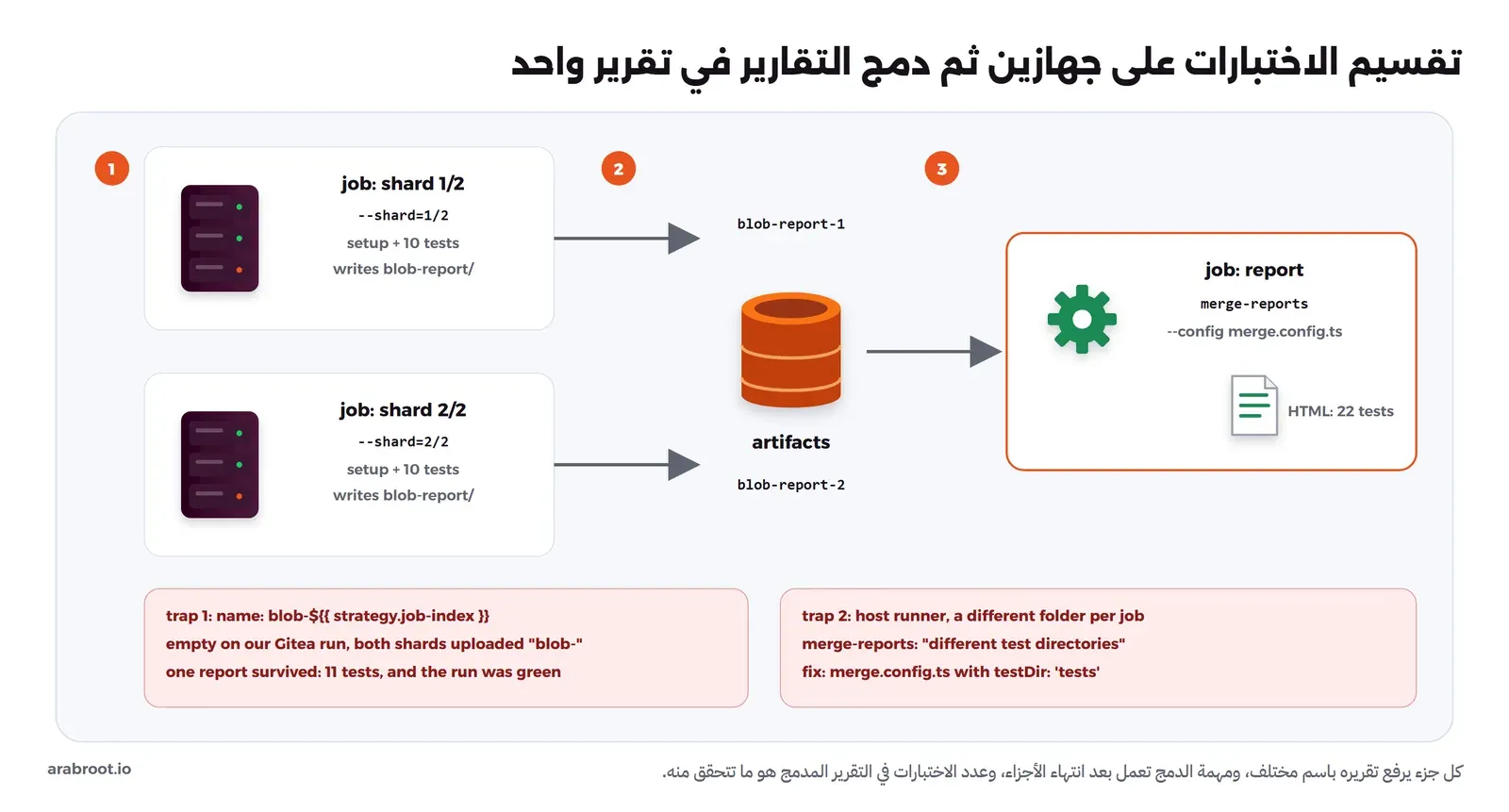
داخل الجهاز الواحد يشغل Playwright الملفات في Workers متوازية، ومع fullyParallel تتوزع الاختبارات داخل الملف الواحد أيضاً. وعندما تكبر المجموعة تقسمها على أكثر من جهاز بالخيار --shard، وكل جهاز يكتب تقريراً بصيغة blob، ثم يدمجها الأمر merge-reports في تقرير HTML واحد، كما تشرح [وثائق التقسيم](https://playwright.dev/docs/test-sharding?ref=arabroot.io)، والصورة التالية تبين المسار، ومعه الخطآن اللذان سنراهما في خط CI:
![مخطط فيه جهازان shard 1/2 وshard 2/2، كل منهما يشغل setup ثم نصف الاختبارات ويرفع blob-report-1 وblob-report-2 كملفات Artifacts، ثم مهمة report تنزلهما وتدمجهما بالأمر merge-reports في تقرير HTML واحد، مع تنبيهين: اسم Artifact مكرر يجعل تقريراً يكتب فوق الآخر، ومجلدات مختلفة تحتاج merge.config.ts](https://arabroot.io/content/images/2026/10/e2e-playwright-02-sharding.webp)

كل جهاز يرفع تقريره باسم مختلف، والمهمة الأخيرة تدمجها

بدأنا على جهازنا أولاً بتشغيل جزأين في Containers متوازية:

```bash
export CI=1
PW_SUFFIX=-shard1 ./pw.sh sh -c "PLAYWRIGHT_BLOB_OUTPUT_DIR=blob-1 npx playwright test --shard=1/2" &
PW_SUFFIX=-shard2 ./pw.sh sh -c "PLAYWRIGHT_BLOB_OUTPUT_DIR=blob-2 npx playwright test --shard=2/2" &
wait
```

```text
Running 11 tests using 2 workers, shard 1 of 2
  ✓   1 [setup] › tests/auth.setup.ts:6:6 › log in as sara (2.9s)
  ✓   2 [chromium] › tests/mock.spec.ts:13:5 › a very long product name does not push the button out of the card (3.4s)
  ...
  11 passed (40.8s)

Running 11 tests using 2 workers, shard 2 of 2
  ✓   1 [setup] › tests/auth.setup.ts:6:6 › log in as sara (3.4s)
  ✓   2 [firefox] › tests/mock.spec.ts:3:5 › a failed payment shows a clear message (14.3s)
  ...
  11 passed (1.0m)
```

ولاحظ أن مشروع setup عمل في كل جزء، فكل جهاز يحتاج حالة الدخول الخاصة به، وأن التقسيم يتبع ترتيب الملفات والمشاريع، فوقعت كل اختبارات Chromium في الجزء الأول وكل اختبارات Firefox في الثاني، ولذلك أخذ الجزء الثاني وقتاً أطول. ثم دمجنا التقريرين:

```bash
mkdir -p e2e/all-blob-reports && cp e2e/blob-1/*.zip e2e/blob-2/*.zip e2e/all-blob-reports/
./pw.sh npx playwright merge-reports --reporter=html,list ./all-blob-reports
```

```text
  ✓  21 [firefox] › tests/shop.spec.ts:17:5 › a product created through the API appears in search (4.7s)
  22 passed (1.0m)
```

والصورة التالية تبين التقرير المدمج، وفيه 22 اختباراً، أي اختبارات الجزأين ومشروعا الدخول:
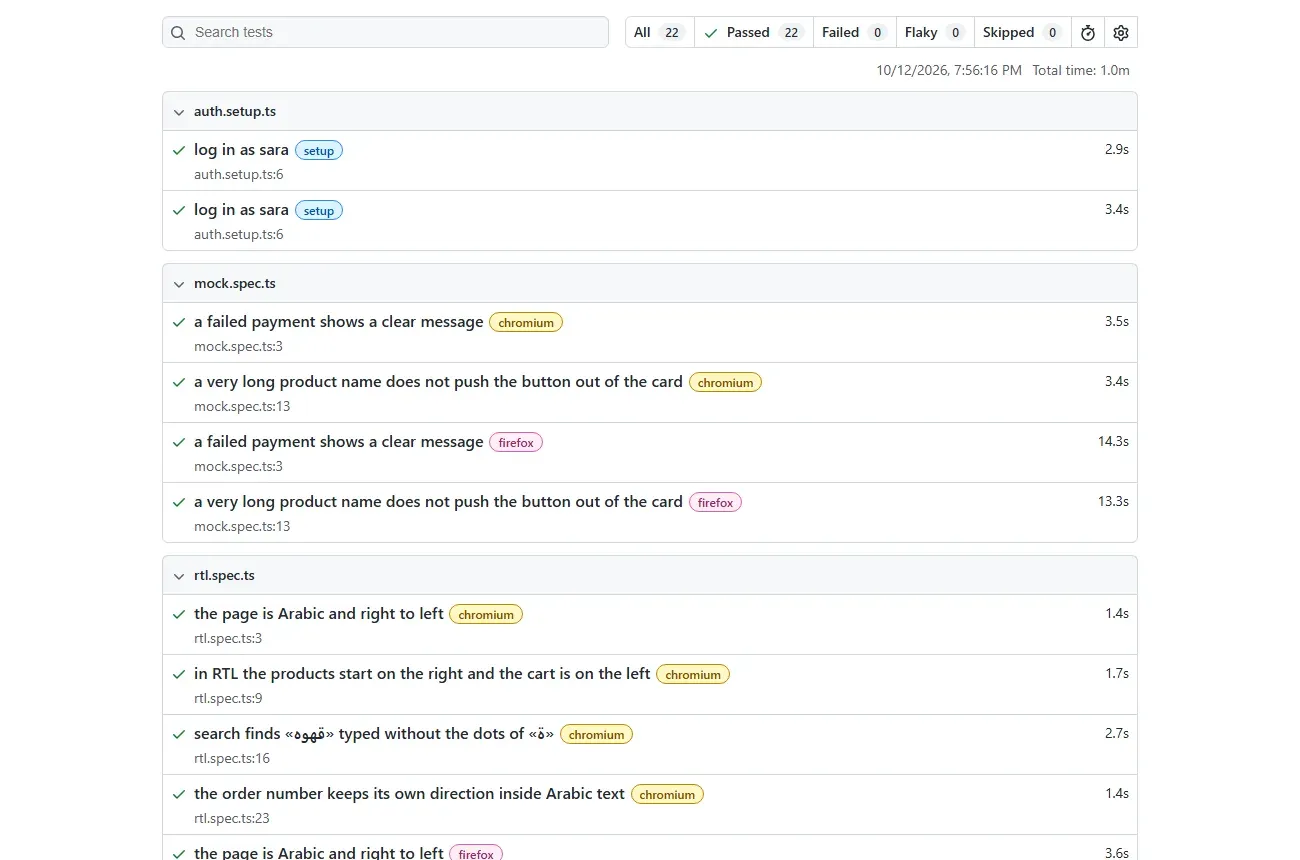
![تقرير HTML من Playwright فيه All 22 وPassed 22 وFailed 0 وFlaky 0، وتحت auth.setup.ts اختباران log in as sara، ثم اختبارات mock.spec.ts وrtl.spec.ts بعلامات chromium وfirefox](https://arabroot.io/content/images/2026/10/e2e-playwright-05-report.webp)

تقرير واحد من جزأين، والاختبار نفسه يظهر مرة لكل متصفح

## التشغيل في خط CI على Gitea Actions

ملف ال workflow التالي يعمل على GitHub Actions وعلى Gitea Actions، وهو مبني على مثال [وثائق التقسيم](https://playwright.dev/docs/test-sharding?ref=arabroot.io): مهمتان e2e متوازيتان كل منهما جزء، ثم مهمة report تدمج التقريرين:

```yaml
name: e2e
on:
  push:
    branches: [main]
  pull_request:

jobs:
  e2e:
    runs-on: ubuntu-latest
    timeout-minutes: 20
    strategy:
      fail-fast: false
      matrix:
        shardIndex: [1, 2]
        shardTotal: [2]
    env:
      CI: "true"
      BASE_URL: http://127.0.0.1:8080
      SARA_PASSWORD: ${{ secrets.SARA_PASSWORD }}
    steps:
      - uses: actions/checkout@v6
      - uses: actions/setup-node@v6
        with:
          node-version: 24
      - name: Start the app
        run: |
          cd app && (node server.mjs > ../app.log 2>&1 &)
          for i in $(seq 1 30); do curl -sf http://127.0.0.1:8080/health && break; sleep 1; done
      - name: Install
        working-directory: e2e
        run: npm ci
      - name: Browsers
        working-directory: e2e
        run: npx playwright install --with-deps chromium firefox
      - name: Test (shard ${{ matrix.shardIndex }} of ${{ matrix.shardTotal }})
        working-directory: e2e
        run: npx playwright test --shard=${{ matrix.shardIndex }}/${{ matrix.shardTotal }}
      - name: Keep the blob report
        if: ${{ !cancelled() }}
        uses: actions/upload-artifact@v4
        with:
          name: blob-report-${{ matrix.shardIndex }}
          path: e2e/blob-report
          retention-days: 1

  report:
    needs: e2e
    if: ${{ !cancelled() }}
    runs-on: ubuntu-latest
    steps:
      - uses: actions/checkout@v6
      - uses: actions/setup-node@v6
        with:
          node-version: 24
      - working-directory: e2e
        run: npm ci
      - uses: actions/download-artifact@v4
        with:
          pattern: blob-report-*
          path: e2e/all-blob-reports
          merge-multiple: true
      - name: One HTML report from all shards
        working-directory: e2e
        run: npx playwright merge-reports --config merge.config.ts --reporter=html,list ./all-blob-reports
      - uses: actions/upload-artifact@v4
        with:
          name: html-report
          path: e2e/playwright-report
          retention-days: 14
```

وملف إعداد الدمج merge.config.ts الذي يستخدمه السطر الأخير سوف نعرف سببه بعد قليل:

```typescript
// Shards may run in different folders (self-hosted runners): tell merge-reports where the tests are
export default {
  testDir: 'tests',
};
```

### runner يعمل داخل Image Playwright نفسها

شرحنا تشغيل Gitea Actions وأنواع ال runner في [دليل Gitea Actions](https://arabroot.io/articles/gitea-actions-%D8%AA%D8%B4%D8%BA%D9%8A%D9%84-ci-cd-%D8%B9%D9%84%D9%89-%D8%AE%D8%A7%D8%AF%D9%85%D9%83/). وهنا اخترنا شكلاً آخر: runner يعمل بالنوع host، أي أن المهمة تعمل داخل Container ال runner نفسه بدل أن ينشئ Container لكل مهمة، كما تشرح [وثائق ال runner](https://docs.gitea.com/usage/actions/act-runner?ref=arabroot.io). وبنيناه من Image Playwright حتى تكون المتصفحات والخطوط جاهزة، وهي البيئة نفسها التي أنشأنا فيها الصور المرجعية:

```dockerfile
# A Gitea runner that runs jobs directly inside the Playwright image ("host" label):
# browsers and Node are already here, and no extra job containers are created.
FROM mcr.microsoft.com/playwright:v1.64.0-noble
COPY --from=gitea/runner:4.1.0 /usr/local/bin/gitea-runner /usr/local/bin/gitea-runner
COPY start.sh /start.sh
WORKDIR /data
ENTRYPOINT ["/bin/sh", "/start.sh"]
```

```bash
#!/bin/sh
set -e
cd /data
if [ ! -s .runner ]; then
  gitea-runner register --no-interactive --instance "$GITEA_INSTANCE_URL" \
    --token "$GITEA_RUNNER_REGISTRATION_TOKEN" --name lab-qa2-runner \
    --labels "ubuntu-latest:host"
fi
exec gitea-runner daemon
```

```yaml
name: lab-qa2-ci

services:
  gitea:
    image: gitea/gitea:1.27.3
    container_name: lab-qa2-gitea
    environment:
      GITEA__security__INSTALL_LOCK: "true"
      GITEA__database__DB_TYPE: sqlite3
      GITEA__server__ROOT_URL: http://git.lab.test:3000/
      GITEA__actions__ENABLED: "true"
      GITEA__actions__DEFAULT_ACTIONS_URL: github
    ports:
      - "127.0.0.1:18300:3000"
    volumes:
      - lab-qa2-ci-gitea:/data
    networks:
      lab-qa2-net:
        aliases: [git.lab.test]

  runner:
    build: ./runner
    image: lab-qa2-runner:1
    container_name: lab-qa2-runner
    environment:
      GITEA_INSTANCE_URL: http://git.lab.test:3000/
      GITEA_RUNNER_REGISTRATION_TOKEN: ${RUNNER_TOKEN:-}
    volumes:
      - lab-qa2-ci-runner:/data
    networks: [lab-qa2-net]
    profiles: [runner]

volumes:
  lab-qa2-ci-gitea:
    name: lab-qa2-ci-gitea
  lab-qa2-ci-runner:
    name: lab-qa2-ci-runner

networks:
  lab-qa2-net:
    name: lab-qa2-net
    external: true
```

```bash
docker exec -u git lab-qa2-gitea gitea actions generate-runner-token
RUNNER_TOKEN=<token> docker compose -f compose.ci.yaml --profile runner up -d runner
docker logs lab-qa2-runner
```

```text
level=info msg="Runner registered successfully."
level=info msg="runner: lab-qa2-runner, with version: v4.1.0, with labels: [ubuntu-latest], declare successfully"
```

ولاحظ أن النوع host لا يعزل المهام عن بعضها ولا عن ال runner، لذلك استخدمه لمستودعات تثق بكودها، واترك capacity على 1 كما هو افتراضياً، والسبب في حالتنا أن مهمتين في الوقت نفسه ستحاولان تشغيل التطبيق على المنفذ 8080 نفسه.

### الخطأ الأول: التشغيل أخضر ونصف الاختبارات غير موجودة

كانت النسخة الأولى من الملف تسمي ال Artifact بهذا الشكل:

```yaml
      - name: Keep the blob report
        uses: actions/upload-artifact@v4
        with:
          name: blob-${{ strategy.job-index }}
          path: e2e/blob-report
```

ونجح التشغيل كاملاً باللون الأخضر، لكن السجل قال شيئاً آخر:

```text
# job e2e (1/2)
  name: blob-
# job report
Found 1 artifact(s)
Filtering artifacts by pattern 'blob-*'
- blob- (ID: 1, Size: 11793, Expected Digest: undefined)
npx playwright merge-reports --reporter=html,list ./all-blob-reports
  11 passed (30.7s)
```

القيمة strategy.job-index كانت فارغة في Gitea 1.27.3 مع runner 4.1.0، فرفع الجزآن تقريرهما بالاسم نفسه blob-، وبقي واحد فقط، فدمجت مهمة report 11 اختباراً بدل 22، ولم يفشل شيء. وعلى GitHub نفسه لا تسمح upload-artifact@v4 برفع اسم مكرر، لأن [ال Artifacts فيها غير قابلة للتعديل Immutable](https://github.com/actions/upload-artifact?ref=arabroot.io). والحل هو ما في مثال الوثائق: مصفوفة Matrix فيها shardIndex وshardTotal، والاسم blob-report-${{ matrix.shardIndex }}. والدرس الأهم: تأكد من عدد الاختبارات في التقرير المدمج، وليس من اللون الأخضر فقط.

### الخطأ الثاني: مجلدات مختلفة لكل جزء

بعد تصحيح الأسماء وصل التقريران، ففشلت مهمة report هذه المرة:

```text
Error: Blob reports being merged were recorded with different test directories, and
merging cannot proceed. This may happen if you are merging reports from
machines with different environments, like different operating systems or
if the tests ran with different playwright configs.
...
Found directories:
/root/.cache/act/968b8cfbf0b2545a/hostexecutor/e2e/tests
/root/.cache/act/a41670d35584d201/hostexecutor/e2e/tests
```

ال runner بالنوع host يعطي كل مهمة مجلد عمل مختلفاً تحت /root/.cache/act، فسجل كل جزء مسار الاختبارات بمجلده، ورفض merge-reports أن يدمج مسارين مختلفين. وعلى GitHub لا يظهر هذا لأن كل المهام تعمل في المسار نفسه. والحل الذي تقترحه رسالة الخطأ نفسها ملف إعداد للدمج فيه testDir، وهو merge.config.ts الذي رأيته أعلاه، وبعده نجح التشغيل الثالث:

```text
Found 2 artifact(s)
  22 passed (1.5m)
```

![صفحة التشغيل رقم 3 في Gitea Actions بعنوان CI: merge config with testDir وحالة Success، فيها المهام e2e (1, 2) وe2e (2, 2) وreport ناجحة، وثلاثة Artifacts هي blob-report-1 وblob-report-2 وhtml-report](https://arabroot.io/content/images/2026/10/e2e-playwright-06-gitea-run.webp)

التشغيل الناجح على Gitea Actions: جزآن ثم تقرير مدمج، وثلاثة Artifacts

## إزالة التجربة

```bash
docker compose -f compose.ci.yaml --profile runner down -v
docker compose down
docker rmi lab-qa2-runner:1 gitea/runner:4.1.0 gitea/gitea:1.27.3
```

وال Containers الأخرى كلها شغلناها بالخيار --rm. أما Image Playwright فاحذفها بالأمر docker rmi باسمها إن لم تعد تحتاجها.

## أخطاء شائعة

- **waitForTimeout في الاختبارات:** رهان على وقت لا تتحكم فيه، واستبدله بتحقق ينتظر الحالة نفسها.
- **إعادة المحاولة دون متابعة:** استخدم --fail-on-flaky-tests أو راجع قائمة flaky في كل تقرير.
- **expect دون await على Locator:** toBeTruthy على Locator ينجح دائماً.
- **محددات CSS منسوخة من DevTools:** تنكسر مع كل تعديل في التصميم، أو تنقر عنصراً آخر بصمت.
- **رفع ملف حالة الدخول:** الملف فيه Cookie جلسة صالحة.
- **صور مرجعية من جهاز المطور:** أنشئها وقارنها في ال Docker Image نفسها التي يستخدمها خط CI.
- **بيانات مشتركة بين الاختبارات المتوازية:** كل اختبار ينشئ بياناته باسم فريد ويحذفها بعده.
- **الثقة باللون الأخضر بعد الدمج:** قارن عدد الاختبارات في التقرير المدمج بعددها في الأجزاء.
- **محاكاة كل ال API:** المحاكاة لحالات لا تستطيع إعادة إنتاجها، والباقي على ال API الحقيقي.

## الخلاصة

وصلنا لنهاية الموضوع، وأهم ما فيه:

- مشروع setup يسجل الدخول مرة واحدة، وال Fixtures تجهز الصفحة وبيانات الاختبار وتحذفها، فتبقى الاختبارات قصيرة ومستقلة.
- المحددات بالدور والاسم العربي نجت من تغيير التصميم، ومحدد CSS لم ينج، والوضع الصارم كشف عنصرين بالدور نفسه.
- محاكاة الشبكة تختبر ما لا تستطيع إعادة إنتاجه، مثل فشل بوابة الدفع، دون أن تلمس الخدمة الحقيقية.
- الصفحة العربية تحتاج اختبارات للاتجاه والموضع والبحث بالأشكال المختلفة للحروف، وصوراً مرجعية بخط يقدمه التطبيق.
- الاختبار المتقلب يشخص بالتكرار وعارض التتبع، ولا يمر بصمت مع --fail-on-flaky-tests، والتحقق الخاطئ يكتشف بتشغيل الاختبار على صفحة مكسورة عمداً.
- في التقسيم تأكد من أسماء ال Artifacts ومن عدد الاختبارات في التقرير المدمج، وعلى runner من نوع host أضف ملف إعداد للدمج.

وفي المقال القادم بإذن الله سوف نختبر ال API نفسه، دون متصفح، مع Bruno وPostman في خط CI.

[![](https://arabroot.io/content/images/2026/10/testing-types-cover-cover.webp)دليلأنواع الاختبارات للمبتدئين: من Unit إلى E2E مع Playwrightما الذي يكشفه كل نوع من الاختبارات وما الذي يفوته، وكم اختباراً تكتب من كل نوع، وأين يعمل كل منها في خط CI.](https://arabroot.io/articles/%D8%A7%D9%86%D9%88%D8%A7%D8%B9-%D8%A7%D9%84%D8%A7%D8%AE%D8%AA%D8%A8%D8%A7%D8%B1%D8%A7%D8%AA-%D9%84%D9%84%D9%85%D8%A8%D8%AA%D8%AF%D8%A6%D9%8A%D9%86-unit-%D9%88-integration-%D9%88-e2e/)[![](https://arabroot.io/content/images/2026/10/ai-testing-cover-cover.webp)دليلاختبارات يكتبها الذكاء الاصطناعي: متى تثق بها؟أين يساعدك الذكاء الاصطناعي في كتابة الاختبارات وأين يخدعك، ولماذا يبقى قرار ما هو الصحيح بيد الإنسان.](https://arabroot.io/articles/%D8%A7%D8%AA%D9%85%D8%AA%D8%A9-%D8%A7%D9%84%D8%A7%D8%AE%D8%AA%D8%A8%D8%A7%D8%B1%D8%A7%D8%AA-%D8%A8%D8%A7%D9%84%D8%B0%D9%83%D8%A7%D8%A1-%D8%A7%D9%84%D8%A7%D8%B5%D8%B7%D9%86%D8%A7%D8%B9%D9%8A/)[![](https://arabroot.io/content/images/2026/10/api-testing-cover-cover.webp)دليلاختبار ال API مع Bruno وPostman في خط CIكيف تكتب اختبارات API تعيش في المستودع وتتحقق من العقد والصلاحيات، وتعمل في خط CI مع Bruno أو Postman.](https://arabroot.io/articles/%D8%A7%D8%AE%D8%AA%D8%A8%D8%A7%D8%B1-api-%D9%85%D8%B9-bruno-%D9%88-postman/)[![](https://arabroot.io/content/images/2026/10/contract-testing-cover-cover.webp)دليلاختبار العقود Contract Testing بين الخدمات مع Pactكيف تمنع خدمة من كسر خدمة أخرى تعتمد عليها قبل النشر، بعقد يكتبه المستهلك ويتحقق منه المزود ويحفظه Pact Broker.](https://arabroot.io/articles/%D8%A7%D8%AE%D8%AA%D8%A8%D8%A7%D8%B1-%D8%A7%D9%84%D8%B9%D9%82%D9%88%D8%AF-contract-testing-%D9%85%D8%B9-pact/)[![](https://arabroot.io/content/images/2026/10/gitea-actions-cover-cover-2.webp)دليلGitea Actions: تشغيل CI/CD وبناء Docker Images على سيرفركاجعل سيرفرك يختبر الكود ويبني Docker Images تلقائياً مع كل push، دون أن يخرج كودك أو أسرارك إلى خدمة CI خارجية.](https://arabroot.io/articles/gitea-actions-%D8%AA%D8%B4%D8%BA%D9%8A%D9%84-ci-cd-%D8%B9%D9%84%D9%89-%D8%AE%D8%A7%D8%AF%D9%85%D9%83/)[![](https://arabroot.io/content/images/2026/10/accessibility-testing-cover-cover.webp)دليلاختبار سهولة الوصول Accessibility لموقع عربيما الذي تجده أدوات فحص سهولة الوصول وما الذي يفوتها، وما الذي يخص المواقع العربية، وكيف تمنع عودة المشاكل في خط CI.](https://arabroot.io/articles/%D8%A7%D8%AE%D8%AA%D8%A8%D8%A7%D8%B1-%D8%B3%D9%87%D9%88%D9%84%D8%A9-%D8%A7%D9%84%D9%88%D8%B5%D9%88%D9%84-accessibility-%D9%84%D9%85%D9%88%D9%82%D8%B9-%D8%B9%D8%B1%D8%A8%D9%8A/)

## سجل التحديثات

- أكتوبر 2026: كتابة المقال، وتنفيذ تجربة ب Playwright 1.64.0 في ال Docker Image الرسمية (Node.js 24.21.0) على تطبيق Node.js في node:24-alpine، وتشغيل خط CI على Gitea 1.27.3 مع Gitea Runner 4.1.0.