

في مقال بوابة الدخول Captive Portal شرحنا كيف تحجز الشبكة الجهاز حتى يثبت الضيف أنه يملك رقم الجوال، وكيف يكتشف الهاتف البوابة، ولماذا لا تحول البوابة طلبات HTTPS، وما دور RADIUS. والكلام وحده لا يكفي لترى متى يتحول الرد من 302 إلى 204، وما الذي يحدث بالضبط في الثانية الستين من الجلسة، لذلك سوف نبني في هذا المقال بوابة تعمل فعلاً، برمز تحقق وجلسة محدودة وسجل محاسبة، وكلها داخل Containers على جهازك، دون أي نقطة وصول أو بطاقة Wi-Fi حقيقية، ثم نشرح كيف تنقل الفكرة نفسها إلى راوتر حقيقي.
وسوف نناقش في هذا المقال ما يلي:
- شكل التجربة: ستة Containers وثلاث شبكات، ولماذا لا نحتاج Wi-Fi حقيقياً.
- الملفات كاملة: Router بقواعد nftables وdnsmasq بالخيار 114، وبوابة بلغة Python وFastAPI، وFreeRADIUS بقاعدة SQLite، ومزود SMS وWhatsApp وهمي.
- عشر خطوات بمخرجات حقيقية: العنوان والخيار 114، والحجز قبل الدخول، وطلب الرمز، والحد من الطلبات، والرمز الخاطئ، والدخول، وانتهاء الجلسة، وسجل المحاسبة، وطلب WhatsApp، وقطع الجلسة عن بعد، وإلغاء الرمز بعد المحاولات الخاطئة.
- ما الذي كسرناه أثناء البناء وكيف تقرأ الخطأ.
- الانتقال إلى جهاز حقيقي خطوة خطوة: OpenWrt مع openNDS، أو OPNsense.
ما الذي سوف نبنيه؟
البوابة في الواقع جهاز بين شبكة الضيوف والإنترنت، والضيف يصل إلى هذا الجهاز عبر نقطة وصول لاسلكية، ولكن نقطة الوصول نفسها لا تشارك في قرار البوابة، فهي تنقل الإطارات Frames فقط، وكل ما يهم البوابة يحدث بعدها: DHCP وDNS والجدار الناري والصفحة وRADIUS. لذلك نستطيع أن نضع مكان الهواء شبكة Docker عادية، ويكون الهاتف Container يطلب عنوانه عبر DHCP كأي هاتف. والصورة التالية تبين ما سنبنيه:
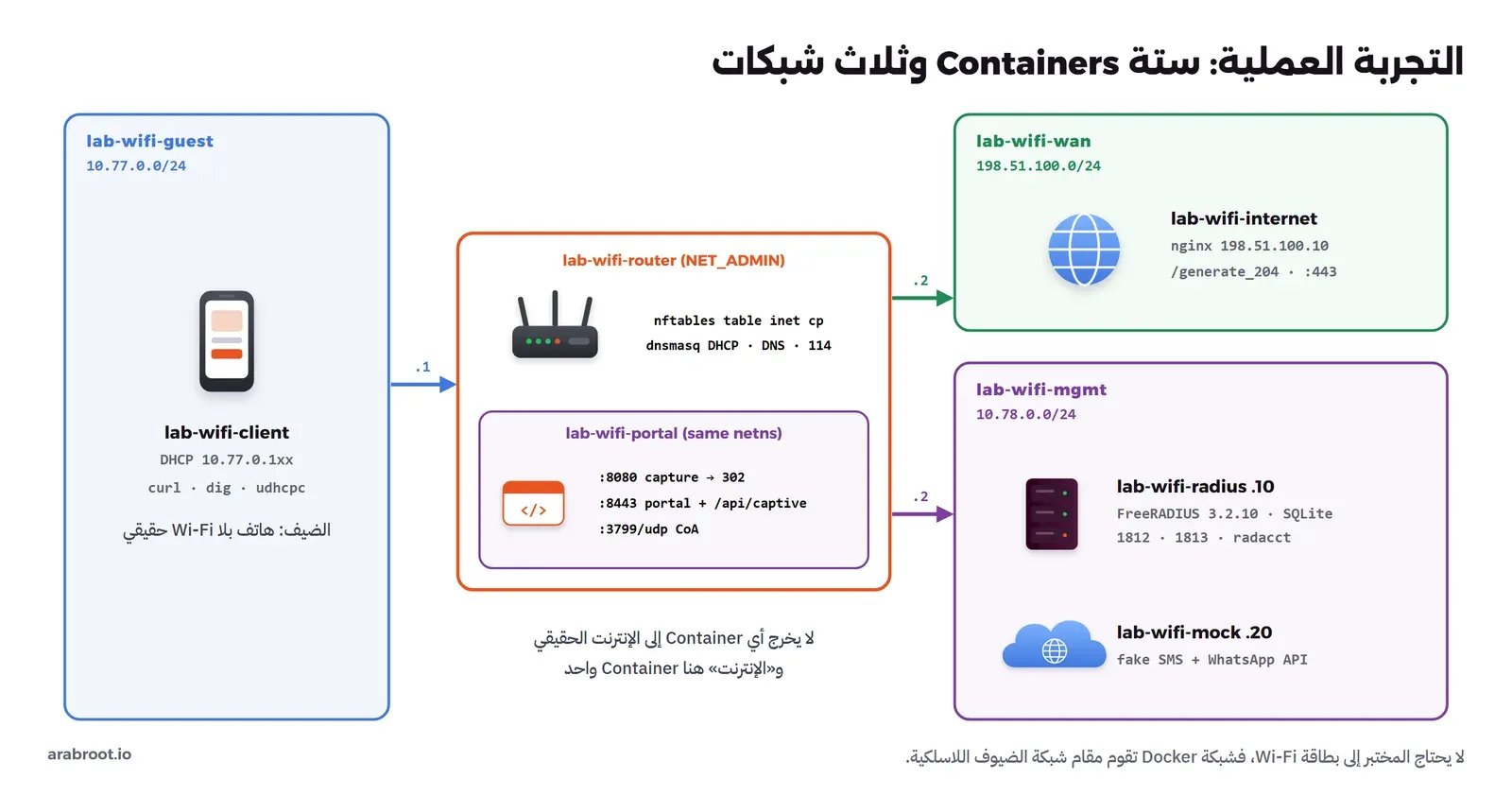
| Container | Image | الدور |
|---|---|---|
lab-wifi-router | alpine:3.24.2 مع nftables 1.1.6 وdnsmasq 2.92 | البوابة الافتراضية لشبكة الضيوف، وDHCP مع الخيار 114، وDNS، والجدار الناري الذي يحجز ويسمح |
lab-wifi-portal | python:3.13.16-slim مع FastAPI 0.143.0 | صفحة الدخول على 8443، واعتراض HTTP على 8080، وواجهة RFC 8908، واستقبال طلبات القطع على 3799، ويعمل داخل شبكة ال Router نفسه |
lab-wifi-radius | freeradius/freeradius-server:3.2.10-alpine | التحقق من الرمز ومدة الجلسة، وتسجيل المحاسبة في SQLite |
lab-wifi-mock | Image البوابة نفسها | مزود SMS ومزود WhatsApp وهميان، يطبعان الطلب الذي كان سيصل إلى المزود الحقيقي ولا يرسلان شيئاً |
lab-wifi-internet | nginx:1.31.6-alpine | «الإنترنت»: يرد على عناوين الفحص، وموقع HTTPS اسمه example.com |
lab-wifi-client | alpine:3.24.2 مع curl 8.22.0 | هاتف الضيف |
ولاحظ أن كل الشبكات لا تخرج إلى الإنترنت الحقيقي، وأن «الإنترنت» هنا Container واحد على عنوان من النطاق 198.51.100.0/24 المخصص للتوثيق، وأن dnsmasq يوجه أسماء الفحص إليه، فتعمل التجربة دون اتصال وتعطي النتيجة نفسها في كل مرة. والصلاحية NET_ADMIN موجودة فقط داخل Containers التجربة الثلاثة التي تحتاجها: ال Router لقواعد الجدار، والبوابة لأنها تضيف الأجهزة إلى قواعده، والهاتف ليضبط عنوانه من DHCP.
الملفات
أنشئ مجلداً للتجربة وضع فيه الملفات التالية بالمسارات المكتوبة فوق كل ملف. نبدأ بملف compose.yaml الذي يربط كل شيء:
name: lab-wifi

services:
  internet:
    image: nginx:1.31.6-alpine
    container_name: lab-wifi-internet
    networks:
      wan: { ipv4_address: 198.51.100.10 }
    volumes:
      - ./internet/default.conf:/etc/nginx/conf.d/default.conf:ro
      - ./certs:/certs:ro

  router:
    build: ./router
    image: lab-wifi-router:1
    container_name: lab-wifi-router
    hostname: cafe-router
    cap_add: [NET_ADMIN]
    sysctls:
      net.ipv4.ip_forward: "1"
    networks:
      wan:   { ipv4_address: 198.51.100.2 }
      guest: { ipv4_address: 10.77.0.1 }
      mgmt:  { ipv4_address: 10.78.0.2 }
    volumes:
      - ./router:/lab:ro
    command: ["sh", "/lab/start.sh"]

  radius:
    build: ./radius
    image: lab-wifi-radius:1
    container_name: lab-wifi-radius
    networks:
      mgmt: { ipv4_address: 10.78.0.10 }
    volumes:
      - db:/data
    command: ["-l", "stdout"]

  mock:
    build: ./portal
    image: lab-wifi-portal:1
    container_name: lab-wifi-mock
    networks:
      mgmt: { ipv4_address: 10.78.0.20 }
    volumes:
      - ./portal/app:/app:ro
    command: ["uvicorn", "mock:app", "--host", "0.0.0.0", "--port", "9000", "--no-access-log"]

  portal:
    image: lab-wifi-portal:1
    container_name: lab-wifi-portal
    network_mode: "service:router"
    cap_add: [NET_ADMIN]
    depends_on: [router, radius, mock]
    environment:
      RADIUS_SERVER: 10.78.0.10
      RADIUS_SECRET: lab-wifi-secret-2026
      NAS_IP: 10.78.0.2
      PORTAL_URL: https://portal.lab.test:8443/portal
      SMS_API: http://10.78.0.20:9000/api/v1/sms/send
      WA_API: http://10.78.0.20:9000/v25.0/109876543210987/messages
      SESSION_DEFAULT: "60"
    volumes:
      - ./portal/app:/app:ro
      - ./certs:/certs:ro
      - db:/data
    command: ["python", "/app/run.py"]

  client:
    build: ./client
    image: lab-wifi-client:1
    container_name: lab-wifi-client
    hostname: guest-phone
    cap_add: [NET_ADMIN]
    networks:
      guest: { ipv4_address: 10.77.0.250 }
    volumes:
      - ./client:/lab:ro
      - ./certs/ca.pem:/ca.pem:ro
    command: ["sleep", "infinity"]

networks:
  wan:
    name: lab-wifi-wan
    internal: true
    ipam: { config: [{ subnet: 198.51.100.0/24, gateway: 198.51.100.254 }] }
  guest:
    # not "internal": Docker drops DHCP broadcasts (0.0.0.0 -> 255.255.255.255) on internal networks
    name: lab-wifi-guest
    driver_opts:
      com.docker.network.bridge.enable_ip_masquerade: "false"
    ipam: { config: [{ subnet: 10.77.0.0/24, gateway: 10.77.0.254 }] }
  mgmt:
    name: lab-wifi-mgmt
    internal: true
    ipam: { config: [{ subnet: 10.78.0.0/24, gateway: 10.78.0.254 }] }

volumes:
  db:
    name: lab-wifi-db
في الإعداد أعلاه لاحظ التالي:
- البوابة
portalتستخدمnetwork_mode: "service:router"، أي أنها ترى واجهات ال Router نفسها وعناوينه وجدول ARP فيه، فتعرف عنوان MAC لكل ضيف، وتستطيع أن تضيفه إلى قواعد nftables، وهذا بالضبط وضع البوابة على راوتر حقيقي. - شبكتا
wanوmgmtمن نوعinternal، أما شبكة الضيوف فليست كذلك، والسبب في قسم الأخطاء، ولكن عليهاenable_ip_masquerade: "false"فلا يخرج منها شيء إلى الإنترنت عبر Docker. - مدة الجلسة 60 ثانية فقط في
SESSION_DEFAULTحتى نرى انتهاءها دون انتظار، وفي الواقع تكون ساعات. - كلمة السر المشتركة لـ RADIUS مكتوبة هنا لأنها تجربة، وفي الإنتاج تأتي من ملف أسرار.
ال Router: DHCP بالخيار 114 والجدار الناري
الملف router/Dockerfile:
FROM alpine:3.24.2
RUN apk add --no-cache nftables dnsmasq iproute2 conntrack-tools tcpdump
والملف router/dnsmasq.conf:
# DNS and DHCP for the guest network only
listen-address=10.77.0.1
bind-interfaces
no-resolv
no-hosts
log-facility=-
log-dhcp
log-queries

dhcp-authoritative
dhcp-range=10.77.0.100,10.77.0.199,255.255.255.0,10m
dhcp-option=option:router,10.77.0.1
dhcp-option=option:dns-server,10.77.0.1
# RFC 8910: the Captive Portal API URI (DHCPv4 option 114)
dhcp-option=114,"https://portal.lab.test:8443/api/captive"

# the portal name, and a tiny offline "internet" for the lab
address=/portal.lab.test/10.77.0.1
address=/connectivitycheck.gstatic.com/198.51.100.10
address=/captive.apple.com/198.51.100.10
address=/www.msftconnecttest.com/198.51.100.10
address=/example.com/198.51.100.10
والسطر المهم هو dhcp-option=114,... الذي يضع رابط الواجهة البرمجية في رد DHCP كما في RFC 8910، والرابط يشير إلى ال API وليس إلى صفحة الدخول، وصيغة الخيار مشروحة في دليل dnsmasq. والجزء المهم في التجربة هو قواعد الجدار في router/cp.nft:
# Captive portal enforcement. GUEST and WAN are replaced by start.sh with the real interface names.
table inet cp {
    # authorised clients: IP and MAC together, each element expires on its own (Session-Timeout)
    set up {
        type ipv4_addr . ether_addr
        flags timeout
        counter
    }
    set down {
        type ipv4_addr
        flags timeout
        counter
    }

    chain prerouting {
        type nat hook prerouting priority dstnat; policy accept;
        iifname "GUEST" ip saddr . ether saddr @up return
        # walled garden: any plain HTTP from an unauthorised guest goes to the portal
        iifname "GUEST" tcp dport 80 ip daddr != 10.77.0.1 dnat ip to 10.77.0.1:8080
    }

    chain input {
        type filter hook input priority filter; policy accept;
        iifname "GUEST" ct state established,related accept
        iifname "GUEST" udp dport { 53, 67 } accept
        iifname "GUEST" tcp dport { 53, 8080, 8443 } accept
        iifname "GUEST" icmp type echo-request limit rate 5/second accept
        iifname "GUEST" counter drop
    }

    chain forward {
        type filter hook forward priority filter; policy drop;
        iifname "GUEST" oifname "WAN" ip saddr . ether saddr @up accept
        iifname "WAN" oifname "GUEST" ct state established,related ip daddr @down accept
        # everything else from guests (HTTPS, QUIC, other guests) is refused at once
        iifname "GUEST" meta l4proto tcp counter reject with tcp reset
        iifname "GUEST" counter reject with icmpx admin-prohibited
    }

    chain postrouting {
        type nat hook postrouting priority srcnat; policy accept;
        oifname "WAN" masquerade
    }
}
والصورة التالية تبين القرار الذي تمر به كل حزمة من الضيف:
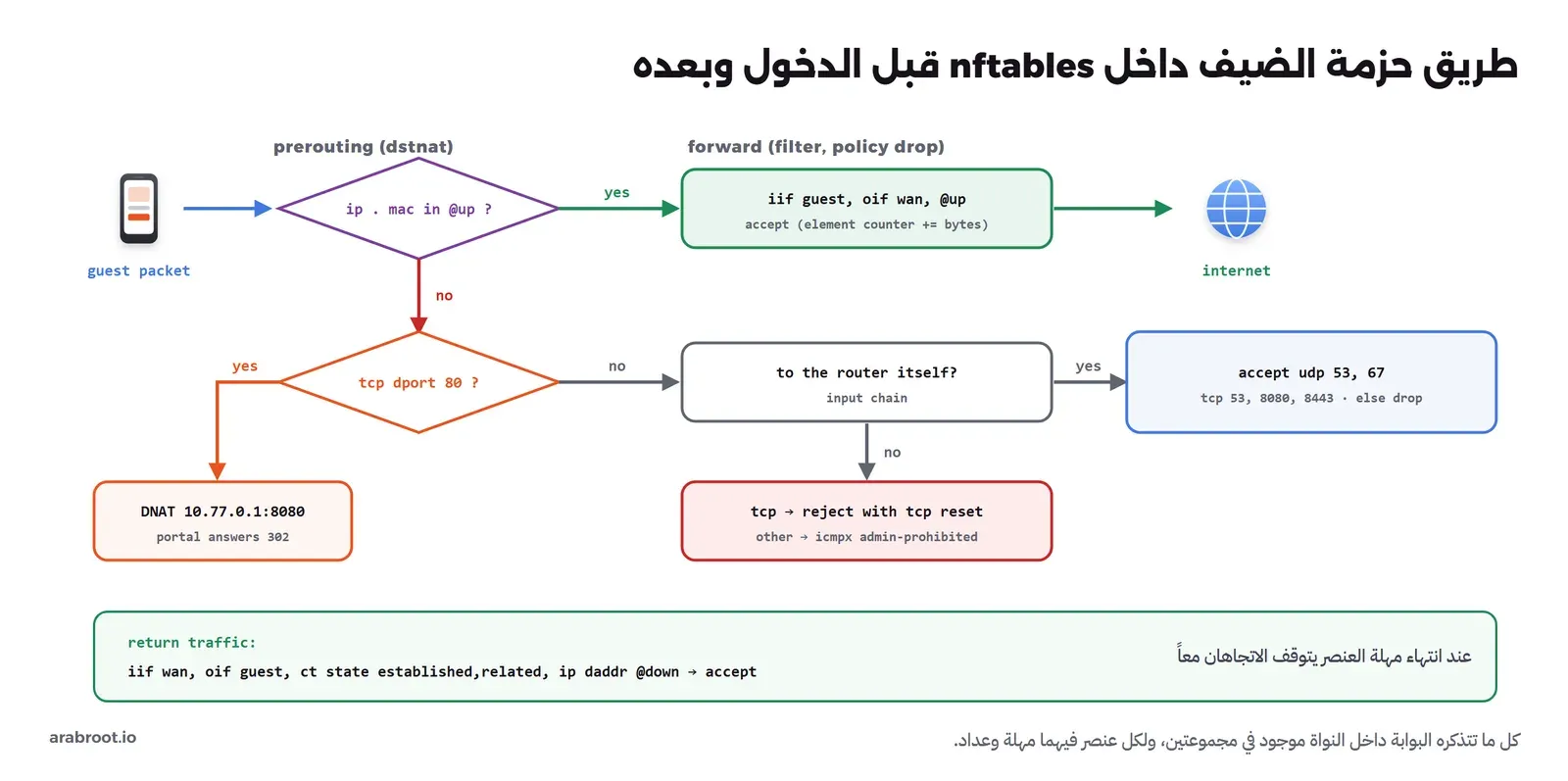
وفي الإعداد أعلاه لاحظ التالي:
- المجموعة
upمفتاحها عنوان IP مع عنوان MAC معاًipv4_addr . ether_addr، فلا يكفي أن يأخذ جهاز آخر العنوان نفسه ليمر، وعليهاflags timeoutفيضاف كل عنصر بمهلة خاصة به ويحذف تلقائياً من النواة عند انتهائها حتى لو توقفت البوابة نفسها عن العمل، وعليهاcounterفلكل عنصر عداد بايتات نقرؤه للمحاسبة. وتشرح صفحة Sets في توثيق nftables هذه الخيارات. - قاعدة
dnatلا تلمس إلا المنفذ 80، وأي شيء آخر من ضيف غير مسجل يرفض فيforwardبرفض فوريtcp reset، فيظهر الخطأ للمتصفح فوراً بدل الانتظار، كما شرحنا في قسم HTTPS في المقال الأول. - السلسلة
inputتفتح للضيوف DNS وDHCP ومنفذي البوابة فقط، فلا يصل الضيف إلى أي خدمة أخرى على ال Router. - حركة العودة تقبل فقط إذا كان عنوان الضيف في المجموعة
down، فعندما تنتهي المهلة تتوقف حتى الاتصالات المفتوحة في الاتجاهين.
وأخيراً router/start.sh الذي يعرف أسماء الواجهات التي أعطاها Docker من عناوينها، لأن ترتيب eth0 وeth1 غير مضمون:
#!/bin/sh
# find the interface names Docker gave us, by address
GUEST=$(ip -o -4 addr show | awk '/10\.77\.0\.1\//{print $2}')
WAN=$(ip -o -4 addr show | awk '/198\.51\.100\.2\//{print $2}')
echo "guest=$GUEST wan=$WAN"
sed -e "s/\"GUEST\"/\"$GUEST\"/g" -e "s/\"WAN\"/\"$WAN\"/g" /lab/cp.nft > /tmp/cp.nft
nft -f /tmp/cp.nft
exec dnsmasq -k -C /lab/dnsmasq.conf
FreeRADIUS بقاعدة SQLite
نستخدم Image الرسمية من FreeRADIUS، ونضيف إليها ثلاثة تعديلات في radius/Dockerfile:
FROM freeradius/freeradius-server:3.2.10-alpine
COPY sql /etc/raddb/mods-enabled/sql
COPY clients.conf /etc/raddb/clients.conf
# Do not keep the one-time code in radpostauth: the default query stores User-Password
RUN sed -i "s/'%{%{User-Password}:-%{Chap-Password}}'/''/" /etc/raddb/mods-config/sql/main/sqlite/queries.conf
# Log every Access-Accept and Access-Reject (without the password)
RUN sed -i "s/^\(\s*\)auth = no/\1auth = yes/" /etc/raddb/radiusd.conf
والملف radius/clients.conf يعرف جهاز الشبكة NAS الوحيد المسموح له بسؤال السيرفر:
# The router/portal is the NAS (the device that asks RADIUS and enforces the answer)
client cafe-router {
    ipaddr = 10.78.0.2
    secret = lab-wifi-secret-2026
    shortname = cafe-router
    require_message_authenticator = yes
}
والملف radius/sql يفعل وحدة SQL بقاعدة SQLite في المجلد /data الذي تشاركه البوابة:
sql {
    dialect = "sqlite"
    driver = "rlm_sql_sqlite"
    sqlite {
        filename = "/data/radius.db"
        busy_timeout = 2000
        bootstrap = "${modconfdir}/${..:name}/main/sqlite/schema.sql"
    }
    radius_db = "radius"
    acct_table1 = "radacct"
    acct_table2 = "radacct"
    postauth_table = "radpostauth"
    authcheck_table = "radcheck"
    groupcheck_table = "radgroupcheck"
    authreply_table = "radreply"
    groupreply_table = "radgroupreply"
    usergroup_table = "radusergroup"
    delete_stale_sessions = yes
    pool {
        start = 1
        min = 1
        max = 4
        spare = 1
        uses = 0
        retry_delay = 30
        lifetime = 0
        idle_timeout = 60
    }
    read_clients = no
    client_table = "nas"
    group_attribute = "SQL-Group"
    $INCLUDE ${modconfdir}/${.:name}/main/${dialect}/queries.conf
}
في الإعداد أعلاه لاحظ التالي:
- الخيار
bootstrapينشئ الجداول من ملف المخطط الرسمي عند أول تشغيل، فلا نكتب SQL بأنفسنا، والجداول المهمة لنا ثلاثة:radcheckلكلمات المرور، وradreplyللخصائص التي ترسل مع القبول، وradacctللمحاسبة. - الاستعلام الافتراضي لجدول
radpostauthيحفظ كلمة المرور مع كل محاولة دخول، وكلمة المرور عندنا هي رمز التحقق، فاستبدلناها بنص فارغ بالأمرsedفي ال Dockerfile، والسبب أن رمزاً يصلح خمس دقائق لا يجب أن يبقى في قاعدة بيانات سنوات. require_message_authenticator = yesيرفض أي طلب بلا الحقل Message-Authenticator، وهو العلاج الذي اعتمده المصنعون بعد ثغرة BlastRADIUS.auth = yesيكتب في السجل كل قبول ورفض مع السبب، دون كلمة المرور.
البوابة بلغة Python
البوابة ملف واحد portal/app/portal.py فيه تطبيقان من FastAPI: الأول على المنفذ 8080 يستقبل كل طلبات HTTP المعترضة ويرد بإعادة التوجيه، والثاني على 8443 عبر HTTPS فيه صفحة الدخول والواجهة البرمجية. وفيما يلي الأجزاء التي تهمنا، والملف كاملاً في نهاية القسم. أولاً كتابة الرمز في RADIUS وإضافة الجهاز إلى الجدار وقراءة العدادات:
def store_code(phone, code, session_timeout):
    digest = hashlib.sha256(code.encode()).hexdigest()
    con = db()
    con.execute("DELETE FROM radcheck WHERE username=?", (phone,))
    con.execute("DELETE FROM radreply WHERE username=?", (phone,))
    con.execute("INSERT INTO radcheck (username, attribute, op, value) VALUES (?, 'SHA2-Password', ':=', ?)", (phone, digest))
    con.execute("INSERT INTO radreply (username, attribute, op, value) VALUES (?, 'Session-Timeout', ':=', ?)", (phone, str(session_timeout)))
    con.close()


def forget_code(phone):
    con = db()
    con.execute("DELETE FROM radcheck WHERE username=?", (phone,))
    con.execute("DELETE FROM radreply WHERE username=?", (phone,))
    con.close()
    PENDING.pop(phone, None)


def nft(*args):
    return subprocess.run(["nft", *args], capture_output=True, text=True, check=True).stdout


def grant(ip, mac, seconds):
    nft("add", "element", "inet", "cp", "up", "{", f"{ip} . {mac}", "timeout", f"{seconds}s", "}")
    nft("add", "element", "inet", "cp", "down", "{", ip, "timeout", f"{seconds}s", "}")


def revoke(ip, mac):
    for args in (("up", f"{ip} . {mac}"), ("down", ip)):
        try:
            nft("delete", "element", "inet", "cp", args[0], "{", args[1], "}")
        except subprocess.CalledProcessError:
            pass              # already expired by its own timeout


def counters():
    """bytes per client IP from the per-element counters of the two sets"""
    out = {}
    for name, key in (("up", "in"), ("down", "out")):
        data = json.loads(nft("-j", "list", "set", "inet", "cp", name))
        for item in data["nftables"]:
            for e in item.get("set", {}).get("elem", []):
                e = e.get("elem", e)
                val = e["val"]["concat"][0] if isinstance(e["val"], dict) else e["val"]
                out.setdefault(val, {})[key] = e.get("counter", {}).get("bytes", 0)
    return out
ثم الحديث مع RADIUS للتحقق والمحاسبة عبر مكتبة pyrad:
def radius():
    return Client(server=os.environ["RADIUS_SERVER"], secret=SECRET, dict=DICT, timeout=3, retries=2)


def common(req, phone, mac, ip):
    req["User-Name"] = phone
    req["NAS-IP-Address"] = NAS_IP
    req["NAS-Identifier"] = "cafe-router"
    req["NAS-Port-Type"] = "Wireless-802.11"
    req["Called-Station-Id"] = "02-00-00-00-00-01:Cafe-Guest"
    req["Calling-Station-Id"] = mac.upper().replace(":", "-")
    req["Framed-IP-Address"] = ip


def radius_auth(phone, code, mac, ip):
    c = radius()
    req = c.CreateAuthPacket(code=packet.AccessRequest)
    common(req, phone, mac, ip)
    req["User-Password"] = req.PwCrypt(code)
    req["Service-Type"] = "Login-User"
    req.add_message_authenticator()
    reply = c.SendPacket(req)
    attrs = {k: reply[k] for k in reply.keys()}
    return reply.code == packet.AccessAccept, attrs


def radius_acct(s, status, cause=None):
    c = radius()
    req = c.CreateAcctPacket()
    common(req, s["phone"], s["mac"], s["ip"])
    req["Acct-Status-Type"] = status
    req["Acct-Session-Id"] = s["sid"]
    req["Event-Timestamp"] = int(time.time())
    if status != "Start":
        req["Acct-Session-Time"] = int(time.time() - s["start"])
        req["Acct-Input-Octets"] = s["in"]
        req["Acct-Output-Octets"] = s["out"]
    if cause:
        req["Acct-Terminate-Cause"] = cause
    c.SendPacket(req)
    log.info("accounting %s sid=%s user=%s in=%s out=%s", status, s["sid"], mask(s["phone"]), s.get("in", 0), s.get("out", 0))
ثم طلب الرمز والتحقق منه:
@app.post("/otp")
async def otp(request: Request, phone: str = Form(""), channel: str = Form("sms"), terms: str = Form("")):
    ip = request.client.host
    mac = client_mac(ip)
    p = norm_phone(phone)
    if not mac:
        return page(phone_form(err("لم نتعرف على جهازك في الشبكة.")), 400)
    if not p:
        return page(phone_form(err("أدخل رقم جوال سعودياً صحيحاً يبدأ بـ 05.")), 400)
    if terms != "1":
        return page(phone_form(err("يجب الموافقة على الشروط.")), 400)
    wait = COOLDOWN - (time.time() - last_send("phone:" + p))
    if wait > 0:
        log.info("rate limit: cooldown phone=%s mac=%s", mask(p), mac)
        return page(phone_form(err(f"طلبت رمزاً قبل قليل، انتظر {int(wait) + 1} ثانية.")), 429)
    for key, (limit, window) in (("phone:" + p, PER_PHONE), ("mac:" + mac, PER_MAC)):
        ok, retry = rate_ok(key, limit, window)
        if not ok:
            log.info("rate limit: %s limit=%s/%ss", key.split(":")[0], limit, window)
            return page(phone_form(err(f"وصلت إلى الحد المسموح من الرموز، حاول بعد {int(retry // 60) + 1} دقيقة.")), 429)
    code = f"{secrets.randbelow(10**6):06d}"
    store_code(p, code, SESSION_DEFAULT)
    PENDING[p] = {"expires": time.time() + OTP_TTL, "tries": 0, "mac": mac, "channel": channel}
    for key in ("phone:" + p, "mac:" + mac):
        SENDS.setdefault(key, []).append(time.time())
    result = await send_code(p, code, "whatsapp" if channel == "whatsapp" else "sms")
    log.info("code sent phone=%s mac=%s channel=%s provider=%s", mask(p), mac, channel, result)
    return page(code_form(p, channel))


@app.post("/verify")
async def verify(request: Request, phone: str = Form(""), code: str = Form("")):
    ip = request.client.host
    mac = client_mac(ip)
    p = norm_phone(phone)
    pend = PENDING.get(p or "")
    if not pend or time.time() > pend["expires"]:
        if p:
            forget_code(p)
        return page(phone_form(err("انتهت صلاحية الرمز أو لم يطلب، اطلب رمزاً جديداً.")), 400)
    if pend["mac"] != mac:
        return page(phone_form(err("أدخل الرمز من الجهاز نفسه الذي طلبه.")), 400)
    try:
        ok, attrs = await asyncio.to_thread(radius_auth, p, code.strip(), mac, ip)
    except Exception as e:  # noqa: BLE001  (timeout, network)
        log.warning("radius unreachable: %s", e)
        return page(code_form(p, pend["channel"], err("خدمة التحقق لا ترد الآن، حاول بعد قليل.")), 503)
    if not ok:
        pend["tries"] += 1
        left = MAX_TRIES - pend["tries"]
        log.info("radius reject phone=%s tries=%s", mask(p), pend["tries"])
        if left <= 0:
            forget_code(p)
            return page(phone_form(err("أدخلت رمزاً خاطئاً 5 مرات، فألغينا الرمز. اطلب رمزاً جديداً.")), 403)
        return page(code_form(p, pend["channel"], err(f"الرمز غير صحيح، وعدد المحاولات المتبقية {left}.")), 401)
    forget_code(p)                                   # one-time: the code cannot be used again
    timeout = int(attrs.get("Session-Timeout", [SESSION_DEFAULT])[0])
    grant(ip, mac, timeout)
    s = {"sid": uuid.uuid4().hex[:16], "phone": p, "mac": mac, "ip": ip, "start": time.time(),
         "timeout": timeout, "in": 0, "out": 0, "last_interim": time.time()}
    SESSIONS[ip] = s
    await asyncio.to_thread(radius_acct, s, "Start")
    log.info("access granted ip=%s mac=%s session-timeout=%ss", ip, mac, timeout)
    return page(f'<h1>تم الاتصال</h1><p class="ok">أصبحت متصلاً بالإنترنت، والجلسة تنتهي بعد {timeout} ثانية.</p>')
والواجهة البرمجية التي يشير إليها الخيار 114، كما تحددها RFC 8908:
@app.get("/api/captive")
async def capport(request: Request):
    """RFC 8908 Captive Portal API"""
    s = SESSIONS.get(request.client.host)
    body = {"captive": True, "user-portal-url": PORTAL_URL}
    if s:
        body = {"captive": False, "user-portal-url": PORTAL_URL,
                "seconds-remaining": max(0, int(s["start"] + s["timeout"] - time.time())),
                "can-extend-session": False}
    return JSONResponse(body, media_type="application/captive+json", headers={"Cache-Control": "private"})
في الكود أعلاه لاحظ التالي:
- البوابة لا تقارن الرمز بنفسها، وإنما تكتب هاش الرمز في
radcheckبالخاصيةSHA2-Passwordومدة الجلسة فيradreply، ثم ترسل ما يكتبه الضيف في Access-Request كأي كلمة مرور، فالقرار ومدة الجلسة يأتيان من RADIUS، وتستطيع لاحقاً أن تغير المدة لكل ضيف أو مجموعة دون أن تلمس البوابة. - الرمز من
secrets.randbelowوليس منrandom، لأن الثانية مخصصة للمحاكاة ويمكن توقع نتائجها، والأولى مولد عشوائي آمن للتشفير. - الحدود الأربعة في أول الملف: مهلة 30 ثانية بين رمزين للرقم نفسه، و3 رموز لكل رقم في 15 دقيقة، و5 رموز لكل جهاز في الساعة، و5 محاولات خاطئة ثم يلغى الرمز، والرمز مرتبط بعنوان MAC للجهاز الذي طلبه.
- بعد القبول تحذف البوابة الرمز من RADIUS فوراً، فلا يصلح مرة ثانية، وتضيف الجهاز إلى nftables بمهلة تساوي
Session-Timeoutالقادم من RADIUS. - السجلات تكتب الرقم مقنعاً
96655***4567ولا تكتب الرمز أبداً. - الحالة في ذاكرة العملية: الرموز المعلقة والجلسات وعدادات الحد، وهذا يكفي للتجربة، وفي الإنتاج تنقلها إلى Valkey أو قاعدة بيانات حتى لا تضيع عند إعادة التشغيل.
وهذا ملف التشغيل portal/app/run.py الذي يشغل المنفذين ومستقبل طلبات القطع:
"""Start the three listeners of the portal: HTTP capture (8080), HTTPS portal and RFC 8908 API (8443), CoA (3799/udp)."""
import asyncio

import uvicorn

from portal import CoA, app, redirector


async def main():
    http = uvicorn.Server(uvicorn.Config(redirector, host="10.77.0.1", port=8080, log_level="warning"))
    https = uvicorn.Server(uvicorn.Config(app, host="10.77.0.1", port=8443, log_level="warning",
                                          ssl_certfile="/certs/portal.lab.test.pem", ssl_keyfile="/certs/portal.lab.test.key"))
    loop = asyncio.get_running_loop()
    await loop.create_datagram_endpoint(CoA, local_addr=("10.78.0.2", 3799))
    await asyncio.gather(http.serve(), https.serve())

asyncio.run(main())
والمزود الوهمي portal/app/mock.py، وهو يطبع الطلب ويرد بالشكل الذي يرد به المزود الحقيقي:
"""Mock SMS and WhatsApp providers: they log what a real provider would receive, and send nothing."""
import json
import logging
import uuid

from fastapi import FastAPI, Request

logging.basicConfig(level=logging.INFO, format="%(asctime)s mock %(message)s", datefmt="%H:%M:%S")
log = logging.getLogger("mock")
app = FastAPI(docs_url=None, redoc_url=None, openapi_url=None)


def show(request, body):
    log.info("%s %s\nAuthorization: %s\n%s", request.method, request.url.path,
             request.headers.get("authorization"), json.dumps(body, ensure_ascii=False, indent=2))


@app.post("/api/v1/sms/send")
async def sms(request: Request):
    body = await request.json()
    show(request, body)
    return {"status": "queued", "message_id": uuid.uuid4().hex[:12]}


@app.post("/v25.0/{phone_number_id}/messages")
async def whatsapp(phone_number_id: str, request: Request):
    body = await request.json()
    show(request, body)
    return {"messaging_product": "whatsapp", "contacts": [{"input": body["to"], "wa_id": body["to"]}],
            "messages": [{"id": "wamid.LAB" + uuid.uuid4().hex[:20]}]}
وبقية ملفات البوابة والهاتف والإنترنت والشهادات في البطاقة التالية، افتحها وانسخها كما هي:
portal/app/portal.py كاملاً
"""A small captive portal for the lab: phone number -> one-time code -> RADIUS -> nftables.

It runs inside the router's network namespace, so it can read the ARP table and change the nftables sets.
"""
import asyncio
import hashlib
import html
import json
import logging
import os
import re
import secrets
import sqlite3
import subprocess
import time
import uuid

import httpx
from fastapi import FastAPI, Form, Request
from fastapi.responses import HTMLResponse, JSONResponse, RedirectResponse
from pyrad import packet
from pyrad.client import Client
from pyrad.dictionary import Dictionary

logging.basicConfig(level=logging.INFO, format="%(asctime)s %(name)s %(message)s", datefmt="%H:%M:%S")
log = logging.getLogger("portal")

PORTAL_URL = os.environ["PORTAL_URL"]
DB = "/data/radius.db"
DICT = Dictionary("/app/dictionary")
SECRET = os.environ["RADIUS_SECRET"].encode()
NAS_IP = os.environ["NAS_IP"]
SESSION_DEFAULT = int(os.environ.get("SESSION_DEFAULT", "3600"))

OTP_TTL = 300                 # the code is valid for 5 minutes
MAX_TRIES = 5                 # wrong codes before the code is cancelled
COOLDOWN = 30                 # seconds between two codes to the same number
PER_PHONE = (3, 900)          # at most 3 codes per number in 15 minutes
PER_MAC = (5, 3600)           # at most 5 codes per device in an hour
INTERIM = 20                  # seconds between accounting updates

PENDING = {}                  # phone -> {"expires", "tries", "mac"}
SENDS = {}                    # rate-limit key -> [timestamps]
SESSIONS = {}                 # ip -> session


# ---------------------------------------------------------------- helpers
def client_mac(ip):
    with open("/proc/net/arp") as f:
        for line in f.readlines()[1:]:
            parts = line.split()
            if parts[0] == ip and parts[3] != "00:00:00:00:00:00":
                return parts[3].lower()
    return None


def norm_phone(raw):
    p = re.sub(r"[\s\-]", "", raw or "")
    if p.startswith("+"):
        p = p[1:]
    if p.startswith("05"):
        p = "966" + p[1:]
    return p if re.fullmatch(r"9665\d{8}", p) else None


def mask(phone):
    return phone[:5] + "***" + phone[-4:]


def rate_ok(key, limit, window):
    now = time.time()
    hits = [t for t in SENDS.get(key, []) if now - t < window]
    SENDS[key] = hits
    return len(hits) < limit, (window - (now - hits[0])) if hits else 0


def last_send(key):
    hits = SENDS.get(key, [])
    return hits[-1] if hits else 0


def db():
    con = sqlite3.connect(DB, timeout=5)
    con.isolation_level = None
    return con


def store_code(phone, code, session_timeout):
    digest = hashlib.sha256(code.encode()).hexdigest()
    con = db()
    con.execute("DELETE FROM radcheck WHERE username=?", (phone,))
    con.execute("DELETE FROM radreply WHERE username=?", (phone,))
    con.execute("INSERT INTO radcheck (username, attribute, op, value) VALUES (?, 'SHA2-Password', ':=', ?)", (phone, digest))
    con.execute("INSERT INTO radreply (username, attribute, op, value) VALUES (?, 'Session-Timeout', ':=', ?)", (phone, str(session_timeout)))
    con.close()


def forget_code(phone):
    con = db()
    con.execute("DELETE FROM radcheck WHERE username=?", (phone,))
    con.execute("DELETE FROM radreply WHERE username=?", (phone,))
    con.close()
    PENDING.pop(phone, None)


def nft(*args):
    return subprocess.run(["nft", *args], capture_output=True, text=True, check=True).stdout


def grant(ip, mac, seconds):
    nft("add", "element", "inet", "cp", "up", "{", f"{ip} . {mac}", "timeout", f"{seconds}s", "}")
    nft("add", "element", "inet", "cp", "down", "{", ip, "timeout", f"{seconds}s", "}")


def revoke(ip, mac):
    for args in (("up", f"{ip} . {mac}"), ("down", ip)):
        try:
            nft("delete", "element", "inet", "cp", args[0], "{", args[1], "}")
        except subprocess.CalledProcessError:
            pass              # already expired by its own timeout


def counters():
    """bytes per client IP from the per-element counters of the two sets"""
    out = {}
    for name, key in (("up", "in"), ("down", "out")):
        data = json.loads(nft("-j", "list", "set", "inet", "cp", name))
        for item in data["nftables"]:
            for e in item.get("set", {}).get("elem", []):
                e = e.get("elem", e)
                val = e["val"]["concat"][0] if isinstance(e["val"], dict) else e["val"]
                out.setdefault(val, {})[key] = e.get("counter", {}).get("bytes", 0)
    return out


# ---------------------------------------------------------------- RADIUS
def radius():
    return Client(server=os.environ["RADIUS_SERVER"], secret=SECRET, dict=DICT, timeout=3, retries=2)


def common(req, phone, mac, ip):
    req["User-Name"] = phone
    req["NAS-IP-Address"] = NAS_IP
    req["NAS-Identifier"] = "cafe-router"
    req["NAS-Port-Type"] = "Wireless-802.11"
    req["Called-Station-Id"] = "02-00-00-00-00-01:Cafe-Guest"
    req["Calling-Station-Id"] = mac.upper().replace(":", "-")
    req["Framed-IP-Address"] = ip


def radius_auth(phone, code, mac, ip):
    c = radius()
    req = c.CreateAuthPacket(code=packet.AccessRequest)
    common(req, phone, mac, ip)
    req["User-Password"] = req.PwCrypt(code)
    req["Service-Type"] = "Login-User"
    req.add_message_authenticator()
    reply = c.SendPacket(req)
    attrs = {k: reply[k] for k in reply.keys()}
    return reply.code == packet.AccessAccept, attrs


def radius_acct(s, status, cause=None):
    c = radius()
    req = c.CreateAcctPacket()
    common(req, s["phone"], s["mac"], s["ip"])
    req["Acct-Status-Type"] = status
    req["Acct-Session-Id"] = s["sid"]
    req["Event-Timestamp"] = int(time.time())
    if status != "Start":
        req["Acct-Session-Time"] = int(time.time() - s["start"])
        req["Acct-Input-Octets"] = s["in"]
        req["Acct-Output-Octets"] = s["out"]
    if cause:
        req["Acct-Terminate-Cause"] = cause
    c.SendPacket(req)
    log.info("accounting %s sid=%s user=%s in=%s out=%s", status, s["sid"], mask(s["phone"]), s.get("in", 0), s.get("out", 0))


async def end_session(ip, cause):
    s = SESSIONS.pop(ip, None)
    if not s:
        return False
    revoke(s["ip"], s["mac"])
    await asyncio.to_thread(radius_acct, s, "Stop", cause)
    log.info("session ended ip=%s cause=%s after %ss", ip, cause, int(time.time() - s["start"]))
    return True


async def accounting_loop():
    while True:
        await asyncio.sleep(2)
        try:
            c = counters()
        except Exception as e:  # noqa: BLE001
            log.warning("counters: %s", e)
            continue
        now = time.time()
        for ip, s in list(SESSIONS.items()):
            s["in"] = c.get(ip, {}).get("in", s["in"])
            s["out"] = c.get(ip, {}).get("out", s["out"])
            if now >= s["start"] + s["timeout"]:
                await end_session(ip, "Session-Timeout")
            elif now - s["last_interim"] >= INTERIM:
                s["last_interim"] = now
                await asyncio.to_thread(radius_acct, s, "Interim-Update")


# ---------------------------------------------------------------- OTP delivery (mock providers)
async def send_code(phone, code, channel):
    headers = {"Authorization": "Bearer LAB-FAKE-TOKEN"}
    async with httpx.AsyncClient(timeout=5) as h:
        if channel == "whatsapp":
            # the request shape of the WhatsApp Cloud API for an authentication template with a copy-code button
            body = {
                "messaging_product": "whatsapp",
                "recipient_type": "individual",
                "to": phone,
                "type": "template",
                "template": {
                    "name": "wifi_login_code",
                    "language": {"code": "ar"},
                    "components": [
                        {"type": "body", "parameters": [{"type": "text", "text": code}]},
                        {"type": "button", "sub_type": "url", "index": "0", "parameters": [{"type": "text", "text": code}]},
                    ],
                },
            }
            r = await h.post(os.environ["WA_API"], json=body, headers=headers)
        else:
            body = {"sender": "CafeWiFi", "to": phone, "text": f"رمز الدخول إلى شبكة المقهى: {code}\nصالح 5 دقائق. لا تشاركه مع أحد."}
            r = await h.post(os.environ["SMS_API"], json=body, headers=headers)
    r.raise_for_status()
    return r.json()


# ---------------------------------------------------------------- pages
CSS = """
*{box-sizing:border-box}body{margin:0;font-family:'Segoe UI',Tahoma,Arial,sans-serif;background:#F4F1EE;color:#2C001E}
.card{max-width:420px;margin:48px auto;background:#fff;border-radius:18px;padding:28px 26px;box-shadow:0 10px 30px rgba(44,0,30,.12)}
h1{font-size:22px;margin:0 0 6px}.sub{color:#6B5B66;margin:0 0 20px;font-size:15px;line-height:1.7}
label{display:block;font-weight:600;margin:14px 0 6px}input[type=tel],input[type=text]{width:100%;padding:12px 14px;font-size:18px;border:1.5px solid #CBBFC7;border-radius:10px;direction:ltr;text-align:left}
.ch{display:flex;gap:10px}.ch label{flex:1;border:1.5px solid #CBBFC7;border-radius:10px;padding:10px;font-weight:500;margin:0;text-align:center}
.terms{font-size:13px;color:#6B5B66;line-height:1.7;margin-top:14px}.terms input{margin-left:6px}
button{width:100%;margin-top:18px;padding:13px;font-size:17px;font-weight:700;color:#fff;background:#E95420;border:0;border-radius:10px}
.ok{background:#E8F5EE;border:1px solid #1F8A55;color:#16673F;border-radius:10px;padding:12px 14px;line-height:1.7}
.err{background:#FDECEC;border:1px solid #C62828;color:#9E1F1F;border-radius:10px;padding:12px 14px;line-height:1.7}
.logo{font-weight:800;color:#E95420;font-size:14px;letter-spacing:.5px;margin-bottom:12px}
"""


def page(body, status=200):
    doc = f"""<!doctype html><html lang="ar" dir="rtl"><head><meta charset="utf-8">
<meta name="viewport" content="width=device-width,initial-scale=1"><title>شبكة المقهى للضيوف</title><style>{CSS}</style></head>
<body><div class="card"><div class="logo">Cafe-Guest Wi-Fi</div>{body}</div></body></html>"""
    return HTMLResponse(doc, status_code=status, headers={"Cache-Control": "no-store"})


def phone_form(msg=""):
    return f"""<h1>أهلاً بك في شبكة المقهى</h1>
<p class="sub">أدخل رقم جوالك وسوف نرسل لك رمز دخول من 6 أرقام، والجلسة تنتهي تلقائياً.</p>{msg}
<form method="post" action="/otp">
<label for="phone">رقم الجوال</label><input id="phone" name="phone" type="tel" placeholder="05xxxxxxxx" required>
<label>أرسل الرمز عبر</label>
<div class="ch"><label><input type="radio" name="channel" value="sms" checked> رسالة SMS</label>
<label><input type="radio" name="channel" value="whatsapp"> WhatsApp</label></div>
<p class="terms"><label style="font-weight:400;margin:0"><input type="checkbox" name="terms" value="1" required>أوافق على شروط الاستخدام، وأعلم أن رقمي يستخدم لإرسال الرمز وتسجيل الجلسة فقط ويحذف بعد 90 يوماً.</label></p>
<button type="submit">أرسل الرمز</button></form>"""


def code_form(phone, channel, msg=""):
    via = "WhatsApp" if channel == "whatsapp" else "SMS"
    return f"""<h1>أدخل رمز الدخول</h1>
<p class="sub">أرسلنا رمزاً من 6 أرقام إلى <b dir="ltr">{mask(phone)}</b> عبر {via}، وصلاحيته 5 دقائق.</p>{msg}
<form method="post" action="/verify"><input type="hidden" name="phone" value="{html.escape(phone)}">
<label for="code">الرمز</label><input id="code" name="code" type="text" inputmode="numeric" autocomplete="one-time-code" maxlength="6" required>
<button type="submit">دخول</button></form>"""


def err(text):
    return f'<p class="err">{text}</p>'


# ---------------------------------------------------------------- apps
redirector = FastAPI(docs_url=None, redoc_url=None, openapi_url=None)


@redirector.api_route("/{path:path}", methods=["GET", "HEAD", "POST"])
async def capture(request: Request, path: str):
    # every plain-HTTP request of an unauthorised guest lands here because of the DNAT rule
    log.info("captured http://%s/%s from %s", request.headers.get("host"), path, request.client.host)
    return RedirectResponse(PORTAL_URL, status_code=302, headers={"Cache-Control": "no-store"})


app = FastAPI(docs_url=None, redoc_url=None, openapi_url=None)


@app.on_event("startup")
async def start_loop():
    asyncio.create_task(accounting_loop())


@app.get("/api/captive")
async def capport(request: Request):
    """RFC 8908 Captive Portal API"""
    s = SESSIONS.get(request.client.host)
    body = {"captive": True, "user-portal-url": PORTAL_URL}
    if s:
        body = {"captive": False, "user-portal-url": PORTAL_URL,
                "seconds-remaining": max(0, int(s["start"] + s["timeout"] - time.time())),
                "can-extend-session": False}
    return JSONResponse(body, media_type="application/captive+json", headers={"Cache-Control": "private"})


@app.get("/portal")
async def portal(request: Request):
    s = SESSIONS.get(request.client.host)
    if s:
        left = int(s["start"] + s["timeout"] - time.time())
        return page(f'<h1>أنت متصل</h1><p class="ok">الجلسة تنتهي بعد {left} ثانية.</p>'
                    '<form method="post" action="/logout"><button type="submit">تسجيل الخروج</button></form>')
    return page(phone_form())


@app.post("/otp")
async def otp(request: Request, phone: str = Form(""), channel: str = Form("sms"), terms: str = Form("")):
    ip = request.client.host
    mac = client_mac(ip)
    p = norm_phone(phone)
    if not mac:
        return page(phone_form(err("لم نتعرف على جهازك في الشبكة.")), 400)
    if not p:
        return page(phone_form(err("أدخل رقم جوال سعودياً صحيحاً يبدأ بـ 05.")), 400)
    if terms != "1":
        return page(phone_form(err("يجب الموافقة على الشروط.")), 400)
    wait = COOLDOWN - (time.time() - last_send("phone:" + p))
    if wait > 0:
        log.info("rate limit: cooldown phone=%s mac=%s", mask(p), mac)
        return page(phone_form(err(f"طلبت رمزاً قبل قليل، انتظر {int(wait) + 1} ثانية.")), 429)
    for key, (limit, window) in (("phone:" + p, PER_PHONE), ("mac:" + mac, PER_MAC)):
        ok, retry = rate_ok(key, limit, window)
        if not ok:
            log.info("rate limit: %s limit=%s/%ss", key.split(":")[0], limit, window)
            return page(phone_form(err(f"وصلت إلى الحد المسموح من الرموز، حاول بعد {int(retry // 60) + 1} دقيقة.")), 429)
    code = f"{secrets.randbelow(10**6):06d}"
    store_code(p, code, SESSION_DEFAULT)
    PENDING[p] = {"expires": time.time() + OTP_TTL, "tries": 0, "mac": mac, "channel": channel}
    for key in ("phone:" + p, "mac:" + mac):
        SENDS.setdefault(key, []).append(time.time())
    result = await send_code(p, code, "whatsapp" if channel == "whatsapp" else "sms")
    log.info("code sent phone=%s mac=%s channel=%s provider=%s", mask(p), mac, channel, result)
    return page(code_form(p, channel))


@app.post("/verify")
async def verify(request: Request, phone: str = Form(""), code: str = Form("")):
    ip = request.client.host
    mac = client_mac(ip)
    p = norm_phone(phone)
    pend = PENDING.get(p or "")
    if not pend or time.time() > pend["expires"]:
        if p:
            forget_code(p)
        return page(phone_form(err("انتهت صلاحية الرمز أو لم يطلب، اطلب رمزاً جديداً.")), 400)
    if pend["mac"] != mac:
        return page(phone_form(err("أدخل الرمز من الجهاز نفسه الذي طلبه.")), 400)
    try:
        ok, attrs = await asyncio.to_thread(radius_auth, p, code.strip(), mac, ip)
    except Exception as e:  # noqa: BLE001  (timeout, network)
        log.warning("radius unreachable: %s", e)
        return page(code_form(p, pend["channel"], err("خدمة التحقق لا ترد الآن، حاول بعد قليل.")), 503)
    if not ok:
        pend["tries"] += 1
        left = MAX_TRIES - pend["tries"]
        log.info("radius reject phone=%s tries=%s", mask(p), pend["tries"])
        if left <= 0:
            forget_code(p)
            return page(phone_form(err("أدخلت رمزاً خاطئاً 5 مرات، فألغينا الرمز. اطلب رمزاً جديداً.")), 403)
        return page(code_form(p, pend["channel"], err(f"الرمز غير صحيح، وعدد المحاولات المتبقية {left}.")), 401)
    forget_code(p)                                   # one-time: the code cannot be used again
    timeout = int(attrs.get("Session-Timeout", [SESSION_DEFAULT])[0])
    grant(ip, mac, timeout)
    s = {"sid": uuid.uuid4().hex[:16], "phone": p, "mac": mac, "ip": ip, "start": time.time(),
         "timeout": timeout, "in": 0, "out": 0, "last_interim": time.time()}
    SESSIONS[ip] = s
    await asyncio.to_thread(radius_acct, s, "Start")
    log.info("access granted ip=%s mac=%s session-timeout=%ss", ip, mac, timeout)
    return page(f'<h1>تم الاتصال</h1><p class="ok">أصبحت متصلاً بالإنترنت، والجلسة تنتهي بعد {timeout} ثانية.</p>')


@app.post("/logout")
async def logout(request: Request):
    await end_session(request.client.host, "User-Request")
    return page(phone_form('<p class="ok">سجلت الخروج، شكراً لزيارتك.</p>'))


# ---------------------------------------------------------------- RFC 5176: Disconnect-Request from the RADIUS side
class CoA(asyncio.DatagramProtocol):
    def connection_made(self, transport):
        self.transport = transport

    def datagram_received(self, data, addr):
        asyncio.create_task(self.handle(data, addr))

    async def handle(self, data, addr):
        req = packet.CoAPacket(packet=data, secret=SECRET, dict=DICT)
        if not req.VerifyCoARequest():
            log.warning("CoA from %s: bad authenticator, ignored", addr[0])
            return
        ip = req["Framed-IP-Address"][0] if "Framed-IP-Address" in req else None
        if not ip and "User-Name" in req:
            ip = next((k for k, s in SESSIONS.items() if s["phone"] == req["User-Name"][0]), None)
        found = await end_session(ip, "Admin-Reset") if ip else False
        reply = req.CreateReply()
        reply.code = packet.DisconnectACK if found else packet.DisconnectNAK
        if not found:
            reply["Error-Cause"] = 503             # Session Context Not Found
        self.transport.sendto(reply.ReplyPacket(), addr)
        log.info("Disconnect-Request from %s for %s -> %s", addr[0], ip, "ACK" if found else "NAK")
portal/Dockerfile وportal/requirements.txt وportal/app/dictionary
FROM python:3.13.16-slim
RUN apt-get update && apt-get install -y --no-install-recommends nftables && rm -rf /var/lib/apt/lists/*
COPY requirements.txt /tmp/requirements.txt
RUN pip install --no-cache-dir -r /tmp/requirements.txt
WORKDIR /app
ENV PYTHONUNBUFFERED=1
fastapi==0.143.0
uvicorn==0.54.0
python-multipart==0.0.32
httpx==0.28.1
pyrad==2.5.4# The RADIUS attributes this portal uses (RFC 2865, RFC 2866, RFC 5176)
ATTRIBUTE User-Name 1 string
ATTRIBUTE User-Password 2 string encrypt=1
ATTRIBUTE NAS-IP-Address 4 ipaddr
ATTRIBUTE Service-Type 6 integer
ATTRIBUTE Framed-IP-Address 8 ipaddr
ATTRIBUTE Reply-Message 18 string
ATTRIBUTE Session-Timeout 27 integer
ATTRIBUTE Idle-Timeout 28 integer
ATTRIBUTE Called-Station-Id 30 string
ATTRIBUTE Calling-Station-Id 31 string
ATTRIBUTE NAS-Identifier 32 string
ATTRIBUTE Acct-Status-Type 40 integer
ATTRIBUTE Acct-Input-Octets 42 integer
ATTRIBUTE Acct-Output-Octets 43 integer
ATTRIBUTE Acct-Session-Id 44 string
ATTRIBUTE Acct-Session-Time 46 integer
ATTRIBUTE Acct-Terminate-Cause 49 integer
ATTRIBUTE Event-Timestamp 55 date
ATTRIBUTE NAS-Port-Type 61 integer
ATTRIBUTE Message-Authenticator 80 octets
ATTRIBUTE Error-Cause 101 integer
VALUE Service-Type Login-User 1
VALUE Acct-Status-Type Start 1
VALUE Acct-Status-Type Stop 2
VALUE Acct-Status-Type Interim-Update 3
VALUE Acct-Terminate-Cause User-Request 1
VALUE Acct-Terminate-Cause Session-Timeout 5
VALUE Acct-Terminate-Cause Admin-Reset 6
VALUE NAS-Port-Type Wireless-802.11 19client/Dockerfile وclient/udhcpc.sh وinternet/default.conf وmake-certs.sh
FROM alpine:3.24.2
RUN apk add --no-cache curl bind-tools
#!/bin/sh
# udhcpc hook: configure eth0 from the lease and print what the network gave us
case "$1" in
deconfig)
ip addr flush dev "$interface" ;;
bound|renew)
ip addr flush dev "$interface"
ip addr add "$ip/$mask" dev "$interface"
ip route replace default via "$router" dev "$interface"
echo "nameserver $dns" > /etc/resolv.conf # Docker bind-mounts this file, so write it in place
echo "ip=$ip/$mask router=$router dns=$dns lease=${lease}s"
[ -n "$opt114" ] && echo "option 114 = $(echo "$opt114" | xxd -r -p)" ;;
esac# A stand-in for "the internet": detection URLs and one HTTPS site
server {
listen 80 default_server;
location = /generate_204 { return 204; }
location = /hotspot-detect.html { default_type text/html; return 200 "<HTML><HEAD><TITLE>Success</TITLE></HEAD><BODY>Success</BODY></HTML>"; }
location / { default_type text/plain; return 200 "example.com over HTTP\n"; }
}
server {
listen 443 ssl;
server_name example.com;
ssl_certificate /certs/example.com.pem;
ssl_certificate_key /certs/example.com.key;
location / { default_type text/plain; return 200 "example.com over HTTPS\n"; }
}#!/bin/sh
# A lab CA, a certificate for the portal and one for example.com (run once, inside alpine)
set -e
apk add -q --no-cache openssl
cd /certs
openssl req -x509 -newkey ec -pkeyopt ec_paramgen_curve:P-256 -nodes -days 30 -subj "/CN=Lab Wi-Fi CA" -keyout ca.key -out ca.pem 2>/dev/null
for name in portal.lab.test example.com; do
openssl req -newkey ec -pkeyopt ec_paramgen_curve:P-256 -nodes -subj "/CN=$name" -keyout $name.key -out $name.csr 2>/dev/null
printf "subjectAltName=DNS:%s\n" $name > $name.ext
openssl x509 -req -in $name.csr -CA ca.pem -CAkey ca.key -CAcreateserial -days 30 -extfile $name.ext -out $name.pem 2>/dev/null
rm $name.csr $name.ext
done
chmod 644 *.key
lsالتشغيل
نولد أولاً جهة إصدار للتجربة وشهادتين، واحدة لاسم البوابة portal.lab.test وواحدة لـ example.com، ثم نبني ونشغل:
mkdir -p certs
docker run --rm --name lab-wifi-certs -v "$PWD/certs:/certs" -v "$PWD/make-certs.sh:/make-certs.sh:ro" alpine:3.24.2 sh /make-certs.sh
docker compose build
docker compose up -d
docker compose ps --format '{{.Name}}\t{{.Status}}'
والمخرج سوف يكون كما يلي:
ca.key
ca.pem
ca.srl
example.com.key
example.com.pem
portal.lab.test.key
portal.lab.test.pem
lab-wifi-client	Up 8 seconds
lab-wifi-internet	Up 12 seconds
lab-wifi-mock	Up 9 seconds
lab-wifi-portal	Up 9 seconds
lab-wifi-radius	Up 10 seconds
lab-wifi-router	Up 11 seconds
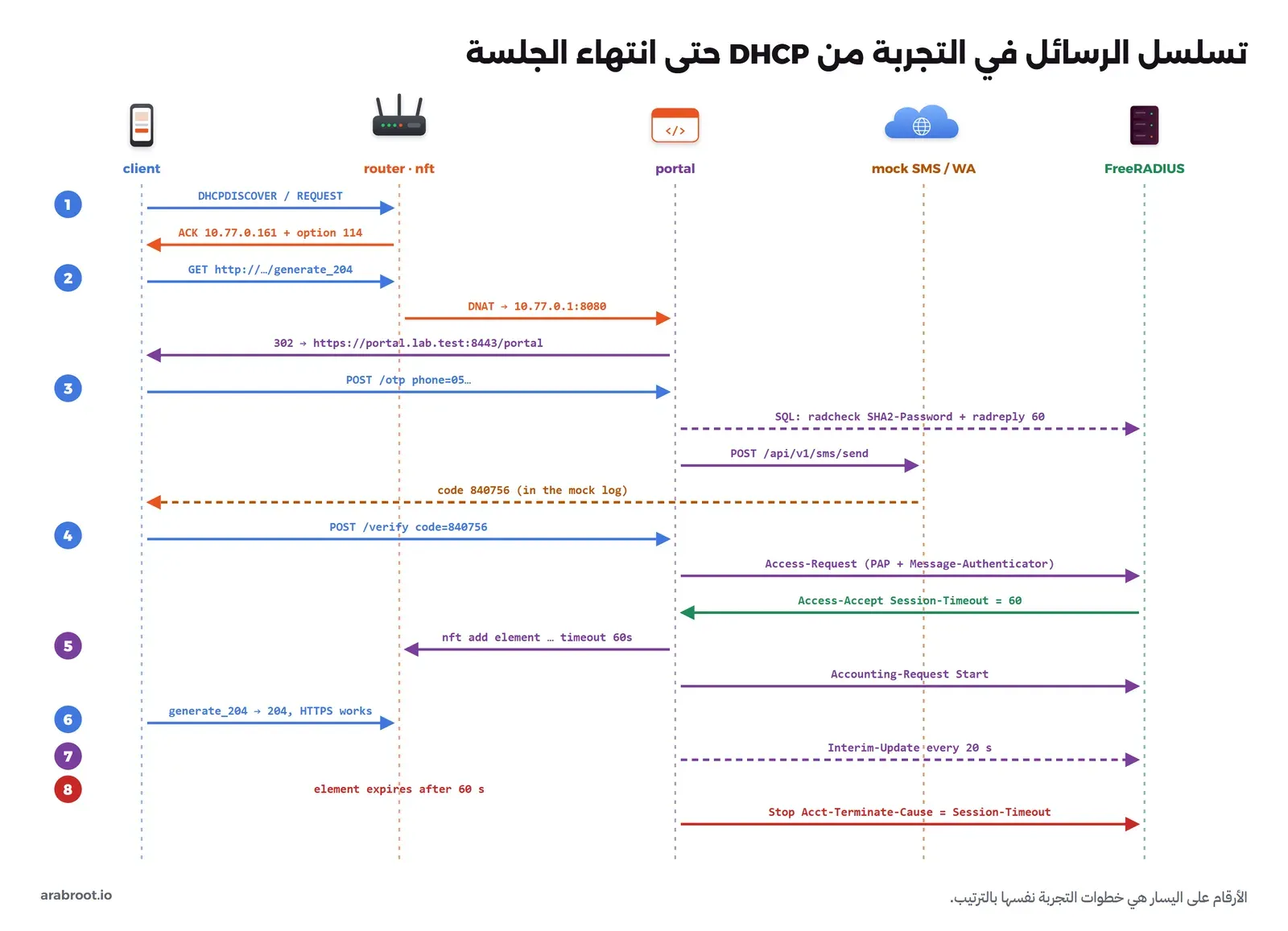
والصورة التالية تبين تسلسل الرسائل في الخطوات القادمة كلها، ارجع إليها كلما احتجت:
الخطوة 1: العنوان والخيار 114
ال Container lab-wifi-client يبدأ بعنوان أعطاه Docker، فنحذفه ونطلب عنواناً من dnsmasq كما يفعل الهاتف، ونطلب معه الخيار 114 بالمعامل -O 114:
docker exec lab-wifi-client sh -c 'ip addr flush dev eth0; ip route flush dev eth0; udhcpc -i eth0 -O 114 -s /lab/udhcpc.sh -n -q; ip route'
docker logs lab-wifi-router 2>&1 | grep -E "DHCP(REQUEST|ACK)|114" | tail -4
والمخرج سوف يكون كما يلي:
udhcpc: started, v1.37.0
udhcpc: broadcasting discover
udhcpc: broadcasting discover
udhcpc: broadcasting select for 10.77.0.161, server 10.77.0.1
udhcpc: lease of 10.77.0.161 obtained from 10.77.0.1, lease time 600
ip=10.77.0.161/24 router=10.77.0.1 dns=10.77.0.1 lease=600s
option 114 = https://portal.lab.test:8443/api/captive
default via 10.77.0.1 dev eth0
10.77.0.0/24 dev eth0 scope link  src 10.77.0.161
dnsmasq-dhcp[1]: 1668706087 DHCPREQUEST(eth1) 10.77.0.161 e6:2e:02:35:a5:d3
dnsmasq-dhcp[1]: 1668706087 DHCPACK(eth1) 10.77.0.161 e6:2e:02:35:a5:d3
dnsmasq-dhcp[1]: 1668706087 requested options: 114:captive-portal
dnsmasq-dhcp[1]: 1668706087 sent size: 40 option:114 captive-portal  https://portal.lab.test:8443/api/captive
لاحظ أن dnsmasq يعرف الخيار 114 باسمه captive-portal، وأنه أرسله لأن الهاتف طلبه في قائمة الخيارات، وأن العقد 600 ثانية، وهو أطول من مدة الجلسة 60 ثانية، وهذا ما ينصح به توثيق pfSense حتى لا يأخذ جهاز جديد عنوان جهاز ما زالت جلسته مفتوحة.
الخطوة 2: الضيف محجوز قبل الدخول
الآن نفعل ما يفعله الهاتف بعد الاتصال: نسأل DNS، ونطلب عنوان فحص Android وعنوان فحص Apple، ثم نحاول فتح موقع عبر HTTPS، ثم نسأل الواجهة البرمجية عن حالتنا:
docker exec lab-wifi-client sh -c '
echo "--- DNS"; dig +short connectivitycheck.gstatic.com
echo "--- Android probe"; curl -s -i --max-time 5 http://connectivitycheck.gstatic.com/generate_204 | grep -iE "^(HTTP|location)"
echo "--- Apple probe"; curl -s -i --max-time 5 http://captive.apple.com/hotspot-detect.html | grep -iE "^(HTTP|location)"
echo "--- HTTPS"; curl -sS --max-time 5 --cacert /ca.pem https://example.com/; echo exit=$?
echo "--- RFC 8908 API"; curl -s -i --cacert /ca.pem https://portal.lab.test:8443/api/captive | grep -iE "^(HTTP|content-type|cache-control|\{)"'
docker logs lab-wifi-portal 2>&1 | grep captured
docker exec lab-wifi-router nft list chain inet cp forward | grep reject
والمخرج سوف يكون كما يلي:
--- DNS
198.51.100.10
--- Android probe
HTTP/1.1 302 Found
location: https://portal.lab.test:8443/portal
--- Apple probe
HTTP/1.1 302 Found
location: https://portal.lab.test:8443/portal
--- HTTPS
curl: (7) Failed to connect to example.com:443 after 1 ms: Could not connect to server
exit=7
--- RFC 8908 API
HTTP/1.1 200 OK
cache-control: private
content-type: application/captive+json
{"captive":true,"user-portal-url":"https://portal.lab.test:8443/portal"}
08:57:45 portal captured http://connectivitycheck.gstatic.com/generate_204 from 10.77.0.161
08:57:45 portal captured http://captive.apple.com/hotspot-detect.html from 10.77.0.161
		iifname "eth1" meta l4proto tcp counter packets 1 bytes 60 reject with tcp reset
		iifname "eth1" counter packets 0 bytes 0 reject with icmpx admin-prohibited
وعند تشغيل الأوامر سوف تجد أنه:
- DNS يعمل قبل الدخول، وهذا ضروري حتى يحل الهاتف اسم البوابة نفسها.
- فحص Android وفحص Apple لم يصلا إلى «الإنترنت» أصلاً، فقاعدة DNAT حولتهما إلى المنفذ 8080، وسجل البوابة يبين الاسم والمسار كما طلبهما الهاتف، والرد
302بدل204أو Success، وهذا ما يجعل الهاتف يفتح نافذة الدخول. - HTTPS فشل خلال ميلي ثانية واحدة، لأن الجدار رد برفض فوري، والعداد في قاعدة
reject with tcp resetأصبح 1، وهو طلبنا هذا. - الواجهة البرمجية ردت بـ
"captive": trueورابط البوابة، بالنوعapplication/captive+json.
الخطوة 3: طلب الرمز
نرسل النموذج كما يرسله المتصفح: الرقم وقناة الإرسال والموافقة على الشروط، ثم ننظر في سجل المزود الوهمي وفي جدولي RADIUS:
docker exec lab-wifi-client curl -s --cacert /ca.pem -o /tmp/p2-code.html -w 'HTTP %{http_code}\n' \
  -d phone=0551234567 -d channel=sms -d terms=1 https://portal.lab.test:8443/otp
docker logs lab-wifi-mock 2>&1 | tail -7
docker logs lab-wifi-portal 2>&1 | grep "code sent"
docker exec lab-wifi-portal python -c "
import sqlite3; c=sqlite3.connect('/data/radius.db')
for t in ('radcheck','radreply'):
    [print(t, r) for r in c.execute(f'select username,attribute,op,value from {t}')]"
والمخرج سوف يكون كما يلي:
HTTP 200
08:57:47 mock POST /api/v1/sms/send
Authorization: Bearer LAB-FAKE-TOKEN
{
  "sender": "CafeWiFi",
  "to": "966551234567",
  "text": "رمز الدخول إلى شبكة المقهى: 840756\nصالح 5 دقائق. لا تشاركه مع أحد."
}
08:57:47 portal code sent phone=96655***4567 mac=e6:2e:02:35:a5:d3 channel=sms provider={'status': 'queued', 'message_id': '48dcdf7ecf64'}
radcheck ('966551234567', 'SHA2-Password', ':=', '8303b4f27e40409606267b8c849af70d5e0c50fc831c979c4b164f6cf10114b7')
radreply ('966551234567', 'Session-Timeout', ':=', '60')
في المخرج أعلاه لاحظ التالي:
- الرقم المكتوب
0551234567تحول إلى الصيغة الدولية966551234567قبل أي شيء، وهذه الخطوة نفسها هي قائمة الدول المسموحة، فالبوابة ترفض أي رقم لا يطابق9665وثمانية أرقام قبل أن يصل إلى المزود. - الرمز
840756ظهر في سجل المزود الوهمي فقط، وهو المكان الذي يقوم مقام هاتف الضيف، أما سجل البوابة فيكتب الرقم مقنعاً ولا يكتب الرمز. - جدول
radcheckفيه هاش SHA-256 للرمز وليس الرمز نفسه، وتستطيع أن تتأكد بالأمرprintf 840756 | sha256sum. وكما قلنا في المقال الأول، هاش ستة أرقام يمكن تخمينه، والحماية الحقيقية هي العمر القصير والحذف بعد الاستخدام.
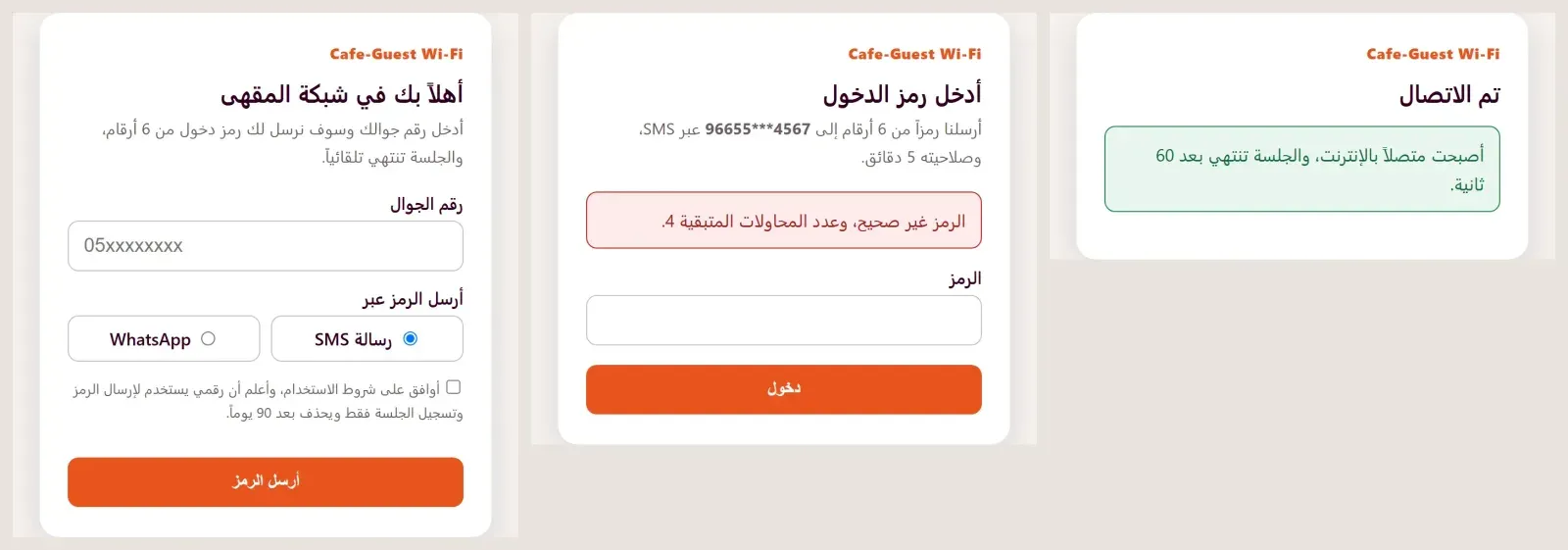
والصورة التالية تبين صفحات البوابة كما يراها الضيف، وهي ملفات HTML نفسها التي نزلها curl من البوابة في هذه الخطوات، فتحناها في متصفح Chrome دون أي تعديل: صفحة الرقم، ثم صفحة الرمز بعد رمز خاطئ، ثم صفحة النجاح:
الخطوة 4: الحد من طلب الرموز
بعد أربع ثوان نطلب رمزاً آخر للرقم نفسه، وهو ما يفعله السكربت الآلي في هجوم ضخ الرسائل، وما يفعله الضيف المستعجل أيضاً:
docker exec lab-wifi-client sh -c "curl -s --cacert /ca.pem -o /tmp/p3.html -w 'HTTP %{http_code}\n' -d phone=0551234567 -d channel=sms -d terms=1 https://portal.lab.test:8443/otp; grep -o '<p class=\"err\">.*</p>' /tmp/p3.html"والمخرج سوف يكون كما يلي:
HTTP 429
<p class="err">طلبت رمزاً قبل قليل، انتظر 23 ثانية.</p>
الرد 429 Too Many Requests، ولم يصل أي طلب إلى المزود الوهمي، أي أنك لم تدفع ثمن رسالة. وسوف نرى الحد الثاني، 3 رموز لكل رقم في 15 دقيقة، في الخطوة الأخيرة.
الخطوة 5: رمز خاطئ
docker exec lab-wifi-client sh -c "curl -s --cacert /ca.pem -o /tmp/p4.html -w 'HTTP %{http_code}\n' -d phone=0551234567 -d code=111111 https://portal.lab.test:8443/verify; grep -o '<p class=\"err\">.*</p>' /tmp/p4.html"
docker logs lab-wifi-radius 2>&1 | grep Login | tail -1
والمخرج سوف يكون كما يلي:
HTTP 401
<p class="err">الرمز غير صحيح، وعدد المحاولات المتبقية 4.</p>
Fri Oct  9 08:57:55 2026 : Auth: (0) Login incorrect (pap: SHA2-256 digest does not match "known good" digest): [966551234567] (from client cafe-router port 0 cli E6-2E-02-35-A5-D3)
لاحظ أن القرار جاء من FreeRADIUS، والسبب مكتوب في سجله: هاش ما كتبه الضيف لا يطابق الهاش المحفوظ، وأن السجل يحمل اسم جهاز الشبكة cafe-router وعنوان MAC للضيف في Calling-Station-Id بالصيغة E6-2E-02-35-A5-D3، ولا يحمل الرمز.
الخطوة 6: الرمز الصحيح
نأخذ الرمز من سجل المزود الوهمي كما يقرؤه الضيف من رسالته، ونرسله، ثم نعيد الفحوصات نفسها:
CODE=$(docker logs lab-wifi-mock 2>&1 | grep -oE 'المقهى: [0-9]{6}' | tail -1 | grep -oE '[0-9]{6}')
docker exec lab-wifi-client sh -c "
curl -s --cacert /ca.pem -o /tmp/p5.html -w 'HTTP %{http_code}\n' -d phone=0551234567 -d code=$CODE https://portal.lab.test:8443/verify
grep -o '<p class=\"ok\">.*</p>' /tmp/p5.html
echo '--- same code again'; curl -s --cacert /ca.pem -o /dev/null -w 'HTTP %{http_code}\n' -d phone=0551234567 -d code=$CODE https://portal.lab.test:8443/verify
echo '--- Android probe'; curl -s -i --max-time 5 http://connectivitycheck.gstatic.com/generate_204 | head -1
echo '--- HTTPS'; curl -s --cacert /ca.pem --max-time 5 https://example.com/
echo '--- RFC 8908 API'; curl -s --cacert /ca.pem https://portal.lab.test:8443/api/captive; echo"
docker logs lab-wifi-radius 2>&1 | grep Login | tail -1
docker logs lab-wifi-portal 2>&1 | grep -E "Start|granted"
docker exec lab-wifi-router nft list set inet cp up | grep elements
والمخرج سوف يكون كما يلي:
HTTP 200
<p class="ok">أصبحت متصلاً بالإنترنت، والجلسة تنتهي بعد 60 ثانية.</p>
--- same code again
HTTP 400
--- Android probe
HTTP/1.1 204 No Content
--- HTTPS
example.com over HTTPS
--- RFC 8908 API
{"captive":false,"user-portal-url":"https://portal.lab.test:8443/portal","seconds-remaining":59,"can-extend-session":false}
Fri Oct  9 08:57:58 2026 : Auth: (1) Login OK: [966551234567] (from client cafe-router port 0 cli E6-2E-02-35-A5-D3)
08:57:58 portal accounting Start sid=4d868d4352a84d40 user=96655***4567 in=0 out=0
08:57:58 portal access granted ip=10.77.0.161 mac=e6:2e:02:35:a5:d3 session-timeout=60s
		elements = { 10.77.0.161 . e6:2e:02:35:a5:d3 counter packets 24 bytes 3302 timeout 1m expires 58s460ms }
وهذه هي اللحظة التي ينتظرها الضيف، ولاحظ فيها التالي:
- الرمز نفسه للمرة الثانية رد بـ
400، لأن البوابة حذفته بعد القبول، فهو لمرة واحدة فعلاً. - فحص Android أصبح يعود بـ
204 No Contentمن «الإنترنت» نفسه، لأن الجهاز في المجموعةupفلم تعد قاعدة DNAT تلمسه، فيقرر الهاتف أن الإنترنت متاح ويغلق نافذة البوابة. - HTTPS يعمل، والواجهة البرمجية أصبحت
"captive": falseومعهاseconds-remaining. - العنصر في المجموعة يحمل العنوان وMAC معاً، ومهلة دقيقة، وعداده بدأ يعد البايتات، وهذه العدادات هي ما نرسله في المحاسبة.
الخطوة 7: انتهاء الجلسة وسجل المحاسبة
ننتظر 63 ثانية، ثم نعيد الفحوصات، ونقرأ سجل البوابة وجدول المحاسبة:
sleep 63
docker exec lab-wifi-client sh -c "
curl -s -i --max-time 5 http://connectivitycheck.gstatic.com/generate_204 | grep -iE '^(HTTP|location)'
curl -sS --cacert /ca.pem --max-time 5 https://example.com/; echo exit=\$?
curl -s --cacert /ca.pem https://portal.lab.test:8443/api/captive; echo"
docker logs lab-wifi-portal 2>&1 | grep -E "accounting|session ended"
docker exec lab-wifi-portal python -c "
import sqlite3; c=sqlite3.connect('/data/radius.db')
q='''select acctsessionid, username, callingstationid, framedipaddress, datetime(acctstarttime,'unixepoch'),
     datetime(acctstoptime,'unixepoch'), acctsessiontime, acctinputoctets, acctoutputoctets, acctterminatecause from radacct'''
[print(r) for r in c.execute(q)]
[print(r) for r in c.execute('select username, pass, reply, authdate from radpostauth')]"
والمخرج سوف يكون كما يلي:
HTTP/1.1 302 Found
location: https://portal.lab.test:8443/portal
curl: (7) Failed to connect to example.com:443 after 1 ms: Could not connect to server
exit=7
{"captive":true,"user-portal-url":"https://portal.lab.test:8443/portal"}
08:57:58 portal accounting Start sid=4d868d4352a84d40 user=96655***4567 in=0 out=0
08:58:20 portal accounting Interim-Update sid=4d868d4352a84d40 user=96655***4567 in=3302 out=3424
08:58:40 portal accounting Interim-Update sid=4d868d4352a84d40 user=96655***4567 in=3302 out=3424
08:58:58 portal accounting Stop sid=4d868d4352a84d40 user=96655***4567 in=3302 out=3424
08:58:58 portal session ended ip=10.77.0.161 cause=Session-Timeout after 60s
('4d868d4352a84d40', '966551234567', 'E6-2E-02-35-A5-D3', '10.77.0.161', '2026-10-09 08:57:58', '2026-10-09 08:58:58', 60, 3302, 3424, 'Session-Timeout')
('966551234567', '', 'Access-Reject', '2026-10-09 08:57:55.489553')
('966551234567', '', 'Access-Accept', '2026-10-09 08:57:58.008130')
في المخرج أعلاه لاحظ التالي:
- الجهاز عاد محجوزاً تماماً كما كان قبل الدخول:
302للفحص، ورفض فوري لـ HTTPS، و"captive": true. ولم يحذفه أحد من الجدار، فالنواة حذفت العنصر عند انتهاء مهلته، والبوابة لاحظت الغياب وأرسلت Stop. - بين Start وStop تحديثان Interim-Update كل 20 ثانية، وهي تحمي السجل إذا انقطع جهاز الشبكة فجأة قبل أن يرسل Stop، فيبقى عندك آخر رقم معروف.
- سطر
radacctهو الإجابة عن السؤال الذي ذكرناه في المقال الأول: من كان يستخدم العنوان10.77.0.161بين 08:57:58 و08:58:58؟ صاحب الرقم966551234567من الجهازE6-2E-02-35-A5-D3، أرسل 3302 بايت واستقبل 3424 بايت، والجلسة انتهت بسبب انتهاء الوقت. وال Input هنا ما أرسله الضيف إلى الشبكة كما تعرفه RFC 2866. - عمود
passفيradpostauthفارغ في المحاولتين، وهذا أثر التعديل الذي وضعناه في Dockerfile الخاص بـ RADIUS.
الخطوة 8: الرمز عبر WhatsApp
نطلب رمزاً جديداً ولكن بالقناة whatsapp، والمزود الوهمي يستقبل الطلب على المسار نفسه الذي تستقبله عليه واجهة WhatsApp Cloud API، أي /v25.0/<PHONE_NUMBER_ID>/messages:
docker exec lab-wifi-client curl -s --cacert /ca.pem -o /dev/null -w 'HTTP %{http_code}\n' \
  -d phone=0551234567 -d channel=whatsapp -d terms=1 https://portal.lab.test:8443/otp
docker logs lab-wifi-mock 2>&1 | sed -n '/v25.0/,$p'
والمخرج سوف يكون كما يلي:
HTTP 200
08:59:25 mock POST /v25.0/109876543210987/messages
Authorization: Bearer LAB-FAKE-TOKEN
{
  "messaging_product": "whatsapp",
  "recipient_type": "individual",
  "to": "966551234567",
  "type": "template",
  "template": {
    "name": "wifi_login_code",
    "language": {
      "code": "ar"
    },
    "components": [
      {
        "type": "body",
        "parameters": [
          {
            "type": "text",
            "text": "800252"
          }
        ]
      },
      {
        "type": "button",
        "sub_type": "url",
        "index": "0",
        "parameters": [
          {
            "type": "text",
            "text": "800252"
          }
        ]
      }
    ]
  }
}
هذا هو جسم الطلب نفسه الذي يرسل إلى https://graph.facebook.com/v25.0/<PHONE_NUMBER_ID>/messages مع توكن حقيقي في ترويسة Authorization، ولاحظ أن الرمز موجود مرتين: في body ليظهر في نص الرسالة، وفي button من النوع url بالفهرس 0 ليعمل زر نسخ الرمز. ولكي يعمل هذا في الواقع تحتاج حساب WhatsApp Business ورقماً مسجلاً، وقالباً من فئة authentication باسم wifi_login_code وباللغة العربية توافق عليه Meta، فالنص كما ذكرنا ثابت لا تكتبه أنت. ولم نرسل أي طلب إلى Meta في هذه التجربة.
الخطوة 9: قطع الجلسة عن بعد
ندخل بالرمز الذي وصل عبر WhatsApp، ثم نرسل من سيرفر RADIUS طلب Disconnect-Request إلى البوابة على المنفذ 3799، كما في RFC 5176، بالأداة radclient الموجودة في Image الرسمية، ثم نرسل طلباً ثانياً لعنوان لا توجد له جلسة:
docker exec lab-wifi-client curl -s --cacert /ca.pem -o /dev/null -w 'HTTP %{http_code}\n' \
  -d phone=0551234567 -d code=800252 https://portal.lab.test:8443/verify
docker exec lab-wifi-radius sh -c "echo 'Framed-IP-Address = 10.77.0.161' | /opt/bin/radclient -x 10.78.0.2:3799 disconnect lab-wifi-secret-2026"
docker logs lab-wifi-portal 2>&1 | grep -E "Disconnect|session ended|Stop" | tail -3
docker exec lab-wifi-client sh -c "curl -s -i --max-time 5 http://connectivitycheck.gstatic.com/generate_204 | head -1"
docker exec lab-wifi-radius sh -c "echo 'Framed-IP-Address = 10.77.0.199' | /opt/bin/radclient -x 10.78.0.2:3799 disconnect lab-wifi-secret-2026"
والمخرج سوف يكون كما يلي:
HTTP 200
Sent Disconnect-Request Id 167 from 0.0.0.0:43242 to 10.78.0.2:3799 length 26
	Framed-IP-Address = 10.77.0.161
Received Disconnect-ACK Id 167 from 10.78.0.2:3799 to 10.78.0.10:43242 length 20
08:59:35 portal accounting Stop sid=b0577055fe6c47c4 user=96655***4567 in=0 out=0
08:59:35 portal session ended ip=10.77.0.161 cause=Admin-Reset after 5s
08:59:35 portal Disconnect-Request from 10.78.0.10 for 10.77.0.161 -> ACK
HTTP/1.1 302 Found
Sent Disconnect-Request Id 193 from 0.0.0.0:47620 to 10.78.0.2:3799 length 26
	Framed-IP-Address = 10.77.0.199
Received Disconnect-NAK Id 193 from 10.78.0.2:3799 to 10.78.0.10:47620 length 26
	Error-Cause = Session-Context-Not-Found
(0) -: Expected Disconnect-ACK got Disconnect-NAK
الجلسة انتهت بعد 5 ثوان بسبب Admin-Reset، وعاد الفحص 302 فوراً. والطلب الثاني رد بـ Disconnect-NAK ومعه Error-Cause = Session-Context-Not-Found، وهو الرمز 503 في RFC 5176. وهذه الطريقة هي ما تستخدمه أنظمة الإدارة لقطع ضيف مزعج، أو لإنهاء جلسات من دفع ثم ألغى، دون أن تلمس الجدار بنفسها.
الخطوة 10: خمس محاولات خاطئة، ثم حد الرقم
بعد انتهاء المهلة نطلب رمزاً ثالثاً، ونجرب خمسة رموز خاطئة، ثم نرسل الرمز الصحيح، ثم نطلب رمزاً رابعاً بعد 31 ثانية:
docker exec lab-wifi-client sh -c "
curl -s --cacert /ca.pem -o /dev/null -w 'HTTP %{http_code}\n' -d phone=0551234567 -d channel=sms -d terms=1 https://portal.lab.test:8443/otp
for i in 1 2 3 4 5; do
  curl -s --cacert /ca.pem -o /tmp/bf.html -w \"try \$i: HTTP %{http_code} \" -d phone=0551234567 -d code=00000\$i https://portal.lab.test:8443/verify
  grep -o '<p class=\"err\">.*</p>' /tmp/bf.html
done"
CODE=$(docker logs lab-wifi-mock 2>&1 | grep -oE 'المقهى: [0-9]{6}' | tail -1 | grep -oE '[0-9]{6}')
docker exec lab-wifi-client sh -c "
curl -s --cacert /ca.pem -o /tmp/x.html -w 'HTTP %{http_code} ' -d phone=0551234567 -d code=$CODE https://portal.lab.test:8443/verify; grep -o '<p class=\"err\">.*</p>' /tmp/x.html
sleep 31
curl -s --cacert /ca.pem -o /tmp/x.html -w 'HTTP %{http_code} ' -d phone=0551234567 -d channel=sms -d terms=1 https://portal.lab.test:8443/otp; grep -o '<p class=\"err\">.*</p>' /tmp/x.html"
والمخرج سوف يكون كما يلي:
HTTP 200
try 1: HTTP 401 <p class="err">الرمز غير صحيح، وعدد المحاولات المتبقية 4.</p>
try 2: HTTP 401 <p class="err">الرمز غير صحيح، وعدد المحاولات المتبقية 3.</p>
try 3: HTTP 401 <p class="err">الرمز غير صحيح، وعدد المحاولات المتبقية 2.</p>
try 4: HTTP 401 <p class="err">الرمز غير صحيح، وعدد المحاولات المتبقية 1.</p>
try 5: HTTP 403 <p class="err">أدخلت رمزاً خاطئاً 5 مرات، فألغينا الرمز. اطلب رمزاً جديداً.</p>
HTTP 400 <p class="err">انتهت صلاحية الرمز أو لم يطلب، اطلب رمزاً جديداً.</p>
HTTP 429 <p class="err">وصلت إلى الحد المسموح من الرموز، حاول بعد 13 دقيقة.</p>
بعد المحاولة الخامسة ألغيت الرمز، فحتى الرمز الصحيح أصبح مرفوضاً، وهذا يجعل فرصة التخمين خمس محاولات من مليون لكل رمز. والطلب الرابع للرقم نفسه رفض بحد 3 رموز في 15 دقيقة، رغم مرور المهلة القصيرة، وهذا الحد هو ما يوقف السكربت الذي يطلب رموزاً لرقم واحد بلا توقف.
ما الذي كسرناه أثناء البناء؟
لم يعمل كل شيء من أول مرة، وفيما يلي خطآن ستقابلهما غالباً إذا بنيت شيئاً مشابهاً، مع طريقة قراءتهما.
DHCP لا يعمل على شبكة Docker الداخلية
في النسخة الأولى كانت شبكة الضيوف من نوع internal: true مثل الشبكتين الأخريين، فكان الهاتف يرسل طلب DHCP ولا يصله شيء:
udhcpc: started, v1.37.0
udhcpc: broadcasting discover
udhcpc: broadcasting discover
udhcpc: broadcasting discover
udhcpc: broadcasting discover
udhcpc: broadcasting discover
udhcpc failed to get a DHCP lease
udhcpc: no lease, failingوtcpdump على واجهة ال Router لم يلتقط أي حزمة على المنفذين 67 و68، في حين أن ping بين الجهازين بعناوين ثابتة كان يعمل. والسبب أن طلب DHCP الأول يخرج من العنوان 0.0.0.0 إلى 255.255.255.255، وكلاهما خارج عنوان الشبكة، وDocker يضع على الشبكات الداخلية قاعدة تسقط ما لا يكون مصدره ووجهته داخل الشبكة. والحل أن تكون شبكة الضيوف شبكة عادية مع إيقاف الترجمة enable_ip_masquerade: "false"، كما في الملف أعلاه. وعلى جهاز حقيقي لا توجد هذه المشكلة أصلاً، ولكن الدرس العام مفيد: إذا وصل ping ولم يصل DHCP، فابحث عن شيء يفلتر البث Broadcast بين الجهازين.
RADIUS يتجاهل البوابة
بعد أن غيرنا عنوان شبكة الإدارة لأن العنوان الأول تعارض مع شبكة أخرى على الجهاز، نسينا أن نعيد بناء Image الخاص بـ RADIUS، فبقي clients.conf بالعنوان القديم، وكتب FreeRADIUS في سجله:
Fri Oct 9 08:48:30 2026 : Error: Ignoring request to auth address * port 1812 bound to server default from unknown client 10.78.0.2 port 49646 proto udpFreeRADIUS لا يرد أبداً على جهاز لا يعرفه، فلا يرسل Reject، وإنما يتجاهل الطلب، فتنتظر البوابة حتى تنتهي مهلة pyrad بعد ثلاث محاولات، وكانت النسخة الأولى من البوابة ترد على الضيف بخطأ 500. لذلك أضفنا في دالة verify التقاط الخطأ والرد بصفحة «خدمة التحقق لا ترد الآن» بالرمز 503، وإذا رأيت عبارة unknown client في سجل RADIUS فراجع عنوان جهاز الشبكة في clients.conf أولاً، ثم كلمة السر المشتركة.
إزالة التجربة
نحذف ال Containers والشبكات وال Volume بأسمائها، ثم ال Images التي بنيناها، والشهادات:
docker compose down -v
docker image rm lab-wifi-router:1 lab-wifi-portal:1 lab-wifi-radius:1 lab-wifi-client:1
rm -rf certs
ولا تستخدم docker system prune أو docker volume prune لهذا الغرض، لأنهما يحذفان ما يخص مشاريع أخرى على الجهاز نفسه.
من التجربة إلى جهاز حقيقي
كل جزء في التجربة له مقابل على الأجهزة الحقيقية، والجدول التالي يضعها جنباً إلى جنب:
| في التجربة | OpenWrt مع openNDS | OPNsense |
|---|---|---|
| شبكة Docker للضيوف | شبكة Wi-Fi للضيوف بواجهة وشبكة مستقلة، مع option isolate '1' | واجهة VLAN للضيوف، ونقطة وصول خارجية تبث الشبكة على هذا VLAN |
dnsmasq مع dhcp-option=114 | dnsmasq نفسه، وopenNDS يضيف الخيار 114 افتراضياً | خدمة DHCP مع الخيار 114 إلى https://<hostname>/api/captiveportal/access/api |
nftables بالمجموعتين up وdown | قواعد openNDS نفسها | قواعد PF والاسم المستعار __captiveportal_zone_<id> |
| صفحة FastAPI | خدمة تحقق خارجية FAS، أي تطبيقك | قالب Template للصفحة |
| FreeRADIUS والجداول | تطبيق FAS يسأل RADIUS أو يقرر بنفسه | RADIUS كمصدر تحقق في System ثم Access ثم Servers، مع المحاسبة |
| المزود الوهمي | مزود SMS مرخص، أو WhatsApp Cloud API بقالب معتمد | |
على راوتر OpenWrt مع openNDS
هذا الطريق مناسب لمقهى أو مكتب صغير براوتر واحد، والخطوات من دليل تثبيت openNDS:
- جهز الراوتر بنظام OpenWrt من الإصدار 22.03 أو أحدث، لأن openNDS من الإصدار 10 لا يعمل على ما قبله، وتأكد أن الواجهة الداخلية تعطي عناوين عبر DHCP وDNS وأن NAT يعمل نحو WAN، لأن openNDS يتوقف إذا لم يجد هذا الشكل.
- أنشئ شبكة Wi-Fi للضيوف بواجهة مستقلة كما في دليل شبكة الضيوف في OpenWrt، وفعل عزل الأجهزة بالخيار
isolateعلى هذه الشبكة اللاسلكية. - ثبت الحزمة بالأمرين
opkg updateثمopkg install opennds، أو من واجهة LuCI. - إذا لم تكن الواجهة المحمية هي
br-lan، فعدل الخيارgatewayinterfaceفي الملف/etc/config/openndsإلى واجهة الضيوف، ثم شغل الخدمة بالأمرservice opennds start. - اتصل بهاتف، فيجب أن تظهر صفحة «اضغط للمتابعة» الافتراضية، وهذا يعني أن الحجز والكشف يعملان.
- لإضافة رمز التحقق، فعل خدمة التحقق الخارجية FAS بالخيارات
fasportوfasremoteipأوfasremotefqdnوfaspath، واختر مستوىfas_secure_enabledمع مفتاحfaskey، والمستويان 3 و4 يفرضان HTTPS للصفحة. وتطبيق FAS هو مكان منطق بوابتنا نفسه: صفحة الرقم، وإرسال الرمز، والحدود، والتحقق عبر RADIUS، ثم إبلاغ openNDS بالسماح للجهاز. - ضع مدة الجلسة والحدود في إعداد openNDS، وتذكر نصيحة توثيقه بأن تكون الجلسة أطول من مدة بقاء الضيف المتوقعة.
على جدار OPNsense
هذا الطريق مناسب لفندق أو شركة فيها عدة نقاط وصول خلف جدار واحد، والخطوات من دليل شبكة الضيوف في OPNsense وتوثيق البوابة:
- أضف واجهة للضيوف من Interfaces ثم Assignments، وغالباً تكون VLAN كما شرحنا في مقال تقسيم الشبكة، وأعطها عنوان شبكة يكفي عدد الضيوف.
- فعل DHCP على الواجهة، وأضف الخيار 114 بالرابط
https://<opnsense-hostname>/api/captiveportal/access/api. - أضف قواعد الجدار في Firewall ثم Rules: يسمح للضيوف بـ DNS والبوابة، ويمنع الوصول إلى الشبكات الداخلية.
- أضف سيرفر RADIUS في System ثم Access ثم Servers، بعنوان FreeRADIUS وكلمة السر المشتركة، أو سيرفر قسائم إذا كانت القسائم تكفيك.
- أنشئ منطقة Zone في Services ثم Captive Portal ثم Administration على واجهة الضيوف، واختر RADIUS في Authenticate using، وفعل Always send accounting requests، وحدد Idle timeout وHard timeout.
- ضع شهادة موثوقة عامة واسم المضيف Hostname المطابق لها في المنطقة، ويمكن إصدارها تلقائياً عبر إضافة ACME.
- ارفع قالب الصفحة من تبويب Templates، وحدد السرعة لكل ضيف من Firewall ثم Shaper إذا احتجت.
وقد يتساءل البعض: OPNsense لا يرسل SMS، فأين يذهب منطق الرمز؟ والإجابة أنه يبقى في تطبيق صغير مثل بوابتنا، يكتب الرمز في RADIUS ويرسله عبر المزود، ثم يتحقق OPNsense من الرمز عبر RADIUS كأنه كلمة مرور، وهذه بالضبط الفكرة التي بنينا عليها التجربة.
الخلاصة
وصلنا لنهاية الموضوع، وأهم ما فيه:
- بوابة الدخول لا تحتاج نقطة وصول لتجربتها، فكل قرارها يحدث بعد نقطة الوصول: DHCP وDNS والجدار والصفحة وRADIUS.
- الخيار 114 في dnsmasq سطر واحد، والهاتف يستلمه مع العنوان، والواجهة البرمجية ترد بـ
application/captive+jsonفيهاcaptiveوseconds-remaining. - مجموعتان في nftables بمهلة وعداد لكل عنصر تكفيان للحجز والسماح وانتهاء الجلسة والمحاسبة، والنواة تنهي الجلسة حتى لو توقفت البوابة.
- الرمز يكتب في RADIUS كهاش ويحذف بعد الاستخدام، والقرار ومدة الجلسة يأتيان من RADIUS، والمحاسبة تعطيك من استخدم العنوان ومتى وكم.
- الحدود الأربعة، المهلة والحد لكل رقم ولكل جهاز وعدد المحاولات، أوقفت كل محاولة في التجربة قبل أن تصل إلى المزود.
- Disconnect-Request على المنفذ 3799 يقطع ضيفاً واحداً من RADIUS دون أن تلمس الجدار.
- على الأجهزة الحقيقية: openNDS مع تطبيق FAS على OpenWrt، أو منطقة بوابة مع RADIUS على OPNsense، ومنطق الرمز في الحالتين تطبيق صغير مثل الذي بنيناه.
وأقرب المقالات إلى هذا الموضوع على الموقع:
 دليلبوابة الدخول Captive Portal: شبكة الضيوف برمز تحققكيف تعمل بوابة الدخول في شبكة Wi-Fi الضيوف، وكيف تختار طريقة التحقق والأدوات المناسبة لمقهى أو فندق أو شركة.
 دليلMikroTik في الواقع: سيناريوهات عملية للبيت والمكتبكيف تبني على RouterOS ما تحتاجه فعلاً في البيت والمكتب، من شبكة ضيوف معزولة إلى الوصول الآمن من الخارج عبر WireGuard.
 دليلتقسيم الشبكة Network Segmentation بال VLAN وال VPCلماذا تصل كاميرا مخترقة إلى قاعدة بياناتك، وكيف تمنع ذلك بتقسيم الشبكة إلى مناطق لا يمر بينها إلا ما تسمح به.
 دليلما هو NAT؟ شرح ترجمة العناوين وتوجيه المنافذلماذا تخرج كل أجهزة بيتك بعنوان عام واحد، وكيف يترجم ال Router العناوين، ولماذا يفشل توجيه المنافذ خلف CGNAT.
 دليلAudit Trail: كيف تبني سجل تدقيق لا يقبل العبثكيف تصمم سجلاً يجيب عن سؤال من غير هذه الصلاحية ومتى، وتحميه من الحذف والتعديل بعد كتابته.
 دليلالشهادات الرقمية TLS للمبتدئين وصيغ ملفاتهاكيف يعرف المتصفح أنه يتحدث مع الموقع الحقيقي، وماذا يوجد داخل الشهادة، ولماذا تأتي ملفاتها بأكثر من صيغة.
سجل التحديثات
- أكتوبر 2026: كتابة المقال وتنفيذ التجربة كاملة على Docker Engine 29.8.0 مع alpine:3.24.2 وnftables 1.1.6 وdnsmasq 2.92 وpython:3.13.16-slim وFastAPI 0.143.0 وuvicorn 0.54.0 وpyrad 2.5.4 وhttpx 0.28.1 وFreeRADIUS 3.2.10 وnginx 1.31.6 وcurl 8.22.0، ومراجعة RFC 8910 وRFC 8908 وRFC 2866 وRFC 5176 وتوثيق WhatsApp Cloud API وopenNDS وOPNsense وpfSense.