في مقال نهج API-first شرحنا لماذا يجب أن يبدأ النظام من العقد Contract وليس من الشاشة، ولماذا أصبح ذلك شرطاً لعمل الوكلاء الذكيين AI Agents، وحسبنا بأرقام توضيحية ما يحدث عندما يصبح الوكلاء أكثر من يستدعي ال API. وفي هذا المقال سوف ننتقل من الفكرة إلى التطبيق: لنفرض أن فريقك في شركة تدير مراكز خدمة، وطلب منه أن يبني خدمة لحجز المواعيد يستخدمها موقع الويب وتطبيق الجوال وأنظمة الشركاء ومساعد ذكي يحجز للعملاء، وأن الإدارة اشترطت أن تكون الخدمة API-first من أول يوم. سوف نبني هذه الخدمة خطوة خطوة، وكل أمر في المقال نفذناه فعلاً وكل مخرج هو المخرج الحقيقي.
في هذا المقال سوف نتناول:
- كتابة عقد OpenAPI 3.1 أولاً، ثم فحصه بأداة Spectral وقواعد خاصة بالمؤسسة.
- تشغيل خادم وهمي Mock بأداة Prism، وبناء صفحة حجز تعمل عليه قبل أن يوجد كود الخدمة.
- توليد هيكل الخادم Server Stub وعميل TypeScript بأنواع Typed Client بأداة openapi-generator، ثم كتابة المنطق.
- اختبار العقد Contract Testing على الخدمة الحقيقية بأداة Schemathesis، وما وجده من فروقات بين الملف والكود.
- نشر التوثيق بأداة Redocly، وإيقاف تغيير غير متوافق Breaking Change في خط النشر CI بأداة oasdiff.
- تحويل نفس العقد إلى أدوات Tools للوكيل الذكي، والتحقق منها بأداة Ajv، وتنفيذ استدعاءات حقيقية بها.
- الصمود Resilience عندما يكثر الوكلاء: هوية الوكيل والصلاحيات، والحصص مع الرمز 429، ومفتاح Idempotency، وعاصفة إعادة المحاولة مقاسة، والتتبع بأداة Jaeger، والتحقق من أهداف SLO.
والصورة التالية تبين الخطوات بالترتيب، مع النتيجة الحقيقية لكل خطوة:
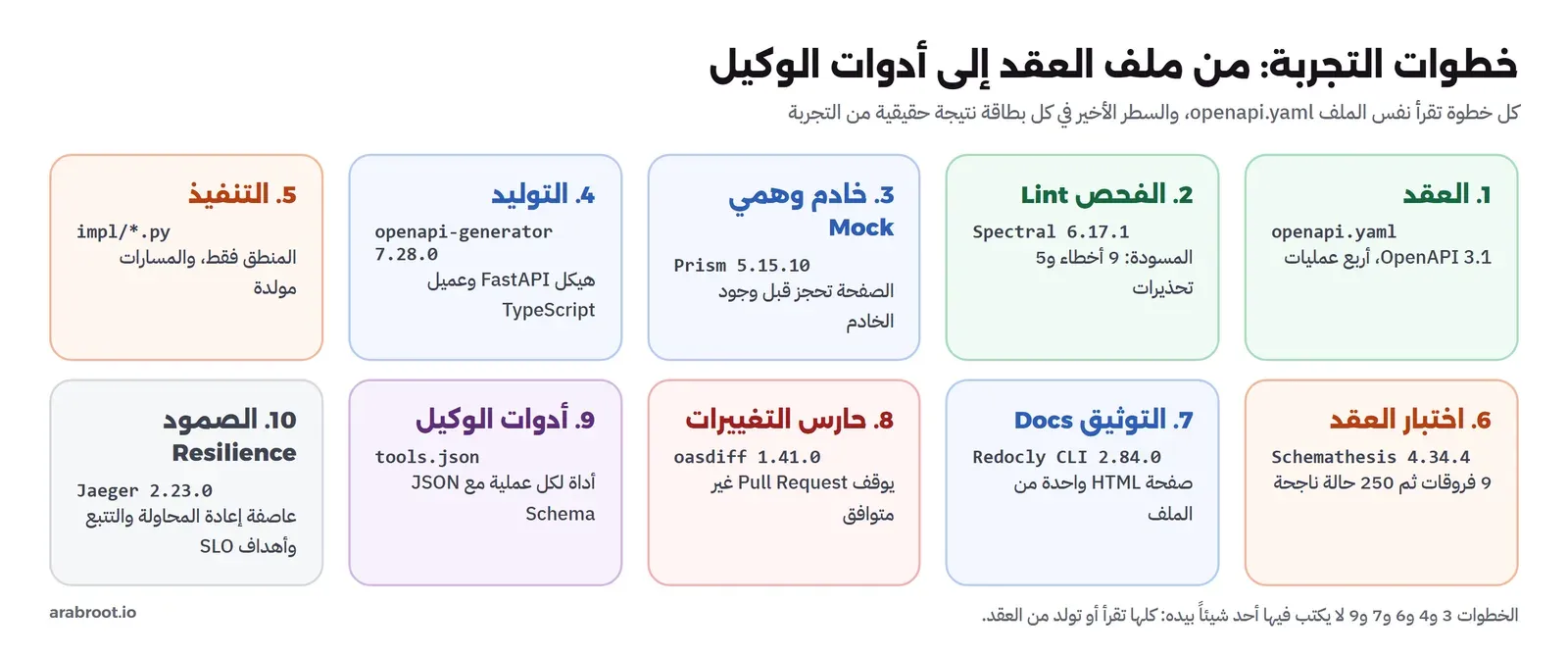
بيئة التجربة Lab Setup
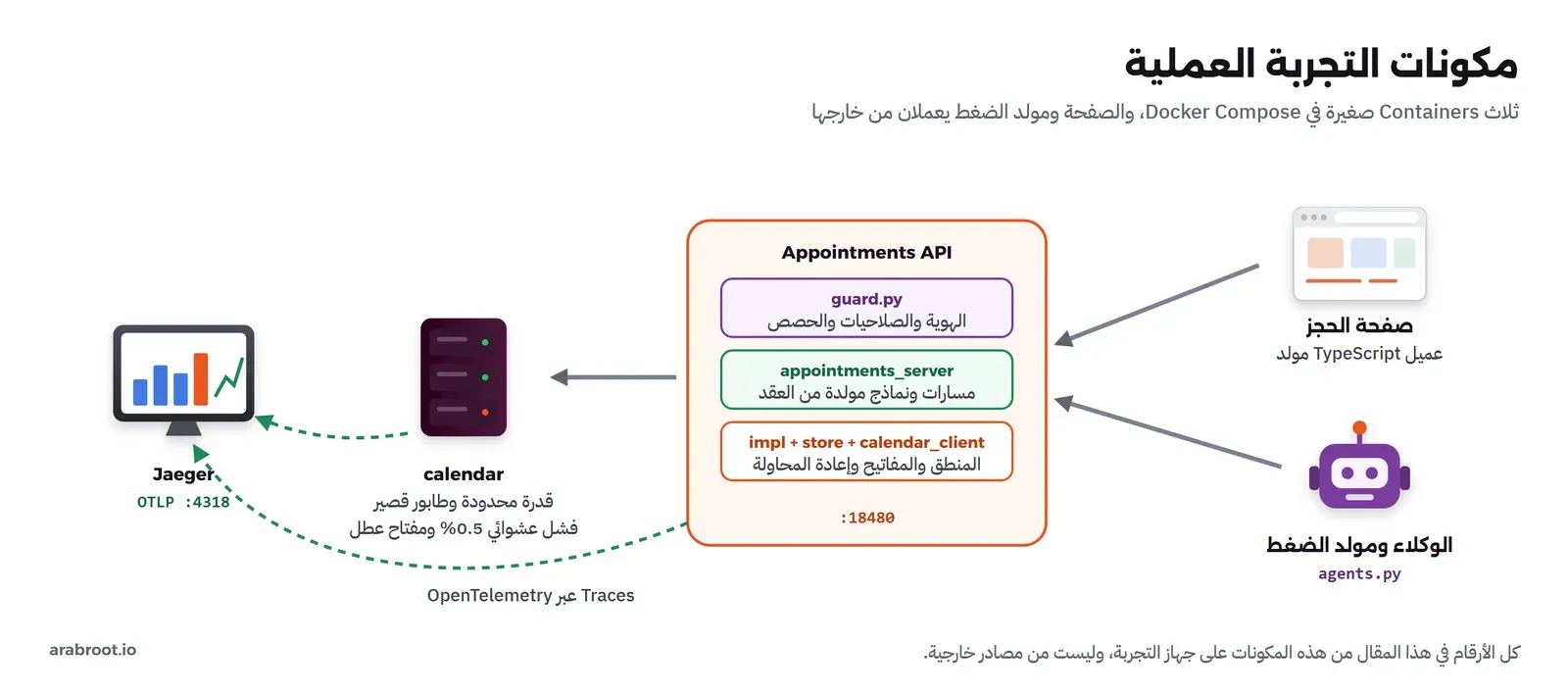
التجربة كلها في Containers صغيرة، ولا تحتاج إلا Docker. والصورة التالية تبين المكونات التي سوف نبنيها:
ولكي لا نثبت أدوات Node على الجهاز، بنينا Image صغيرة فيها أدوات JavaScript التي نحتاجها بإصدارات مثبتة:
FROM node:24-slim
WORKDIR /tools
RUN npm install --no-audit --no-fund @stoplight/[email protected] @redocly/[email protected] [email protected] [email protected] [email protected] [email protected] [email protected]
ENV PATH=/tools/node_modules/.bin:$PATH NODE_PATH=/tools/node_modules
WORKDIR /work
docker build -t arabroot-lab-api-first-node:1 nodetoolsأما أدوات Prism وopenapi-generator وoasdiff وJaeger فلها Images رسمية سوف نستخدمها مباشرة، والخدمة نفسها بلغة Python مع FastAPI.
الخطوة 1: العقد أولاً بصيغة OpenAPI 3.1
قبل أي سطر كود نكتب الملف contract/openapi.yaml. والخدمة فيها أربع عمليات: قراءة المواعيد المتاحة listSlots، والحجز createAppointment، وقراءة حجز getAppointment، والإلغاء cancelAppointment. والملف كاملاً نحو 300 سطر، وفيما يلي أهم جزء فيه، وهو عملية الحجز مع المكونات المشتركة التي تستخدمها:
  /v1/appointments:
    post:
      operationId: createAppointment
      tags: [appointments]
      summary: Book a slot
      description: |
        Books one free slot for one customer. Send a new Idempotency-Key for every new booking and
        the same key when you retry, so a retry never creates a second booking.
      parameters:
        - $ref: '#/components/parameters/IdempotencyKey'
      requestBody:
        required: true
        content:
          application/json:
            schema:
              $ref: '#/components/schemas/AppointmentCreate'
            example:
              slot_id: slot_20261201_0900
              customer_ref: CUS-10442
      responses:
        '201':
          description: Booked.
          headers:
            Location:
              description: URL of the new appointment.
              schema:
                type: string
          content:
            application/json:
              schema:
                $ref: '#/components/schemas/Appointment'
              example:
                id: apt_3f9c2a71
                slot_id: slot_20261201_0900
                customer_ref: CUS-10442
                status: booked
                created_at: '2026-11-28T10:15:00Z'
        '400':
          $ref: '#/components/responses/BadRequest'
        '401':
          $ref: '#/components/responses/Unauthorized'
        '403':
          $ref: '#/components/responses/Forbidden'
        '409':
          description: The slot is already taken, or the key was used with a different body.
          content:
            application/problem+json:
              schema:
                $ref: '#/components/schemas/Problem'
        '429':
          $ref: '#/components/responses/TooManyRequests'
        '503':
          $ref: '#/components/responses/Unavailable'
...
components:
  parameters:
    IdempotencyKey:
      name: Idempotency-Key
      in: header
      required: true
      description: Unique key per booking attempt (UUID). Reuse it only when retrying the same request.
      schema:
        type: string
        minLength: 8
        maxLength: 64
  schemas:
    AppointmentCreate:
      type: object
      additionalProperties: false
      required: [slot_id, customer_ref]
      properties:
        slot_id:
          type: string
          pattern: '^slot_[0-9]{8}_[0-9]{4}$'
          description: A free slot id from listSlots.
        customer_ref:
          type: string
          pattern: '^CUS-[0-9]{5}$'
          description: Customer reference, for example CUS-10442.
  responses:
    TooManyRequests:
      description: Quota of this caller is used up; wait Retry-After seconds.
      headers:
        Retry-After:
          $ref: '#/components/headers/RetryAfter'
      content:
        application/problem+json:
          schema:
            $ref: '#/components/schemas/Problem'
في العقد أعلاه لاحظ التالي:
- كل عملية لها
operationIdووصف مكتوب بلغة يفهمها إنسان ونموذج لغوي معاً، لأن هذا الوصف سوف يصبح لاحقاً وصف أداة الوكيل كما هو. - العقد يوثق كل رد ممكن، ومنها
429معRetry-Afterو503عندما تتعطل خدمة خلفية، لأن الوكيل يجب أن يعرف من العقد نفسه متى ينتظر ومتى يعيد المحاولة. - عملية الحجز تطلب ترويسة
Idempotency-Keyإجبارية، فلا يوجد طريق لإنشاء حجز بدون مفتاح يجعل إعادة المحاولة آمنة، وقد شرحنا الفكرة في مقال Idempotency. - الأخطاء كلها بصيغة
application/problem+jsonمن RFC 9457، ونموذج الطلب يرفض الحقول غير المعروفةadditionalProperties: false، وكل معرف له نمط Pattern محدد. - الأمثلة
exampleليست زينة، فالخادم الوهمي يرد بها كما سوف نرى بعد قليل.
الخطوة 2: فحص العقد Lint مع Spectral
دليل الأسلوب Style Guide الذي يكتب في مستند لا يقرؤه أحد بعد الأسبوع الأول، لذلك نكتبه قواعد آلية في ملف contract/.spectral.yaml. وأداة Spectral تأتي بقواعد OpenAPI الأساسية، ونضيف إليها أربع قواعد خاصة بنا:
extends: ["spectral:oas"]
rules:
  operation-description: error
  operation-operationId: error
  version-in-path:
    description: Every path starts with a major version such as /v1/.
    severity: error
    given: "$.paths"
    then:
      field: "@key"
      function: pattern
      functionOptions:
        match: "^/v[0-9]+/"
  quota-response:
    description: Every operation documents 429 so agents know how to back off.
    severity: error
    given: "$.paths[*][get,post,put,patch,delete]"
    then:
      field: "responses.429"
      function: truthy
  post-needs-idempotency-key:
    description: POST operations take an Idempotency-Key header so retries are safe.
    severity: error
    given: "$.paths[*].post"
    then:
      field: "parameters"
      function: truthy
ولكي نرى قيمة هذه القواعد، فحصنا أولاً مسودة سريعة كتبها أحد أعضاء الفريق في دقائق، بلا إصدار في المسار وبلا أوصاف ولا ردود للأخطاء:
docker run --rm -v "$PWD:/work" -w /work arabroot-lab-api-first-node:1 \
  spectral lint --ruleset contract/.spectral.yaml contract/openapi.draft.yaml
والمخرج سوف يكون كما يلي:
/work/contract/openapi.draft.yaml
  1:1   warning  oas3-api-servers            OpenAPI "servers" must be present and non-empty array.
  2:6   warning  info-contact                Info object must have "contact" object.                              info
  2:6   warning  info-description            Info "description" must be present and non-empty string.             info
  6:10    error  version-in-path             Every path starts with a major version such as /v1/.                 paths./slots
  7:9     error  operation-description       Operation "description" must be present and non-empty string.        paths./slots.get
  7:9     error  operation-operationId       Operation must have "operationId".                                   paths./slots.get
  7:9   warning  operation-tags              Operation must have non-empty "tags" array.                          paths./slots.get
 17:17    error  quota-response              Every operation documents 429 so agents know how to back off.        paths./slots.get.responses
 20:17    error  version-in-path             Every path starts with a major version such as /v1/.                 paths./appointments
 21:10    error  operation-description       Operation "description" must be present and non-empty string.        paths./appointments.post
 21:10    error  operation-operationId       Operation must have "operationId".                                   paths./appointments.post
 21:10  warning  operation-tags              Operation must have non-empty "tags" array.                          paths./appointments.post
 21:10    error  post-needs-idempotency-key  POST operations take an Idempotency-Key header so retries are safe.  paths./appointments.post
 33:17    error  quota-response              Every operation documents 429 so agents know how to back off.        paths./appointments.post.responses

✖ 14 problems (9 errors, 5 warnings, 0 infos, 0 hints)
تسعة أخطاء وخمسة تحذيرات، وكل خطأ منها كان سوف يصبح مشكلة حقيقية لاحقاً: مسار بلا إصدار يعني أن أول تغيير غير متوافق سوف يفرض على كل العملاء دفعة واحدة، وعملية بلا operationId تعني أن العميل المولد والأداة المولدة للوكيل بلا اسم ثابت، وعملية حجز بلا مفتاح Idempotency تعني حجوزات مكررة عند أول انقطاع في الشبكة. أما العقد الكامل فيمر بلا أخطاء:
docker run --rm -v "$PWD:/work" -w /work arabroot-lab-api-first-node:1 \
  spectral lint --ruleset contract/.spectral.yaml contract/openapi.yaml
No results with a severity of 'error' found!الخطوة 3: خادم وهمي Mock مع Prism والشاشة تبدأ قبل الخادم
الآن يستطيع فريق الشاشة أن يبدأ عمله دون أن ينتظر أحداً، لأن أداة Prism تقرأ العقد وتشغل خادماً يرد بالأمثلة الموجودة فيه، وتتحقق من كل طلب يصلها مقابل العقد:
docker run -d --name arabroot-lab-api-first-mock -p 127.0.0.1:18481:4010 \
-v "$PWD/contract:/c:ro" stoplight/prism:5.15.10 mock -m false -h 0.0.0.0 /c/openapi.yamlmock بالخطأ TypeError: Cannot read properties of undefined (reading 'isPrimary') إذا لم تمرر الخيار -m false، والسبب أن وضع العمليات المتعددة Multiprocess يعمل افتراضياً ولا يعمل داخل هذه ال Image، لذلك أضفنا الخيار في الأمر أعلاه.نطلب المواعيد المتاحة من الخادم الوهمي:
curl -s "http://localhost:18481/v1/slots?service=passport-renewal&date=2026-12-01" -H "Authorization: Bearer dev-token"{"items":[{"id":"slot_20261201_0900","service":"passport-renewal","start":"2026-12-01T09:00:00+03:00"},{"id":"slot_20261201_0930","service":"passport-renewal","start":"2026-12-01T09:30:00+03:00"}]}ثم نرسل طلب حجز خاطئاً عمداً، بلا مفتاح Idempotency وبرقم عميل لا يطابق النمط:
curl -s -i -X POST http://localhost:18481/v1/appointments -H "Authorization: Bearer dev-token" \
  -H "Content-Type: application/json" -d '{"slot_id":"slot_20261201_0900","customer_ref":"10442"}'
HTTP/1.1 400 Bad Request
Access-Control-Allow-Origin: *
sl-violations: [{"location":["request","body","customer_ref"],"severity":"Error","code":"pattern","message":"Request body property customer_ref must match pattern \"^CUS-[0-9]{5}$\""},{"location":["request","header"],"severity":"Error","code":"required","message":"Request header must have required property 'idempotency-key'"}]
Content-type: application/problem+json
{"type":"string","title":"string","status":0,"detail":"string"}في المخرج أعلاه لاحظ التالي:
- الخادم الوهمي رفض الطلب بالرمز
400كما يقول العقد، ووضع في الترويسةsl-violationsسبب الرفض بالتفصيل، فيعرف مطور الشاشة خطأه قبل أن يوجد الخادم الحقيقي. - جسم الرد هو
{"type":"string","title":"string","status":0,...}، والسبب أن نسختنا الأولى من العقد لم يكن فيها مثال لنموذج الخطأProblem، فولد Prism قيماً شكلية. وكذلك رد الحجز الناجح في المحاولة الأولى جاء بالمعرف"id":"string"، ونبهتنا Prism نفسها بأنه لا يطابق نمط المعرف.
وهذا درس عملي مهم: الخادم الوهمي جيد بقدر جودة الأمثلة في العقد. فأضفنا مثالاً لرد الحجز ومثالاً لنموذج الخطأ، وأعدنا التشغيل، فأصبحت الردود واقعية:
HTTP/1.1 201 Created
Location: string
Content-type: application/json

{"id":"apt_3f9c2a71","slot_id":"slot_20261201_0900","customer_ref":"CUS-10442","status":"booked","created_at":"2026-11-28T10:15:00Z"}

{"type":"about:blank","title":"Bad Request","status":400,"detail":"customer_ref must match ^CUS-[0-9]{5}$"}
ولاحظ أن ترويسة Location ما زالت string، لأن العقد يصفها بنوعها فقط دون مثال، وهذه من التفاصيل التي يكشفها الخادم الوهمي مبكراً ولا تكلف شيئاً في هذه المرحلة.
عميل TypeScript مولد وصفحة الحجز
بدل أن يكتب فريق الشاشة دوال fetch بيده، يولد عميلاً بأنواع Typed Client من العقد بأداة openapi-generator:
docker run --rm -v "$PWD:/work" openapitools/openapi-generator-cli:v7.28.0 generate \
  -i /work/contract/openapi.yaml -g typescript-fetch -o /work/gen/client
والأداة تكتب 21 ملفاً، منها apis/SlotsApi.ts وapis/AppointmentsApi.ts ونموذج لكل مخطط في العقد مثل models/Slot.ts. ثم كتبنا الصفحة بملف web/app.ts قصير يستخدم هذا العميل:
// Booking page: talks to the API only through the client generated from the contract.
import { Configuration, SlotsApi, AppointmentsApi, ListSlotsServiceEnum } from '../gen/client';

const params = new URLSearchParams(location.search);
const config = new Configuration({ basePath: params.get('api') ?? 'http://localhost:18481', accessToken: 'dev-token' });
const slots = new SlotsApi(config);
const appointments = new AppointmentsApi(config);
const list = document.querySelector('#slots')!;
const status = document.querySelector('#status')!;

async function show() {
    const res = await slots.listSlots({ service: ListSlotsServiceEnum.PassportRenewal, date: new Date('2026-12-01') });
    list.innerHTML = '';
    for (const s of res.items) {
        const b = document.createElement('button');
        b.textContent = s.start.toLocaleTimeString('en-GB', { hour: '2-digit', minute: '2-digit', timeZone: 'Asia/Riyadh' });
        b.onclick = async () => {
            const a = await appointments.createAppointment({
                idempotencyKey: crypto.randomUUID(),
                appointmentCreate: { slotId: s.id, customerRef: 'CUS-10442' },
            });
            status.textContent = `تم الحجز: ${a.id} (${a.status})`;
        };
        list.append(b);
    }
    status.textContent = `${res.items.length} مواعيد متاحة من ${config.basePath}`;
}
show().catch(e => { status.textContent = 'خطأ: ' + e; });
نفحص الأنواع ثم نجمع الملف للمتصفح:
docker run --rm -v "$PWD:/work" -w /work/web arabroot-lab-api-first-node:1 tsc -p tsconfig.json
docker run --rm -v "$PWD:/work" -w /work/web arabroot-lab-api-first-node:1 \
  esbuild app.ts --bundle --format=iife --target=es2022 --outfile=app.js
app.js 20.2kb
⚡ Done in 344msثم شغلنا الصفحة من nginx على المنفذ 18482 وفتحناها على الخادم الوهمي وضغطنا على أول موعد، والصورة التالية من التجربة:

والآن نختبر فائدة العميل المولد: لنفرض أن مطوراً كتب s.startTime بدل s.start، وcustomerReference بدل customerRef. فعند فحص الأنواع:
app-wrong.ts(16,27): error TS2339: Property 'startTime' does not exist on type 'Slot'.
app-wrong.ts(20,52): error TS2353: Object literal may only specify known properties, and 'customerReference' does not exist in type 'AppointmentCreate'.
الخطآن ظهرا قبل التشغيل، ولو كانت الصفحة تستخدم fetch مباشرة لظهر الأول وقتاً فارغاً على الشاشة، والثاني حجزاً يرفضه الخادم في الإنتاج.
الخطوة 4: توليد هيكل الخادم Server Stub
الآن يبدأ فريق الخدمة، وأول شيء يفعله هو توليد هيكل FastAPI من نفس العقد:
docker run --rm -v "$PWD:/work" openapitools/openapi-generator-cli:v7.28.0 generate \
  -i /work/contract/openapi.yaml -g python-fastapi -o /work/gen/server \
  --additional-properties=packageName=appointments_server
[main] WARN o.o.codegen.DefaultCodegen - OpenAPI 3.1 support is still in beta. To report an issue related to 3.1 spec, please kindly open an issue in the Github repo: https://github.com/openAPITools/openapi-generator.
[main] WARN o.o.c.l.AbstractPythonCodegen - Date (reserved word) cannot be used as model name. Renamed to ModelDateلاحظ التحذير الأول: دعم OpenAPI 3.1 في openapi-generator ما زال تجريبياً Beta في الإصدار 7.28.0، وسوف نرى أثر ذلك عندما نختبر العقد. والأداة تولد المسارات في apis/ والنماذج في models/، ولكل مجموعة عمليات كلاس أساسي مثل BaseAppointmentsApi، والمسار المولد يستدعي أول كلاس يرث منه:
    if not BaseAppointmentsApi.subclasses:
        raise HTTPException(status_code=500, detail="Not implemented")
    return await BaseAppointmentsApi.subclasses[0]().create_appointment(idempotency_key, appointment_create)
وهذا تصميم جيد، لأننا لا نعدل الكود المولد أبداً، وإنما نضع كودنا في مجلد impl، فإذا تغير العقد أعدنا التوليد دون أن نفقد شيئاً. والقاعدة هنا: الكود المولد لا يعدل باليد ولا يراجع في طلبات الدمج، والعقد هو الذي يراجع.
الخطوة 5: التنفيذ Implementation
نكتب ثلاثة أجزاء: المنطق في impl، وطبقة الهوية والحصص guard.py، والتطبيق الذي يجمعها app.py. وأول نسخة كتبناها من تنفيذ الحجز كانت هكذا:
# Implementation of the generated BaseAppointmentsApi.
from fastapi import HTTPException
from appointments_server.apis.appointments_api_base import BaseAppointmentsApi
from appointments_server.models.appointment import Appointment
import store


class AppointmentsImpl(BaseAppointmentsApi):
    async def create_appointment(self, idempotency_key, appointment_create):
        return store.create(idempotency_key, appointment_create.slot_id, appointment_create.customer_ref)

    async def get_appointment(self, appointment_id):
        a = store.APPOINTMENTS.get(appointment_id)
        if not a:
            raise HTTPException(404, "no appointment with this id")
        return Appointment(**a)

    async def cancel_appointment(self, appointment_id):
        if appointment_id not in store.APPOINTMENTS:
            raise HTTPException(404, "no appointment with this id")
        store.APPOINTMENTS[appointment_id]["status"] = "cancelled"
ولاحظ أن الكلاس AppointmentsImpl لا يعرف شيئاً عن HTTP: لا مسارات ولا تحليل للطلب ولا تحقق من الحقول، فكل ذلك في الكود المولد من العقد، وما يبقى للمطور هو منطق العمل فقط. أما الهوية والحصص فهي في طبقة وسيطة Middleware منفصلة guard.py تعمل قبل أي عملية، لأن قواعد الوصول يجب أن تكون في مكان واحد وليس في كل دالة، وسوف نعود إليها في قسم الصمود. والكود يبدو صحيحاً، ويعمل عند تجربته يدوياً، وهنا بالضبط تظهر قيمة الخطوة التالية. أما ملف store.py فيحفظ الحجوزات ومفاتيح Idempotency، والمفتاح يحفظ مع بصمة Hash لجسم الطلب، فإذا جاء نفس المفتاح بجسم مختلف رفض:
# In-memory store for the lab. In production keep appointments and idempotency keys in the database,
# and save the key with its result in the same transaction that creates the appointment.
import hashlib, json, secrets
from datetime import datetime, timezone
from fastapi import HTTPException

APPOINTMENTS: dict[str, dict] = {}
IDEMPOTENCY: dict[str, tuple[str, str]] = {}   # key -> (body hash, appointment id)


def booked_slots():
    return {a["slot_id"] for a in APPOINTMENTS.values() if a["status"] == "booked"}


def create(key: str, slot_id: str, customer_ref: str) -> dict:
    digest = hashlib.sha256(json.dumps([slot_id, customer_ref]).encode()).hexdigest()
    if key in IDEMPOTENCY:
        seen_digest, apt_id = IDEMPOTENCY[key]
        if seen_digest != digest:
            raise HTTPException(409, "Idempotency-Key was already used with a different body")
        return APPOINTMENTS[apt_id] | {"_replayed": True}
    if slot_id in booked_slots():
        raise HTTPException(409, "slot already booked")
    apt_id = "apt_" + secrets.token_hex(4)
    APPOINTMENTS[apt_id] = {"id": apt_id, "slot_id": slot_id, "customer_ref": customer_ref, "status": "booked",
                            "created_at": datetime.now(timezone.utc).isoformat(timespec="seconds")}
    IDEMPOTENCY[key] = (digest, apt_id)
    return APPOINTMENTS[apt_id]
الخطوة 6: اختبار العقد مع Schemathesis
أداة Schemathesis تقرأ العقد، وتولد منه مئات الطلبات الصحيحة والخاطئة، وترسلها إلى الخدمة الحقيقية، وتتحقق أن كل رد يطابق العقد: رمز الحالة موثق، ونوع المحتوى صحيح، والجسم يطابق المخطط، والبيانات الخاطئة ترفض، والمورد المحذوف لا يعود. وهذا يختلف عن اختبار العقود مع Pact الذي يبدأ من توقعات العميل، فهنا نبدأ من ملف OpenAPI نفسه. شغلنا الأداة بتوكن وكيل الاختبار وبرقم بذرة Seed ثابت حتى تتكرر النتائج:
docker compose cp contract/openapi.yaml api:/app/openapi.yaml
docker compose exec -T api schemathesis run /app/openapi.yaml --url http://localhost:8080 \
  -H "Authorization: Bearer $CT" --seed 2026 -n 40
والمخرج في الجولة الأولى (مختصر، مع حالة من كل نوع):
 ❌  Examples (in 1.88s)
     ❌ 1 failed  ⏭  3 skipped
 ❌  Coverage (in 32.34s)
     ❌ 4 failed
 ❌  Fuzzing (in 8.16s)
     ❌ 4 failed
 ❌  Stateful (in 5.16s)
     Scenarios:    24
     ✅ 20 passed  ❌ 4 failed

____________________________ POST /v1/appointments _____________________________
- ST103 Undocumented status code
    Received: 200
    Documented: 201, 400, 401, 409, 429, 503

___________________ DELETE /v1/appointments/{appointment_id} ___________________
- ST103 Undocumented status code
    Received: 200
    Documented: 204, 401, 404, 429

________________________________ GET /v1/slots _________________________________
- ST103 Undocumented status code
    Received: 422
    Documented: 200, 400, 401, 429
    `{"detail":[{"type":"missing","loc":["query","date"],"msg":"Field required","input":null}]}`

- ST101 Server error
    Received: 500
    curl -X GET -H 'Authorization: [Filtered]' 'http://localhost:8080/v1/slots?date=2000-01-01&service=__not_in_enum__'

__________________ OPTIONS /v1/appointments/{appointment_id} ___________________
- ST205 Allow header mismatch
    `Allow: GET` does not match the schema. Missing documented methods: DELETE

Failures:
  ❌ ST101 Server error: 1
  ❌ ST205 Allow header mismatch: 1
  ❌ ST103 Undocumented status code: 7

Test cases:
  286 generated, 8 found 9 unique failures
تسعة فروقات بين العقد والخدمة، في كود كان يبدو صحيحاً عند التجربة اليدوية. والصورة التالية تلخص كل ما وجدته الأداة في كل الجولات ومصدر كل فرق وإصلاحه:
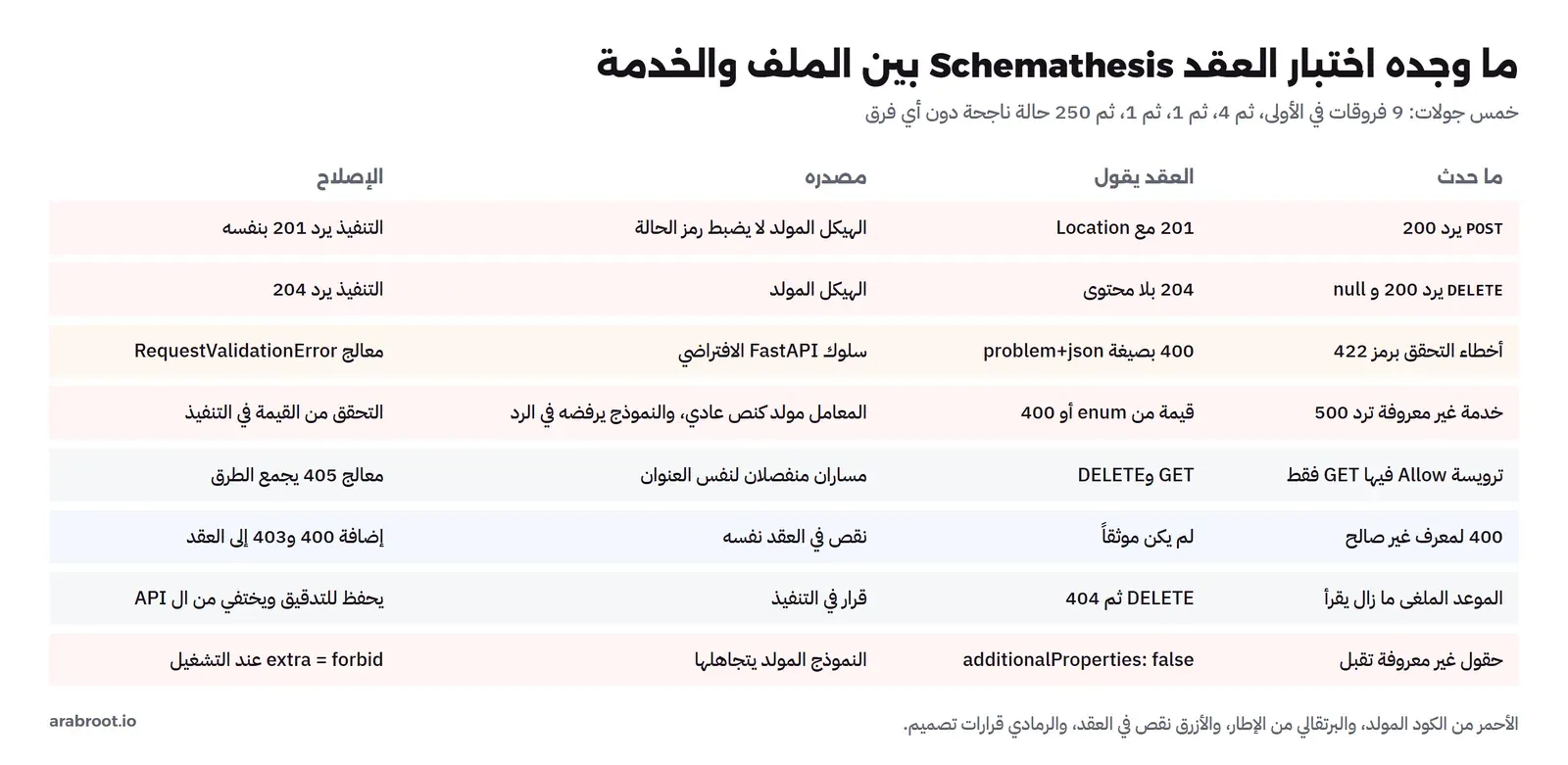
في النتائج أعلاه لاحظ التالي:
- الكود المولد ليس صحيحاً بالضرورة: المسار المولد لعملية الحجز لا يضبط رمز الحالة، فيرد FastAPI بالرمز الافتراضي
200بدل201، وعملية الإلغاء ترد200معnullبدل204. والمعاملserviceالذي يحدده العقد بقائمة قيم enum ولد نصاً عادياً بلا تحقق، بينما نموذج الردSlotيتحقق من نفس القائمة، فوصلت قيمة غير معروفة إلى نموذج الرد ورفضها، وكانت النتيجة خطأ500. - الإطار له سلوكه الخاص: FastAPI يرد على أخطاء التحقق بالرمز
422وجسم خاص به، والعقد يقول400بصيغةproblem+json. - العقد نفسه كان ناقصاً: في الجولة الثانية رد ال API بالرمز
400على معرف لا يطابق النمط في عمليتي القراءة والإلغاء، وهذا سلوك صحيح، ولكن العقد لم يوثقه، فأضفناه إلى العقد. وكذلك أضفنا403لكل العمليات بعد أن رأينا أن الوكيل الذي لا يملك الصلاحية يحصل عليه. - قرارات التصميم تظهر: في الجولة الثالثة وجدت المرحلة التي تتبع سلسلة العمليات Stateful أن الموعد بعد
DELETEما زال يقرأ بالرمز200وحالتهcancelled، والمتوقع منDELETEأن يختفي المورد. فقررنا أن الموعد الملغى يبقى في قاعدة البيانات للتدقيق ويرد ال API عليه بالرمز404، وكتبنا ذلك في وصف العملية في العقد. - وفي الجولة الرابعة وجدت الأداة أن طلب الحجز يقبل مع حقل غير معروف، رغم أن العقد يقول
additionalProperties: false، لأن النموذج المولد يتجاهل الحقول الزائدة بدل أن يرفضها.
والإصلاحات كلها في كودنا وليس في الكود المولد، وهذا هو ملف app.py بعدها:
# The running service: the generated FastAPI app (routes and models from the contract)
# plus identity and quotas, contract-shaped errors and tracing.
from fastapi import Request
from starlette.exceptions import HTTPException   # also catches the router's 405 and body-parsing errors
from fastapi.exceptions import RequestValidationError
from starlette.routing import Match
from appointments_server.main import app
from appointments_server.models.appointment_create import AppointmentCreate
from calendar_client import Unavailable
from guard import guard, problem
from otel import setup_tracing

# the contract says additionalProperties: false, the generated model ignores unknown fields; make it reject them
AppointmentCreate.model_config["extra"] = "forbid"
AppointmentCreate.model_rebuild(force=True)

app.middleware("http")(guard)
setup_tracing(app, "appointments-api")


@app.exception_handler(RequestValidationError)        # FastAPI answers 422; the contract says 400 problem+json
async def bad_request(request: Request, exc: RequestValidationError):
    e = exc.errors()[0]
    return problem(400, "Bad Request", f"{'.'.join(map(str, e['loc']))}: {e['msg']}")


@app.exception_handler(Unavailable)
async def unavailable(request: Request, exc: Unavailable):
    return problem(503, "Service Unavailable", "calendar is not answering", {"Retry-After": str(exc.retry_after)})


@app.exception_handler(HTTPException)
async def http_error(request: Request, exc: HTTPException):
    headers = None
    if exc.status_code == 405:                         # list every method of the path, not only the first route's
        allowed = sorted({m for r in app.router.routes if r.matches(request.scope)[0] != Match.NONE
                          for m in getattr(r, "methods", ())})
        headers = {"Allow": ", ".join(allowed)}
    return problem(exc.status_code, "Error", str(exc.detail), headers)
وتنفيذ الحجز أصبح يرد بنفسه بالرمز 201 مع Location وترويسة Idempotent-Replayed، والإلغاء يرد 204، وقراءة المواعيد تتحقق من قيمة service مقابل قائمة العقد. وبعد الإصلاحات أعدنا الاختبار بنفس البذرة:
 ✅  Examples (in 5.95s)
     ✅ 1 passed  ⏭  3 skipped
 ✅  Coverage (in 34.63s)
     ✅ 4 passed
 ✅  Fuzzing (in 4.53s)
     ✅ 4 passed
 ✅  Stateful (in 2.61s)
     Scenarios:    14
     API Links:    4 covered / 4 selected / 4 total (4 inferred)
     ✅ 14 passed

Test cases:
  250 generated, 250 passed

========================== No issues found in 53.21s ===========================
وقد يتساءل البعض: هل يعني هذا أن الخدمة صحيحة؟ والإجابة لا، فاختبار العقد يتحقق من الشكل وليس من قواعد العمل: فهو لا يعرف أن الموعد في الماضي لا يجب أن يحجز، ولا أن العميل لا يجب أن يحجز عشرة مواعيد في نفس اليوم. وهذه تحتاج اختبارات خاصة بها، كما شرحنا في مقال اختبار API مع Bruno وPostman. ولكن اختبار العقد يضمن شيئاً مهماً جداً للوكلاء والشركاء: أن ما يقرؤونه في العقد هو ما سوف يحصلون عليه.
الخطوة 7: نشر التوثيق Docs مع Redocly
التوثيق يبنى من نفس الملف في كل نشر، فلا يتأخر عن الكود أبداً. وأداة Redocly CLI تبني صفحة HTML واحدة فيها كل شيء:
docker run --rm -v "$PWD:/work" -w /work arabroot-lab-api-first-node:1 \
  redocly build-docs contract/openapi.yaml -o docs/index.html
║ build-docs renders docs with Redoc 3. ║
Prerendering docs
🎉 bundled successfully in: docs/index.html (301 KiB) [⏱ 17882ms].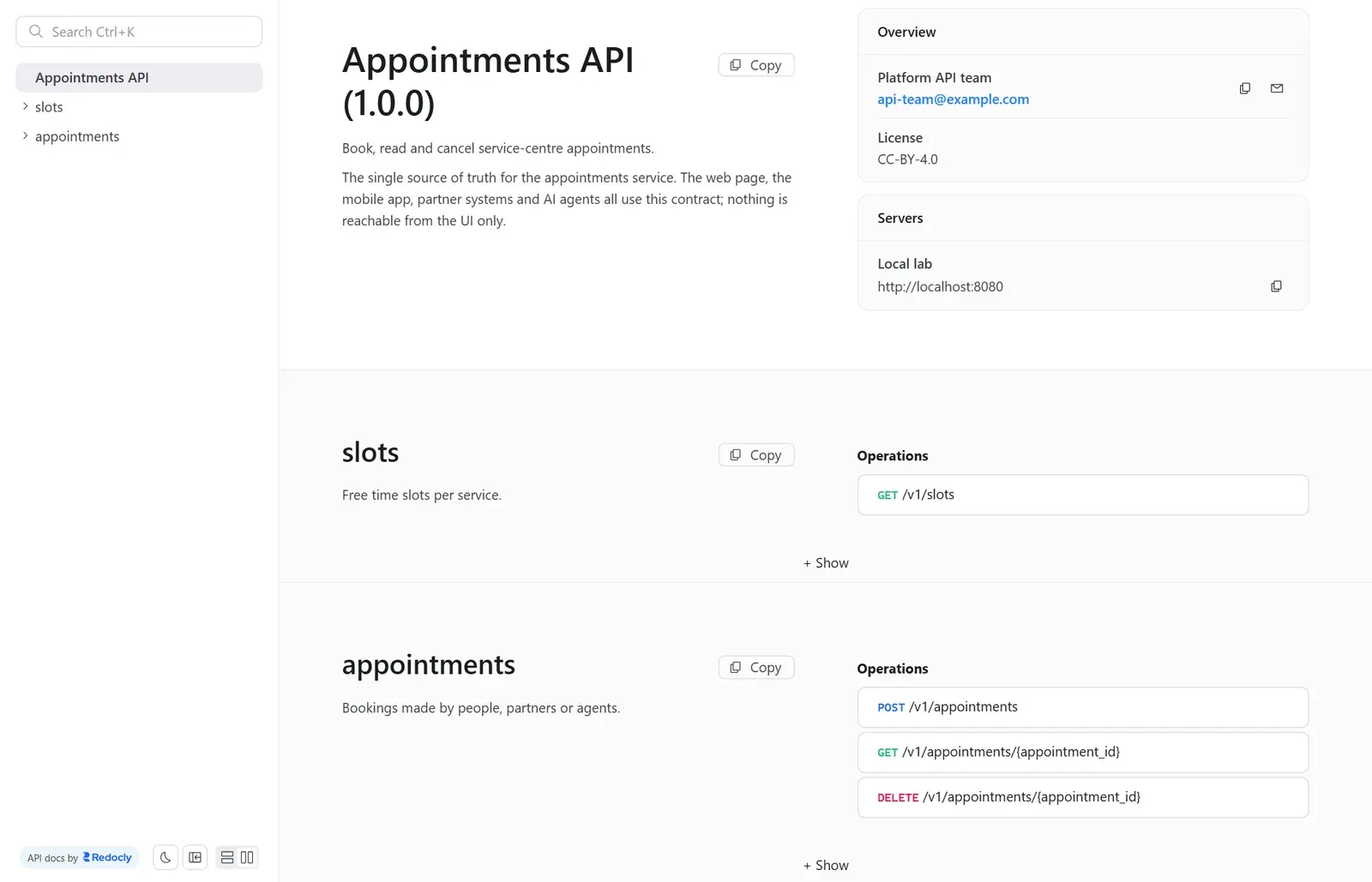
وهذه الصفحة هي ما ينشر في بوابة المطورين Developer Portal، ويمكن استبدال Redoc بأداة Scalar إذا أردت تجربة الطلبات من الصفحة نفسها، فكلاهما يقرأ نفس الملف.
الخطوة 8: إيقاف التغيير غير المتوافق في CI مع oasdiff
بعد شهر من الإطلاق، قرر مطور أن اسم الحقل customer_id أوضح من customer_ref، وأن الحجز يجب أن يحمل حقلاً جديداً إجبارياً channel يحدد مصدر الحجز. والتغيير منطقي من وجهة نظره، ولكن كل تطبيق جوال قديم وكل شريك وكل وكيل يرسل customer_ref سوف يحصل على 400 في اليوم التالي. لذلك نضع في خط النشر خطوة تقارن العقد في طلب الدمج بالعقد في الفرع الرئيسي، وفيما يلي ملف GitHub Actions:
name: contract
on:
  pull_request:
    paths: ["contract/**"]
jobs:
  check:
    runs-on: ubuntu-24.04
    steps:
      - uses: actions/checkout@v4
        with: { fetch-depth: 0 }
      - name: Contract of the main branch
        run: mkdir -p base && git show origin/main:contract/openapi.yaml > base/openapi.yaml
      - name: Lint
        run: docker run --rm -v "$PWD:/work" -w /work stoplight/spectral:6.17.1 lint --ruleset contract/.spectral.yaml --fail-severity=error contract/openapi.yaml
      - name: Breaking changes
        run: docker run --rm -v "$PWD:/work" -w /work tufin/oasdiff:v1.41.0 breaking base/openapi.yaml contract/openapi.yaml --fail-on ERR
ونفس الخطوتين في سكربت ci/contract-check.sh يشغله المطور على جهازه قبل أن يرفع التغيير، وشغلناه على تغيير المطور:
#!/bin/sh
# Contract gate: the same two steps the CI workflow runs on every pull request that touches contract/.
#   base/openapi.yaml = the contract on the main branch, contract/openapi.yaml = the contract in the pull request
set -e
echo "== lint (Spectral)"
docker run --rm -v "$PWD:/work" -w /work stoplight/spectral:6.17.1 \
  lint --ruleset contract/.spectral.yaml --fail-severity=error contract/openapi.yaml
echo "== breaking changes (oasdiff)"
docker run --rm -v "$PWD:/work" -w /work tufin/oasdiff:v1.41.0 \
  breaking base/openapi.yaml contract/openapi.yaml --fail-on ERR
echo "contract OK"
sh contract-check.sh; echo "exit=$?"== lint (Spectral)
No results with a severity of 'error' found!
== breaking changes (oasdiff)
5 changes: 4 error, 1 warning, 0 info
error [new-required-request-property] at contract/openapi.yaml
in API POST /v1/appointments
added the new required request property `channel`
error [new-required-request-property] at contract/openapi.yaml
in API POST /v1/appointments
added the new required request property `customer_id`
error [response-required-property-removed] at base/openapi.yaml
in API POST /v1/appointments
removed the required property `customer_ref` from the response with the `201` status
error [response-required-property-removed] at base/openapi.yaml
in API GET /v1/appointments/{appointment_id}
removed the required property `customer_ref` from the response with the `200` status
warning [request-property-removed] at base/openapi.yaml
in API POST /v1/appointments
removed the request property `customer_ref`
exit=1في المخرج أعلاه لاحظ التالي:
- العقد الجديد صحيح من ناحية الأسلوب، فمر من Spectral، والمشكلة ليست في شكله وإنما في علاقته بالعقد السابق، وهذا ما لا يراه إلا من يقارن النسختين.
- oasdiff وجد أربعة أخطاء: حقلان إجباريان جديدان في الطلب، وحقل إجباري حذف من ردين. والتحذير عن حذف
customer_refمن الطلب جاء تحذيراً وليس خطأ، لأن حذف حقل من الطلب لا يعطل العميل وحده، والتعطيل الحقيقي من الحقل الإجباري الجديد. - رمز الخروج
1يوقف طلب الدمج، فلا يصل التغيير إلى الإنتاج إلا بقرار واع: إما إصدار جديد/v2مع فترة إيقاف للقديم، وإما تغيير متوافق.
والتغيير المتوافق لنفس الحاجة هو أن يبقى customer_ref كما هو، وأن يضاف channel اختيارياً بقيمة افتراضية web، فيحصل الفريق على ما يريد ولا يتعطل أي عميل قديم:
        channel:
          type: string
          enum: [web, mobile, partner, agent]
          default: web
          description: Where the booking came from. Optional; old clients that do not send it get web.
== lint (Spectral)
No results with a severity of 'error' found!
== breaking changes (oasdiff)
No breaking changes to report, but the specs are different.
Run 'oasdiff diff' to see structural differences.
contract OK
exit=0وقد شرحنا متى تحتاج إصداراً جديداً وكيف تغلق القديم بترويستي Deprecation وSunset في مقال تصميم واجهات API.
الخطوة 9: من العقد إلى أدوات الوكيل AI Tools
في مقال مساعد AI داخل بوابة إدارة SaaS حولنا ملف OpenAPI إلى أدوات للمساعد، ثم شغلناه مع نموذج حقيقي في الجزء العملي مع نموذج سحابي. وهنا نفعل نفس الشيء بسكربت قصير يحول كل عملية في العقد إلى أداة بالشكل الذي يستخدمه بروتوكول MCP في tools/list: اسم ووصف ومخطط مدخلات inputSchema وتلميحات annotations:
// Turns every operation of the OpenAPI contract into one tool definition for an AI agent
// (MCP "tools/list" shape: name, description, inputSchema, annotations), then checks each schema with Ajv.
//   node contract-to-tools.mjs ../contract/openapi.yaml > tools.json
import { readFileSync } from 'node:fs';
import { parse } from 'yaml';
import Ajv2020 from 'ajv/dist/2020.js';
import addFormats from 'ajv-formats';

const spec = parse(readFileSync(process.argv[2], 'utf8'));
const deref = (o) => {
    if (Array.isArray(o)) return o.map(deref);
    if (o && typeof o === 'object') {
        if (o.$ref) return deref(o.$ref.slice(2).split('/').reduce((n, k) => n[k], spec));
        return Object.fromEntries(Object.entries(o).filter(([k]) => k !== 'example').map(([k, v]) => [k, deref(v)]));
    }
    return o;
};

const tools = [];
for (const [path, item] of Object.entries(spec.paths)) {
    for (const method of ['get', 'post', 'put', 'patch', 'delete']) {
        const op = item[method];
        if (!op) continue;
        const props = {}, required = [];
        for (const p of deref([...(item.parameters || []), ...(op.parameters || [])])) {
            if (p.name === 'Idempotency-Key') continue;          // the runtime adds it, never the model
            props[p.name] = { ...p.schema, description: p.description };
            if (p.required) required.push(p.name);
        }
        const body = deref(op.requestBody?.content?.['application/json']?.schema);
        if (body) { Object.assign(props, body.properties); required.push(...(body.required || [])); }
        tools.push({
            name: op.operationId,
            description: `${op.summary}. ${op.description}`.replace(/\s+/g, ' ').trim(),
            inputSchema: { type: 'object', properties: props, required, additionalProperties: false },
            annotations: { readOnlyHint: method === 'get', destructiveHint: method === 'delete',
                           idempotentHint: method !== 'post' },
            _meta: { http: { method: method.toUpperCase(), path } },   // used by the runtime, not shown to the model
        });
    }
}

const ajv = new Ajv2020({ strict: true, strictTypes: false, allErrors: true });
addFormats(ajv);
for (const t of tools) ajv.compile(t.inputSchema);           // throws if a schema is not valid JSON Schema 2020-12
console.error(`${tools.length} tools, all input schemas compile as JSON Schema 2020-12`);
console.log(JSON.stringify({ tools }, null, 2));
docker run --rm -v "$PWD:/work" arabroot-lab-api-first-node:1 sh -c \
'cp /work/tools/*.mjs /tools/ && node /tools/contract-to-tools.mjs /work/contract/openapi.yaml > /work/tools/tools.json'4 tools, all input schemas compile as JSON Schema 2020-12ونسخنا السكربت إلى /tools قبل تشغيله لأن Node يبحث عن الحزم المستوردة بجانب الملف، والحزم مثبتة في /tools/node_modules. وهذه أداة الحجز كما خرجت في tools.json:
{
  "name": "createAppointment",
  "description": "Book a slot. Books one free slot for one customer. Send a new Idempotency-Key for every new booking and the same key when you retry, so a retry never creates a second booking.",
  "inputSchema": {
    "type": "object",
    "properties": {
      "slot_id": {
        "type": "string",
        "pattern": "^slot_[0-9]{8}_[0-9]{4}$",
        "description": "A free slot id from listSlots."
      },
      "customer_ref": {
        "type": "string",
        "pattern": "^CUS-[0-9]{5}$",
        "description": "Customer reference, for example CUS-10442."
      }
    },
    "required": ["slot_id", "customer_ref"],
    "additionalProperties": false
  },
  "annotations": { "readOnlyHint": false, "destructiveHint": false, "idempotentHint": false },
  "_meta": { "http": { "method": "POST", "path": "/v1/appointments" } }
}
في الأداة أعلاه لاحظ التالي:
- الوصف والأنماط والحقول الإجبارية جاءت من العقد كما هي، فإذا تحسن وصف العملية في العقد تحسنت الأداة في نفس النشر.
- ترويسة
Idempotency-Keyليست من مدخلات النموذج، فبيئة التشغيل Runtime هي التي تولد المفتاح وتعيد استخدامه إذا أعادت الطلب بعد انقطاع، والسبب أن النموذج لا يعتمد عليه في توليد مفاتيح فريدة ولا في تذكرها. - تلميحات
annotationsمشتقة من الطريقة: القراءةreadOnlyHint، والحذفdestructiveHintالذي يجب أن يطلب تأكيد المستخدم قبل تنفيذه، كما شرحنا في مقال المساعد.
ثم نفذنا ثلاثة استدعاءات بالشكل الذي يرسله النموذج، عبر سكربت call-tool.mjs الذي يتحقق من المدخلات بنفس المخطط ثم يحولها إلى طلب HTTP حقيقي على الخدمة. الاستدعاء الأول listSlots أعاد ستة مواعيد متاحة بالرمز 200، وفيما يلي الاستدعاءان الآخران:
run '{"name":"createAppointment","arguments":{"slot_id":"slot_20261201_1030","customer_ref":"CUS-31415"}}'
run '{"name":"createAppointment","arguments":{"slot_id":"10:30","customer":"Ahmad"}}'
حيث run دالة صغيرة في الطرفية تشغل call-tool.mjs داخل Container على نفس شبكة الخدمة. ولم نستخدم في هذه الخطوة نموذجاً لغوياً، لأن الهدف هو التحقق من أن العقد ينتج أدوات صحيحة تعمل على الخدمة الحقيقية، أما تشغيل نفس الفكرة مع نموذج فعلي فهو ما فعلناه في سلسلة المساعد.
### createAppointment
{
 "http": "POST /v1/appointments",
 "status": 201,
 "body": {
  "id": "apt_585459ab",
  "slot_id": "slot_20261201_1030",
  "customer_ref": "CUS-31415",
  "status": "booked",
  "created_at": "2026-11-28T12:20:00+00:00"
 }
}
### model sends a wrong argument
{"rejected_before_http":["/ must have required property 'customer_ref'","/ must NOT have additional properties","/slot_id must match pattern \"^slot_[0-9]{8}_[0-9]{4}$\""]}
وقد يتساءل البعض: لماذا لا نكتب خادم MCP مباشرة؟ والإجابة أن ملف tools.json هو نفسه ما يعيده خادم MCP في tools/list، وسكربت call-tool.mjs هو نفسه ما يفعله الخادم في tools/call، فتحويل هذين السكربتين إلى خادم MCP بمكتبة رسمية عمل قصير. والمهم أن الأدوات والخادم كلاهما يولد من العقد، فلا يوجد مكان ثالث يكتب فيه وصف العملية ويختلف مع الوقت.
الاستدعاء الثالث يحاكي نموذجاً أرسل الوقت 10:30 بدل معرف الموعد، واسم العميل بدل رقمه، فرفض قبل أن يصل إلى الخدمة، والرسالة تقول للنموذج بالضبط ما الخطأ ليصححه في المحاولة التالية. وهذا الرفض المبكر يوفر طلباً على الخدمة ويمنع بيانات غريبة من الوصول إليها.
الخطوة 10: الصمود Resilience عندما يكثر الوكلاء
في مقال نهج API-first قلنا إن أول ما ينهار عندما يصبح الوكلاء أكثر من يستدعي ال API هو حدود الهوية والصلاحيات وحدود الاستهلاك، ثم تأتي عاصفة إعادة المحاولة التي تضاعف الضغط على الخدمات الخلفية. وفي هذا القسم سوف نرى كل ذلك بأرقام مقاسة على خدمتنا.
هوية الوكيل Agent Identity والصلاحيات Scopes
كل وكيل له هوية خاصة به، والتوكن الذي يحمله يقول من ينفذ ومن يطلب: الحقل sub هو المستخدم، والحقل act.sub هو الوكيل الذي يعمل نيابة عنه، كما في RFC 8693. وفي التجربة نصدر التوكن بسكربت صغير لأن الهدف هو ال API وليس مزود الهوية، أما في الإنتاج فيصدره مزود الهوية Identity Provider كما شرحنا في مقال OAuth وOpenID Connect:
# Issues a short-lived token for an agent acting for a user (dev only; production uses the identity provider).
#   python mint.py <user> <agent> <tenant> "<scopes>" [minutes]
import os, sys, time, jwt
user, agent, tenant, scopes = sys.argv[1:5]
minutes = int(sys.argv[5]) if len(sys.argv) > 5 else 5
now = int(time.time())
print(jwt.encode({"sub": user, "act": {"sub": agent}, "tenant": tenant, "scope": scopes,
                  "aud": "appointments-api", "iat": now, "exp": now + minutes * 60},
                 os.environ["TOKEN_SECRET"], algorithm="HS256"))
TOKEN=$(docker compose exec -T api python mint.py u-1001 agent:booking-assistant center-a "slots:read appointments:read appointments:write" 5)ومحتوى التوكن بعد فك ترميزه:
{
 "sub": "u-1001",
 "act": {
  "sub": "agent:booking-assistant"
 },
 "tenant": "center-a",
 "scope": "slots:read appointments:read appointments:write",
 "aud": "appointments-api",
 "iat": 1795863798,
 "exp": 1795864098
}
لاحظ أن الفرق بين iat وexp هو 300 ثانية فقط، فإذا تسرب التوكن من سجلات الوكيل أو من سياق النموذج، فلا قيمة له بعد خمس دقائق. وطبقة guard.py أمام كل عملية تتحقق من التوقيع والجمهور aud وتاريخ الانتهاء، ثم من الصلاحية التي تحتاجها العملية. وجربنا ثلاث حالات خاطئة:
### read-only agent tries to book
{"type":"about:blank","title":"Forbidden","status":403,"detail":"token lacks scope appointments:write"}
### expired token
{"type":"about:blank","title":"Unauthorized","status":401,"detail":"Signature has expired"}
### no token
{"type":"about:blank","title":"Unauthorized","status":401,"detail":"Not enough segments"}
الحالة الأولى هي الأهم: وكيل الأسئلة الشائعة agent:faq-bot يعمل لنفس المستخدم، ولكن توكنه يحمل slots:read فقط، فلا يستطيع أن يحجز حتى لو طلب منه المستخدم ذلك أو خدعه نص في محادثة، وهذا هو مبدأ أقل الصلاحيات Least Privilege مطبقاً على الوكلاء، كما شرحنا في مقال أمن واجهات API.
الحصص Quotas والرمز 429 مع Retry-After
الحصص في guard.py تحسب ثلاثة عدادات لكل طلب: للوكيل، وللمستأجر Tenant، وللمستخدم، في نافذة ثابتة Fixed Window مدتها 10 ثوان. وجعلنا حصة الوكيل في التجربة 10 طلبات لكل 10 ثوان حتى نراها بسرعة، وهذا هو الجزء الذي يطبقها:
    agent = claims.get("act", {}).get("sub", "direct")
    if agent not in UNLIMITED_AGENTS:
        window = int(time.time()) // WINDOW
        reset = WINDOW - int(time.time()) % WINDOW
        for kind, key in (("agent", agent), ("tenant", claims.get("tenant")), ("user", claims["sub"])):
            counters[(kind, key, window)] += 1
            used = counters[(kind, key, window)]
            if used > QUOTA[kind]:
                return problem(429, "Too Many Requests", f"{kind} quota {QUOTA[kind]}/{WINDOW}s used",
                               {"Retry-After": str(reset), "RateLimit-Policy": f'"{kind}";q={QUOTA[kind]};w={WINDOW}',
                                "RateLimit-Remaining": "0"})
ثم أرسلنا 12 طلباً متتالياً من نفس الوكيل في بداية نافذة جديدة:
call  1 -> 200
call  2 -> 200
call  3 -> 200
call  4 -> 200
call  5 -> 200
call  6 -> 200
call  7 -> 200
call  8 -> 200
call  9 -> 200
call 10 -> 200
call 11 -> 429  Retry-After: 3  RateLimit-Policy: "agent";q=10;w=10
call 12 -> 429  Retry-After: 3  RateLimit-Policy: "agent";q=10;w=10
### the 429 body
{"type":"about:blank","title":"Too Many Requests","status":429,"detail":"agent quota 10/10s used"}
في المخرج أعلاه لاحظ التالي:
- الرد يقول للوكيل كم ينتظر بالضبط
Retry-After: 3، وهي الثواني الباقية في النافذة، فالوكيل المنضبط ينتظرها بدل أن يعيد المحاولة فوراً. - ترويسة
RateLimit-Policyمن مسودة IETF لترويسات حدود الاستهلاك تقول أي حصة انتهت: حصة الوكيل وليست حصة المستأجر، فيعرف فريق الوكيل أن المشكلة في وكيله وليست في عملائه. - الحصة للوكيل منفصلة عن حصة المستخدم، فلو دخل وكيل في حلقة لا نهائية لاستهلك حصته هو فقط، وبقي المستخدم قادراً على الحجز من التطبيق. وقد شرحنا الخوارزميات الأدق من النافذة الثابتة في مقال تحديد معدل الطلبات.
أمان الكتابة بمفتاح Idempotency
لنفرض أن الوكيل أرسل طلب الحجز، ثم انقطع الاتصال قبل أن يصله الرد، فهو لا يعرف هل تم الحجز أم لا. والحل البسيط أن يعيد الطلب، وبدون مفتاح يعني ذلك حجزين لنفس العميل. وفيما يلي ما حدث عند إعادة نفس الطلب بنفس المفتاح، ثم بنفس المفتاح وجسم مختلف، ثم بمفتاح جديد لنفس الموعد، ثم بلا مفتاح:
curl -s -i -X POST $API/v1/appointments -H "Authorization: Bearer $TOKEN" \
  -H "Idempotency-Key: 4b8e2c1a-0d6f-4e7b-9a35-1f2c3d4e5f60" -H "Content-Type: application/json" \
  -d '{"slot_id":"slot_20261201_0900","customer_ref":"CUS-10442"}'
### first attempt
HTTP/1.1 201 Created
location: /v1/appointments/apt_3223ffc2
idempotent-replayed: false
{"id":"apt_3223ffc2","slot_id":"slot_20261201_0900","customer_ref":"CUS-10442","status":"booked","created_at":"2026-11-28T11:18:48+00:00"}
### retry with the same key
HTTP/1.1 201 Created
location: /v1/appointments/apt_3223ffc2
idempotent-replayed: true
{"id":"apt_3223ffc2","slot_id":"slot_20261201_0900","customer_ref":"CUS-10442","status":"booked","created_at":"2026-11-28T11:18:48+00:00"}
### same key, different body
{"type":"about:blank","title":"Error","status":409,"detail":"Idempotency-Key was already used with a different body"}
### new key, same slot
{"type":"about:blank","title":"Error","status":409,"detail":"slot already booked"}
### missing key
{"type":"about:blank","title":"Bad Request","status":400,"detail":"header.idempotency-key: Field required"}الإعادة بنفس المفتاح أعادت نفس الحجز apt_3223ffc2 بنفس وقت الإنشاء، مع ترويسة idempotent-replayed: true التي تقول للعميل إن هذا رد محفوظ وليس حجزاً جديداً. واستخدام نفس المفتاح لجسم مختلف رفض بالرمز 409، لأنه غالباً خطأ في وكيل يعيد استخدام مفتاح قديم. والطلب بدون مفتاح رفض بالرمز 400، لأن العقد يجعل المفتاح إجبارياً.
عاصفة إعادة المحاولة Retry Storm بأرقام مقاسة
الآن نصل إلى أخطر ما يحدث عندما يكثر الوكلاء. خدمتنا تعتمد على خدمة التقويم calendar، وهذه لها قدرة محدودة: عاملان Workers يأخذ كل طلب نحو 40 ملي ثانية، وطابور قصير من أربعة طلبات، وما زاد على ذلك يرفض فوراً بالرمز 503، مثل أي خدمة حقيقية تحت الضغط. وأضفنا لها مفتاحاً يوقفها تماماً لعدد من الثواني، كما يحدث عند إعادة تشغيلها أو عند نشر نسخة فيها خطأ.
ثم كتبنا مولد ضغط agents.py يحاكي الوكلاء: يرسل 10 طلبات قراءة في الثانية لمدة 40 ثانية، وفي الثانية العاشرة يوقف خدمة التقويم خمس ثوان، ويسجل لكل طلب نتيجته وزمنه وعدد محاولاته، ثم يقرأ من خدمة التقويم عدد الطلبات التي وصلتها في كل ثانية. وشغلناه مرتين بنفس الوكلاء ونفس العطل:
- إعادة فورية Naive: الوكيل يعيد المحاولة فوراً حتى ثلاث مرات عند
5xxأو429، وال API نفسه يعيد استدعاء التقويم فوراً حتى ثلاث مرات. وهذا ما يكتبه أغلب الناس في البداية لأنه يبدو آمناً. - إعادة منضبطة Disciplined: الوكيل ينتظر
Retry-Afterإن وجدت، وإلا ينتظر تأخيراً يتضاعف Exponential Backoff مع قيمة عشوائية كاملة Full Jitter. وال API يستدعي التقويم بمهلة Timeout مقدارها 500 ملي ثانية، ويعيد مرة واحدة فقط بتأخير عشوائي، وبميزانية Retry Budget لا تسمح بأن تتجاوز الإعادات 10% من الاستدعاءات، ومعه قاطع دائرة Circuit Breaker يفتح إذا فشل أكثر من نصف الاستدعاءات في آخر ثانيتين، فيرد فوراً بالرمز503معRetry-After: 2دون أن يلمس التقويم.
وهذا هو الجزء الأساسي من calendar_client.py في ال API:
async def free_slots(service: str, day: str):
    params = {"service": service, "date": day}
    if MODE == "naive":
        for attempt in range(4):
            try:
                return await _once(params)
            except httpx.HTTPError:
                if attempt == 3:
                    raise Unavailable(1)
    # disciplined
    if not breaker.allow():
        raise Unavailable(2)
    budget.on_call()
    for attempt in range(2):
        try:
            slots = await _once(params)
            breaker.record(True)
            return slots
        except httpx.HTTPError:
            breaker.record(False)
            if attempt == 1 or not breaker.allow() or not budget.take():
                raise Unavailable(2)
            await asyncio.sleep(random.uniform(0, 0.05 * 2 ** attempt))  # full jitter
وشغلنا مولد الضغط مرة بعد تشغيل ال API بالمتغير RETRY_MODE=naive، ومرة بعد تشغيله بالمتغير RETRY_MODE=disciplined:
docker compose exec -T -e TOKEN=$T -e AGENT_MODE=naive agents python agents.py /out/run.json
docker compose exec -T -e TOKEN=$T -e AGENT_MODE=disciplined agents python agents.py /out/run.json
mode=naive requests=400 calendar_calls=662 peak_calendar_rps=78 (7.8x of 10)
mode=disciplined requests=400 calendar_calls=440 peak_calendar_rps=34 (3.4x of 10)والصورة التالية تبين عدد الطلبات التي وصلت إلى خدمة التقويم في كل ثانية في التشغيلين:
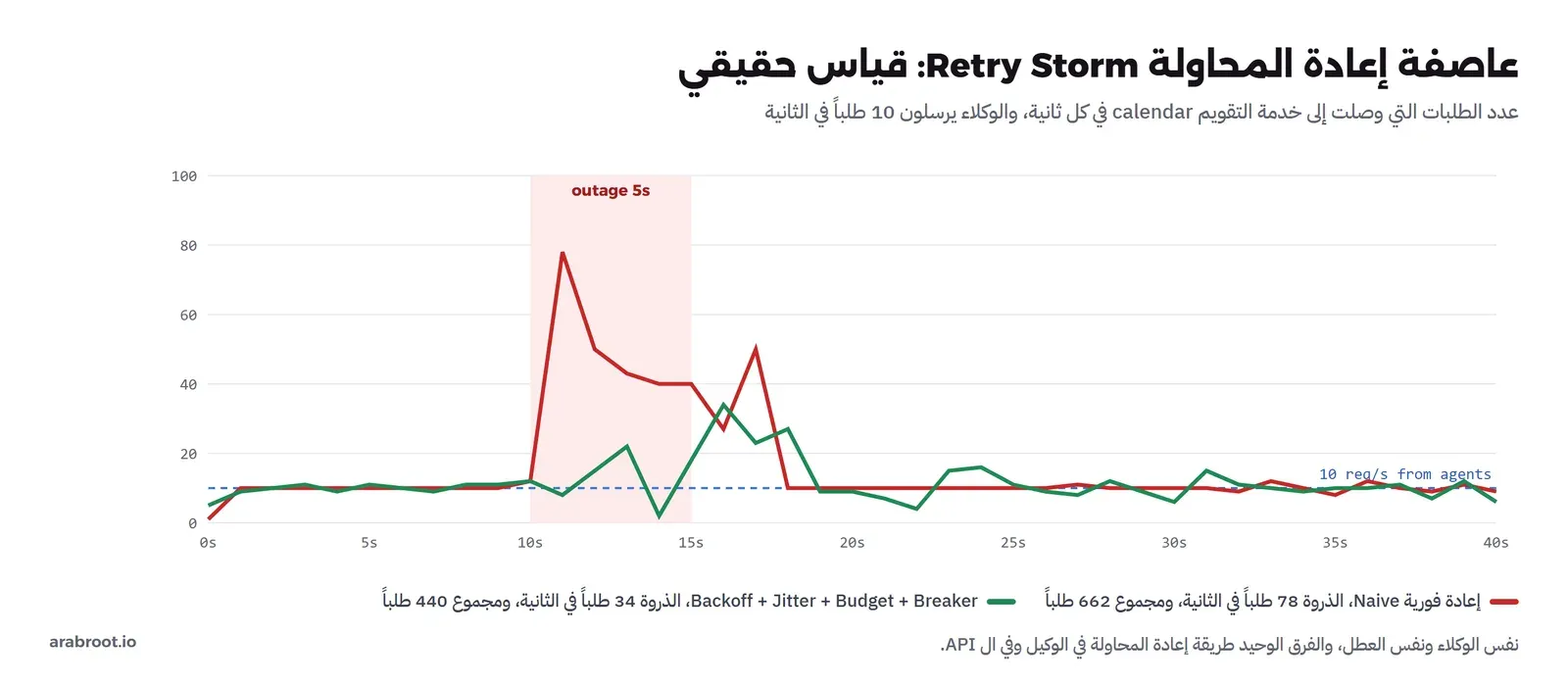
في النتائج أعلاه لاحظ التالي:
- في الإعادة الفورية وصل إلى التقويم في الثانية الأولى من العطل 78 طلباً بدل 10، أي 7.8 أضعاف، وبقي بين 40 و50 طلباً في الثانية طوال العطل. وهذا داخل المدى الذي ذكرناه في الحساب التوضيحي (5 إلى 10 أضعاف)، والسبب أن كل محاولة من الوكيل تصبح حتى أربع محاولات في ال API، والوكيل نفسه يحاول حتى أربع مرات، فالحد الأعلى نظرياً 16 ضعفاً. والخدمة المعطلة هي التي تدفع الثمن، فهي تستقبل أقوى ضغط في أسوأ لحظة.
- في الإعادة المنضبطة بقي الضغط على التقويم قريباً من الطبيعي خلال العطل، ولم يصله أي طلب في ثانيتين كان فيهما قاطع الدائرة مفتوحاً، ثم ارتفع إلى 34 طلباً في الثانية بعد العطل لأن الطلبات المؤجلة عادت بعد انتظار
Retry-After. ومجموع ما وصل إلى التقويم 440 استدعاء لـ 400 طلب، مقابل 662 في الإعادة الفورية. - ويجب أن نذكر الجانب الآخر بوضوح: الإعادة الفورية أنهت 397 طلباً بنجاح من 400، والمنضبطة 395، لأن قاطع الدائرة يرد بالفشل فوراً بدل أن يحاول. وفي عطل مدته خمس ثوان وخدمة تعود سليمة، تبدو الإعادة الفورية كأنها نجحت، والسبب أن الخدمة في التجربة تملك قدرة تكفي لامتصاص الضغط بعد عودتها. أما في الإنتاج، حيث تعود الخدمة ببطء وتملأ ذاكرتها المؤقتة من جديد، فهذا الضغط المضاعف هو الذي يمنعها من العودة أصلاً، فتتحول دقيقة العطل إلى ساعة، كما شرحنا في مقال كيف تمنع خدمة بطيئة من إسقاط نظامك كله.
والقرار العملي من هذه التجربة: لا تجعل إعادة المحاولة سلوكاً افتراضياً في كل طبقة، وإنما اختر طبقة واحدة تعيد المحاولة (غالباً الأقرب إلى العميل)، واجعل الطبقات الأخرى تفشل بسرعة مع Retry-After واضح، وضع على كل استدعاء لخدمة خلفية مهلة وميزانية وقاطع دائرة. واكتب ذلك في العقد نفسه، كما فعلنا بالرمز 503 مع Retry-After، حتى يعرف كل وكيل يقرأ العقد كيف يتصرف عند الفشل.
التتبع Tracing: أي اعتمادية بدأت الأخطاء؟
في الحساب التوضيحي قلنا إن نسبة فشل 0.5% تعني آلاف الأخطاء يومياً، وإنك بدون تتبع موزع لا تعرف أي خدمة بدأت السلسلة. وفي خدمتنا أضفنا OpenTelemetry إلى ال API وإلى خدمة التقويم بملف صغير مشترك، يرسل التتبع عبر OTLP إلى Jaeger، ويضيف التتبع تلقائياً إلى FastAPI وإلى عميل httpx، فينتقل رقم التتبع Trace ID من الخدمة الأولى إلى الثانية في ترويسة traceparent:
# Shared OpenTelemetry setup: traces go over OTLP/HTTP to Jaeger (OTEL_EXPORTER_OTLP_ENDPOINT).
import os
from opentelemetry import trace
from opentelemetry.sdk.resources import Resource
from opentelemetry.sdk.trace import TracerProvider
from opentelemetry.sdk.trace.export import BatchSpanProcessor
from opentelemetry.exporter.otlp.proto.http.trace_exporter import OTLPSpanExporter
from opentelemetry.instrumentation.fastapi import FastAPIInstrumentor
from opentelemetry.instrumentation.httpx import HTTPXClientInstrumentor


def setup_tracing(app, service_name: str):
    if os.getenv("OTEL_SDK_DISABLED") == "true":
        return trace.get_tracer(service_name)
    provider = TracerProvider(resource=Resource.create({"service.name": service_name}))
    provider.add_span_processor(BatchSpanProcessor(OTLPSpanExporter()))
    trace.set_tracer_provider(provider)
    FastAPIInstrumentor.instrument_app(app, excluded_urls="admin/.*")
    HTTPXClientInstrumentor().instrument()
    return trace.get_tracer(service_name)
ثم رفعنا نسبة الفشل العشوائي في خدمة التقويم إلى 30% حتى تظهر الأخطاء في عينة صغيرة، وأرسلنا 20 طلباً، فكانت النتائج كما يلي:
[200, 200, 200, 200, 200, 200, 200, 503, 200, 200, 200, 503, 200, 200, 200, 503, 200, 200, 200, 200]ثلاثة أخطاء من عشرين وصلت إلى العميل. والسؤال الذي يسأله فريق التشغيل الآن: من أين جاءت؟ وبدل أن نبحث في سجلات كل خدمة على حدة، كتبنا سكربتاً صغيراً trace_errors.py يسأل Jaeger عبر واجهته /api/v3/traces عن تتبعات الساعة الأخيرة، ويحتفظ بالتي فيها خطأ، ويبحث في كل واحد منها عن الخطأ الذي ليس له ابن فاشل، أي المكان الذي بدأ منه الخطأ:
python trace_errors.py http://localhost:18486traces: 20, with errors: 6
where the error starts: calendar GET /calendar/free in 6 of 6 traces
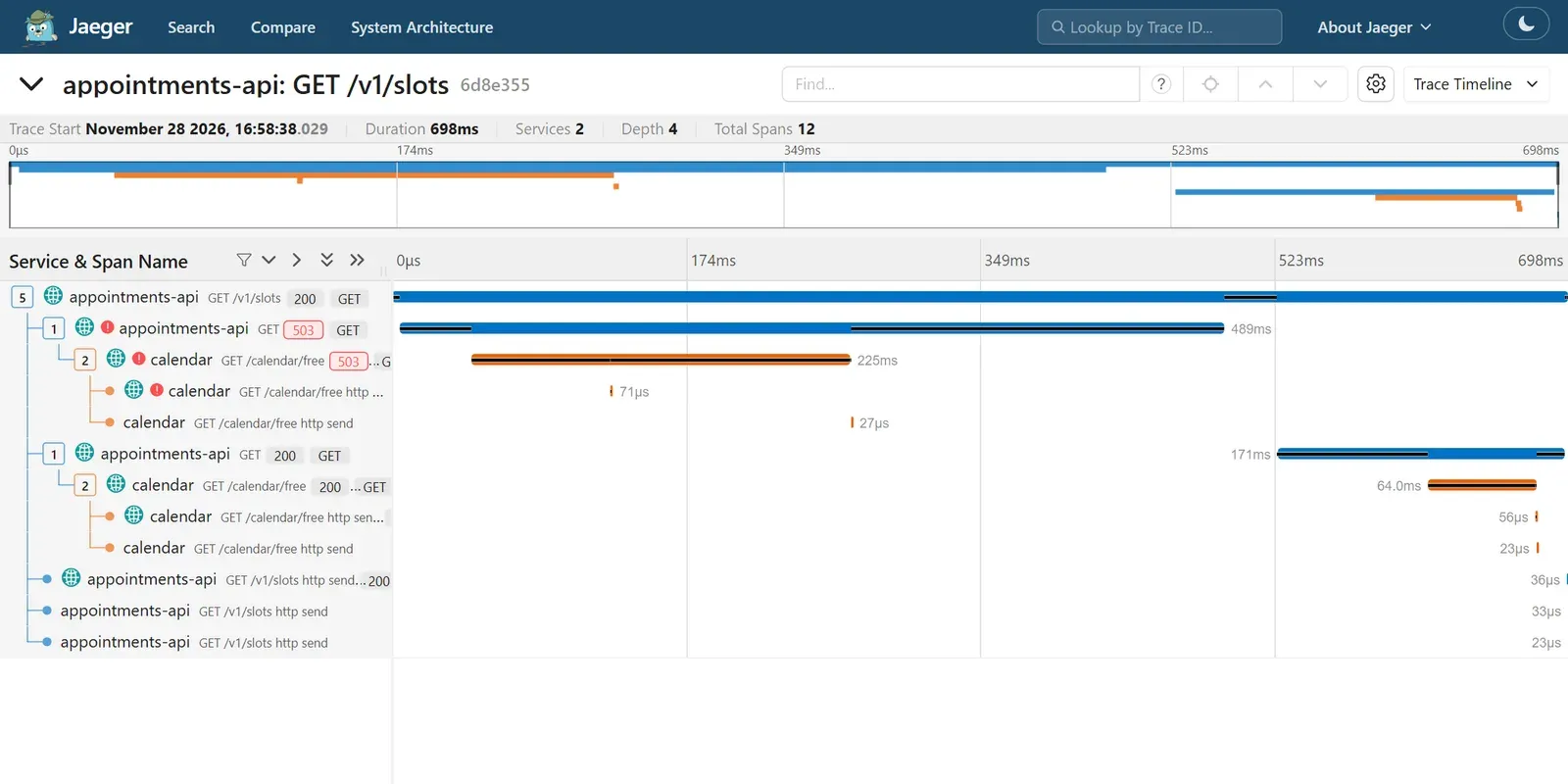
trace 6d8e355d8d1459635ec9f4b17634f390
appointments-api GET /v1/slots 697.9 ms 200
appointments-api GET 489.4 ms 503 ERROR
calendar GET /calendar/free 225.0 ms 503 ERROR
appointments-api GET 170.6 ms 200
calendar GET /calendar/free 64.0 ms 200في المخرج أعلاه لاحظ التالي:
- ستة تتبعات فيها خطأ، والخطأ بدأ في كل الستة من خدمة التقويم في العملية
GET /calendar/free، فالجواب عن سؤال «أي اعتمادية تسبب المشكلة؟» جاء في سطر واحد. - العميل رأى ثلاثة أخطاء فقط بينما التتبع يرى ستة، والسبب أن إعادة المحاولة المنضبطة في ال API أنقذت ثلاثة طلبات. والتتبع المعروض أعلاه مثال على ذلك: المحاولة الأولى إلى التقويم فشلت بالرمز
503، ثم نجحت الثانية، فوصل العميل الرد200. وهذا يعني أن عدد الأخطاء الذي يراه العميل لا يكفي لمعرفة صحة الاعتماديات، فخدمة تفشل في 30% من الاستدعاءات قد تبدو سليمة من الخارج حتى تنفد ميزانية الإعادة. - زمن الطلب كله 698 ملي ثانية، منها 489 في المحاولة الفاشلة، فالإعادة أنقذت الطلب لكنها ضاعفت زمنه، وهذا ما سوف نراه في قياس SLO بعد قليل.
والصورة التالية من واجهة Jaeger لنفس التتبع:
وقد شرحنا تشغيل Jaeger وأخذ العينات Sampling وتخزين التتبعات للإنتاج في مقال Jaeger، وأساس التتبع الموزع في مقال التتبع الموزع مع OpenTelemetry.
التحقق من أهداف SLO وميزانية الأخطاء
الخطوة الأخيرة أن نحكم على كل تشغيل بالأرقام التي كتبناها في المقال السابق: زمن الاستجابة p95 أقل من 300 ملي ثانية، ونسبة نجاح 99.9%. والسكربت slo_check.py يقرأ نتائج مولد الضغط، ويحسب زمن p95 من وجهة نظر الوكيل، أي من أول محاولة إلى آخر رد بما في ذلك الانتظار بين المحاولات، ويحسب عدد الأخطاء المسموح بها لهذا العدد من الطلبات:
# Checks one load-test result against the SLO: p95 latency under 300 ms and 99.9% of requests succeed.
import json, sys

SLO_P95_MS, SLO_SUCCESS = 300, 0.999
for path in sys.argv[1:]:
    d = json.load(open(path))
    reqs = d["requests"]
    ok = [r for r in reqs if r["status"] == 200]
    lat = sorted(r["ms"] for r in reqs)
    p95 = lat[int(len(lat) * 0.95) - 1]
    success = len(ok) / len(reqs)
    allowed = len(reqs) * (1 - SLO_SUCCESS)          # failures the SLO allows for this many requests
    failed = len(reqs) - len(ok)
    print(f"{d['mode']:<12} requests={len(reqs)} p95={p95:.0f}ms success={success:.4%} "
          f"failed={failed} allowed={allowed:.1f} "
          f"-> p95 {'PASS' if p95 < SLO_P95_MS else 'FAIL'}, availability {'PASS' if success >= SLO_SUCCESS else 'FAIL'}"
          f" (error budget used {failed / allowed:.0%})")
وشغلناه على ثلاثة تشغيلات: تشغيل أساسي بلا عطل، ثم تشغيلي العاصفة السابقين:
docker compose exec -T agents python slo_check.py /out/run-baseline.json /out/run-naive.json /out/run-disciplined.jsonbaseline requests=400 p95=6288ms success=100.0000% failed=0 allowed=0.4 -> p95 FAIL, availability PASS (error budget used 0%)
naive requests=400 p95=4146ms success=99.2500% failed=3 allowed=0.4 -> p95 FAIL, availability FAIL (error budget used 750%)
disciplined requests=400 p95=4686ms success=98.7500% failed=5 allowed=0.4 -> p95 FAIL, availability FAIL (error budget used 1250%)في المخرج أعلاه لاحظ التالي:
- في التشغيلين مع العطل استهلكت ميزانية الأخطاء أضعافاً: 400 طلب بهدف 99.9% تسمح بـ 0.4 خطأ، أي ولا خطأ واحد عملياً، فثلاثة أخطاء تعني 750% من الميزانية، وخمسة تعني 1250%. وهذا يوضح لماذا تحسب الميزانية على شهر كامل وليس على 40 ثانية: في الشهر نفس الهدف يسمح بنحو 43 دقيقة، وعطل مدته خمس ثوان يستهلك جزءاً صغيراً منها.
- زمن p95 في تشغيلي العطل بين 4 و5 ثوان، لأنه يقاس من وجهة نظر الوكيل بما فيه الانتظار بين المحاولات، فإعادة المحاولة تنقذ الطلب لكنها تضيف ثوان إلى زمنه. والوسيط p50 في نفس التشغيلين كان 73 و129 ملي ثانية، فالمشكلة في الذيل Tail وليست في الطلب المعتاد.
- والأهم هو السطر الأول: التشغيل الأساسي بلا أي عطل نجح بنسبة 100%، ولو كان مؤشرك الوحيد هو نسبة النجاح لقلت إن الخدمة ممتازة، ولكن p95 كان 6288 ملي ثانية. وعندما قسمنا التشغيل إلى فترات من 5 ثوان، كان الوسيط بين 63 و223 ملي ثانية في أول 25 ثانية، ثم ارتفع إلى نحو 5 ثوان بين الثانية 25 والثانية 35. وخدمة التقويم لم تتعطل في هذه الفترة، بل وصلتها طلبات أقل من المعتاد، أي أن التأخير كان قبل الوصول إليها، في ال API أو في الطريق إليه. وهذا بالضبط ما يكشفه هدف زمن الاستجابة ولا تكشفه نسبة النجاح، والخطوة التالية في مثل هذه الحالة هي التتبع كما فعلنا في القسم السابق.
لذلك اكتب لكل API هدفين على الأقل، واحداً للتوافر وواحداً لزمن الاستجابة، وقسهما من جهة العميل وليس من داخل الخدمة فقط، وتابع استهلاك ميزانية الأخطاء بالتنبيه على سرعة الاستهلاك Burn Rate كما يشرح كتاب Google SRE Workbook، وقد شرحنا الأساس في مقال ماذا تعني 99.9%.
التنظيف Cleanup
بعد التجربة نحذف كل ما شغلناه، بما فيه ال Volumes وال Images التي سحبناها أو بنيناها:
docker compose --profile load down -v
docker rm -f arabroot-lab-api-first-web
docker image rm arabroot-lab-api-first:1 arabroot-lab-api-first-node:1 stoplight/prism:5.15.10 \
  stoplight/spectral:6.17.1 tufin/oasdiff:v1.41.0 openapitools/openapi-generator-cli:v7.28.0 jaegertracing/jaeger:2.23.0
أخطاء شائعة Common Mistakes
- تعديل الكود المولد باليد: يضيع التعديل في أول إعادة توليد، والصحيح أن يبقى المنطق في
implوأن تصلح فجوات المولد في طبقتك كما فعلنا معextra = forbid. - الثقة في المولد بلا اختبار: رأينا أن openapi-generator 7.28.0 لم يضبط
201و204، ولم يتحقق من enum في المعامل، وتجاهلadditionalProperties: false، وكلها ظهرت في اختبار العقد وليس في التجربة اليدوية. - عقد بلا أمثلة: الخادم الوهمي يرد بقيم مثل
"string"، فيبني فريق الشاشة على بيانات لا تشبه الواقع. - فحص الأسلوب دون مقارنة الإصدارات: العقد الذي يغير اسم حقل يمر من Spectral بلا أخطاء، ولا يوقفه إلا oasdiff.
- مفتاح API واحد لكل الوكلاء: لا تعرف أي وكيل استهلك الحصة، ولا تستطيع أن تسحب صلاحية وكيل واحد دون أن توقف الجميع.
- إعادة فورية في كل طبقة: ثلاث محاولات في الوكيل وثلاث في ال API تعني حتى 16 استدعاء للخدمة المعطلة لكل طلب، وقد قسنا 7.8 أضعاف في عطل مدته خمس ثوان.
- قياس الأخطاء من جهة العميل فقط: الإعادة تخفي فشل الاعتمادية، فلا تراه إلا في التتبع.
الخلاصة
وصلنا لنهاية الموضوع، وأهم ما فيه:
- بنينا خدمة المواعيد بالعقد أولاً: فحصت Spectral المسودة فوجدت 9 أخطاء و5 تحذيرات، وعملت صفحة الحجز على خادم Prism الوهمي قبل أن يوجد الخادم، وكشف العميل المولد بأنواع TypeScript خطأين في أسماء الحقول قبل التشغيل.
- الكود المولد من openapi-generator وفر المسارات والنماذج، ولكن Schemathesis وجد 9 فروقات في الجولة الأولى بين العقد والخدمة، بعضها من المولد وبعضها من FastAPI وبعضها نقص في العقد نفسه، وانتهينا بعد خمس جولات إلى 250 حالة ناجحة.
- التوثيق بني من نفس الملف بأداة Redocly، وأوقف oasdiff في CI تغييراً غير متوافق بأربعة أخطاء، ومر التغيير المتوافق لنفس الحاجة.
- نفس العقد أصبح أربع أدوات للوكيل بشكل MCP، كلها تمر من Ajv كمخططات JSON Schema 2020-12، والمدخلات الخاطئة رفضت قبل أن تصل إلى الخدمة.
- هوية لكل وكيل بتوكن مدته خمس دقائق وصلاحيات محددة، وحصص لكل وكيل ومستأجر ومستخدم مع
429وRetry-After، ومفتاح Idempotency منع الحجز المكرر. - الإعادة الفورية ضاعفت الضغط على الخدمة المعطلة 7.8 مرات، والإعادة المنضبطة مع قاطع الدائرة أبقته قريباً من الطبيعي، والتتبع في Jaeger أشار إلى خدمة التقويم في 6 من 6 تتبعات فاشلة.
والمقالات القريبة من هذا الموضوع:
 دليلAPI-first: لماذا يبدأ نظامك من العقد لا من الشاشةما معنى أن تبني أنظمة شركتك أو جهتك بنهج API-first، ولماذا أصبح شرطاً لعمل الوكلاء الذكيين والتكامل بين الجهات.
 دليلمساعد بوابة SaaS عملياً مع نموذج سحابينبني بوابة إدارة بمستأجرين ومساعداً يولد أدواته من OpenAPI ويعمل مع Claude، ثم نختبر العزل والتأكيد والحقن ونحسب تكلفته لكل مستأجر.
 دليلاختبار العقود Contract Testing بين الخدمات مع Pactكيف تمنع خدمة من تعطيل خدمة أخرى تعتمد عليها قبل النشر، بعقد يكتبه المستهلك ويتحقق منه المزود ويحفظه Pact Broker.
 دليلIdempotency: كيف تجعل العملية آمنة عند تكرارهالماذا تصل الرسالة نفسها أكثر من مرة، وكيف تكتب مستهلكاً يطبقها مرة واحدة فقط مهما تكررت.
 دليلتحديد معدل الطلبات Rate Limiting وخوارزمياتهكيف تعمل خوارزميات تحديد معدل الطلبات، وأيها يناسب واجهتك، وكيف تطبقها على عدة سيرفرات وترد بالرمز 429 الصحيح.
 دليلالتتبع الموزع Distributed Tracing مع OpenTelemetryكيف ترى طلباً واحداً يمر بعدة خدمات في شجرة زمنية واحدة، فتعرف أين أبطأ وأين فشل دون أن تخمن من السجلات.
تدريب عملي
- أضف إلى العقد عملية لتغيير موعد
rescheduleAppointment، ثم شغل Spectral وSchemathesis وoasdiff، وتحقق أن الإضافة متوافقة وأن الأداة الجديدة ظهرت فيtools.json. - غير خوارزمية الحصص في
guard.pyمن النافذة الثابتة إلى Token Bucket، وكرر تجربة الطلبات الاثني عشر، وقارن قيمةRetry-After.
سجل التحديثات
- نوفمبر 2026: كتابة المقال، وتنفيذ التجربة على Docker Engine 29.8.0 مع OpenAPI 3.1 وSpectral 6.17.1 وPrism 5.15.10 وopenapi-generator 7.28.0 وTypeScript 7.0.2 وFastAPI 0.165.0 وSchemathesis 4.34.4 وRedocly CLI 2.84.0 وoasdiff 1.41.0 وAjv 8.20.0 وOpenTelemetry SDK 1.45.2 وJaeger 2.23.0.